Working with IR Collections in the Treble SDK
This guide explains how to work with IR (Impulse Response) collections in the Treble SDK. It covers loading collections, accessing metadata, assigning processing recipes (filters and device rendering), running remote processing, and exporting IR data for downstream tasks like audio AI processing.
Introduction
An IR Collection is a structured way to work with sets of impulse responses. Each IR in a collection comes with rich metadata:
- Source information - where the sound came from (position, type, tags)
- Receiver information - where the sound was captured (position, type, tags)
- Simulation details - room properties, simulation type, IR length, custom metadata
- Optional device information - for device-rendered IRs
- Processing recipes - per-IR filter chains and device render parameters, applied remotely on demand
The collection is backed by a Polars DataFrame, which makes it easy to filter, query, and analyze your IRs.
Quickstart: Recommended Workflow
You can work with a collection directly in memory loading IR audio from the cloud on demand via a data loader. Saving the metadata (Polars DataFrame) to disk is optional, but recommended when you want to persist a collection across sessions, share it, or resume processing later without re-fetching simulation metadata.
Option A: From a Dataset
# 1. Get collection from a dataset (e.g., Treble10 - free starter dataset)
collection = tsdk.datasets.purchase("Treble10")

# 2. Load audio when needed
dl = collection.get_data_loader(work_dir="./cache")
mono_ir = collection[0].get_mono_ir(dl)
print(f"Audio shape: {mono_ir.data.shape}, Sampling rate: {mono_ir.sampling_rate} Hz")

# Optional: save metadata for later use (does not download audio files)
collection.write_parquet("treble10_metadata.parquet")

# Later: reload and access IRs from the cloud on-demand
collection = tsdk.collections.ir_collection_from_file("treble10_metadata.parquet")
dl = collection.get_data_loader(work_dir="./cache")
mono_ir = collection[0].get_mono_ir(dl)
Option B: From Your Own Simulations
# 1. Create collection from your simulations
collection = tsdk.collections.ir_collection()
collection.add_simulations([my_sim1, my_sim2])

# 2. Load audio on demand
dl = collection.get_data_loader(work_dir="./cache")
mono_ir = collection[0].get_mono_ir(dl)
print(f"Audio shape: {mono_ir.data.shape}, Sampling rate: {mono_ir.sampling_rate} Hz")

# Optional: save metadata for later use
collection.write_parquet("my_sims_metadata.parquet")

# Later: reload and access on-demand
collection = tsdk.collections.ir_collection_from_file("my_sims_metadata.parquet")
dl = collection.get_data_loader(work_dir="./cache")
mono_ir = collection[0].get_mono_ir(dl)
Option C: From Simulation Collections
# Create a simulation collection from your simulations
sim_coll = tsdk.collections.simulation_collection()
sim_coll.add_simulations([my_sim1, my_sim2])

# Convert to IR collection (extracts all source-receiver pairs)
ir_collection = sim_coll.get_ir_collection()

# Optionally inherit custom columns from simulation collection
ir_collection = sim_coll.get_ir_collection(
    inherit_columns=[{"split": "split"}]
)
When to Save Metadata
Saving to parquet (or another supported format) is optional, but useful when you need to:
- Persist across sessions: Reload a collection later without re-fetching simulation metadata
- Share or version collections: Store small metadata files (~KB), not large audio files
- Resume processing: Keep processing recipes and collection state for remote IR processing
When you do save, IR audio is still fetched from the cloud on demand (see The IRDataLoader). The SDK handles downloading and caching audio files automatically.
Extracting Audio Data with Paired Metadata for Downstream Processing
for ir_info in ir_collection:
    # Load IR audio (processed by default if a recipe was applied)
    ir = ir_info.get_mono_ir(dl)  # or get_spatial_ir(), get_device_ir()

    # Do something with the audio data
    audio = ir.data

    # Access paired metadata
    ir_info.source.location
    ir_info.simulation # Treble simulation object

    # Access data from DataFrame row
    ir_info.dataframe_row["source_receiver_dist"]
    ir_info.dataframe_row["ir_length"]
    ir_info.dataframe_row["receiver_tags"]
    ...
Understanding Your Collection
Viewing the Data
The collection is backed by a Polars DataFrame. Access it through the collection:
# Get collection from Treble10 dataset
collection = tsdk.datasets.purchase("Treble10")

# Access to the underlying Polars DataFrame
print(collection.dataframe.head())

# Show column names and types
print(collection.dataframe.schema)

# List all column names
print(collection.columns)
Default Columns
A typical IR collection includes these columns:
| Column | Description |
|---|---|
id | Unique identifier for each IR |
source_id | ID of the sound source |
source_label | Human-readable label for the source |
source_location | (x, y, z) position of the source |
source_type | Type of source (point source, directional, etc.) |
receiver_id | ID of the microphone/receiver |
receiver_label | Human-readable label for the receiver |
receiver_location | (x, y, z) position of the receiver |
receiver_type | Type of receiver (mono, spatial, etc.) |
simulation_id | ID of the simulation this IR belongs to |
simulation_type | Type of simulation (wave-based, geometrical, hybrid) |
ir_length | Length of the IR in seconds |
Additional columns can be added via the add_column method. See Working with Your DataFrame for details.
The following columns are required and must always be present:
idsource_idreceiver_idsimulation_idsimulation_type
Accessing Individual IR Metadata
To work with a specific IR and access its detailed metadata:
# Get a single IR's info object
ir_info = collection.get_ir_info("bf16e6290e677cd0ee2573e1b57387ab")
# Alternatively, get a specific row like this: collection[42]

# Access metadata properties
print(f"Source: {ir_info.source.label}")
print(f"Source position: {ir_info.source.location}")
print(f"Receiver: {ir_info.receiver.label}")
print(f"Receiver position: {ir_info.receiver.location}")
print(f"Simulation type: {ir_info.simulation.type}")
print(f"IR type: {ir_info.ir_type}")  # Mono, Spatial, Device, or Moving
Working with Your DataFrame
The collection is backed by a Polars DataFrame. This section covers all ways to query, filter, enrich, and transform your collection data.
Filtering the Collection
You can filter using Polars syntax.
import polars as pl

# Filter to get only IRs from a specific source
specific_source_irs = collection.filter_collection(
    pl.col("source_id") == "43edd75d-1ee6-412d-ae25-827fd5d3ca39"
)

# Filter by multiple conditions
long_hybrid_irs = collection.filter_collection(
    (pl.col("ir_length") > 1.5) &
    (pl.col("simulation_type") == "Hybrid")
)
Adding Custom Columns
The recommended way to enrich your collection with computed values is the add_column(name, mapper) method. This applies a mapper function to each IR and adds the result as a new column in the Polars DataFrame.
# Add a column for source-receiver distance
import numpy as np
from treble_tsdk.collections.ir_info import IRInfo


def compute_distance(ir_info: IRInfo) -> float:
    # These are `treble.Point3D` objects
    source_pos = ir_info.source.location
    receiver_pos = ir_info.receiver.location

    # Compute distance using `Point3D` convenience function
    distance = (receiver_pos - source_pos).euclidean_distance()
    return distance


collection.add_column("source_receiver_distance", compute_distance)

# Filter by the new column
close_irs = collection.filter_collection(pl.col("source_receiver_distance") < 5.0)
More examples:
Add line-of-sight information:
def has_line_of_sight(ir_info: IRInfo):
    model = ir_info.simulation.get_model()
    return model.has_line_of_sight(ir_info.source, ir_info.receiver)

collection.add_column("source_receiver_line_of_sight", has_line_of_sight)
Add direction of arrival (DOA):
def compute_doa(ir_info: IRInfo):
    doa_vec = ir_info.source.location - ir_info.receiver.location
    doa_sph = treble.Rotation.cartesian_to_spherical(*doa_vec.to_list())
    return doa_sph.to_list()[:2]  # [azimuth, elevation]

collection.add_column("DOA", compute_doa)
Adding Acoustic Parameters
We can fetch various pre-computed acoustic parameters from the cloud with enrich_with_acoustic_parameters.
# Add common acoustic parameters
collection.enrich_with_acoustic_parameters(
    acoustic_parameters=["t30", "edt", "d50", "c50"],  # Specify which parameters you need
    work_dir="./acoustic_params"
)

# Now these columns are available in the collection
print(collection.dataframe.columns)
You can fetch a list of supported parameters using,
treble.AcousticParameters.supported_parameters()
Sorting the Collection
Sort your collection by one or more columns using the sort() method:
# Sort by source-receiver distance descending
sorted_coll = collection.sort("source_receiver_distance", descending=True)

# Sort by multiple columns
sorted_coll = collection.sort(
    ["simulation_type", "ir_length"],
    descending=[False, True]
)
Row Access
Get subsets of your collection using head() and tail():
# Get first 10 rows as new collection
first_10 = collection.head(10)

# Get last 5 rows as new collection
last_5 = collection.tail(5)

# Direct indexing returns individual IRInfo objects
ir_info = collection[42]
Removing Columns
Remove custom columns using remove_column():
# Remove a temporary column
enriched.remove_column("my_column")
System columns (id, source_id, receiver_id, simulation_id, simulation_type) cannot be removed and will raise a ValueError.
Sampling with Distributions
Sample rows where a column follows a target distribution using importance weighting:
from treble_tsdk.collections.distributions import (
    Gaussian,
    Uniform,
    LogNormal,
    Exponential,
    Bimodal,
)

# Sample with Gaussian (normal) distribution
gaussian_sampled = collection.sample_with_gaussian_distribution(
    column="source_receiver_distance", n_samples=100, target_mean=5.0, target_std=1.0
)

# Sample with uniform distribution
uniform_sampled = collection.sample_with_distribution(
    column="ir_length", n_samples=50, distribution=Uniform(low=0.5, high=1.5)
)

# Sample with log-normal distribution
lognormal_sampled = collection.sample_with_distribution(
    column="c50", n_samples=75, distribution=LogNormal(mean=0.5, sigma=0.3)
)

# Reproducible sampling with seed
reproducible = collection.sample_with_gaussian_distribution(
    column="crossover_frequency",
    n_samples=25,
    target_mean=1000,
    target_std=100,
    seed=42,
)
Available distributions:
Gaussian(mean, std, seed)- Normal distributionUniform(low, high, seed)- Uniform within a rangeLogNormal(mean, sigma, seed)- Log-normal distributionExponential(scale, seed)- Exponential distributionBimodal(mean1, std1, mean2, std2, weight1, seed)- Two Gaussians mixed
Saving and Loading Collections
Optionally persist collection metadata to disk. This saves the DataFrame and processing recipes — not the audio files themselves.
# Save collection metadata
collection.write_parquet("my_collection.parquet")

# Load collection later
loaded_collection = tsdk.collections.ir_collection_from_file("my_collection.parquet")
Supported file formats:
.parquet.csv.ndjson.json.ipc.arrow
Interactive Visualization
Launch an interactive widget to explore your collection:
# Launch interactive plot
collection.plot()
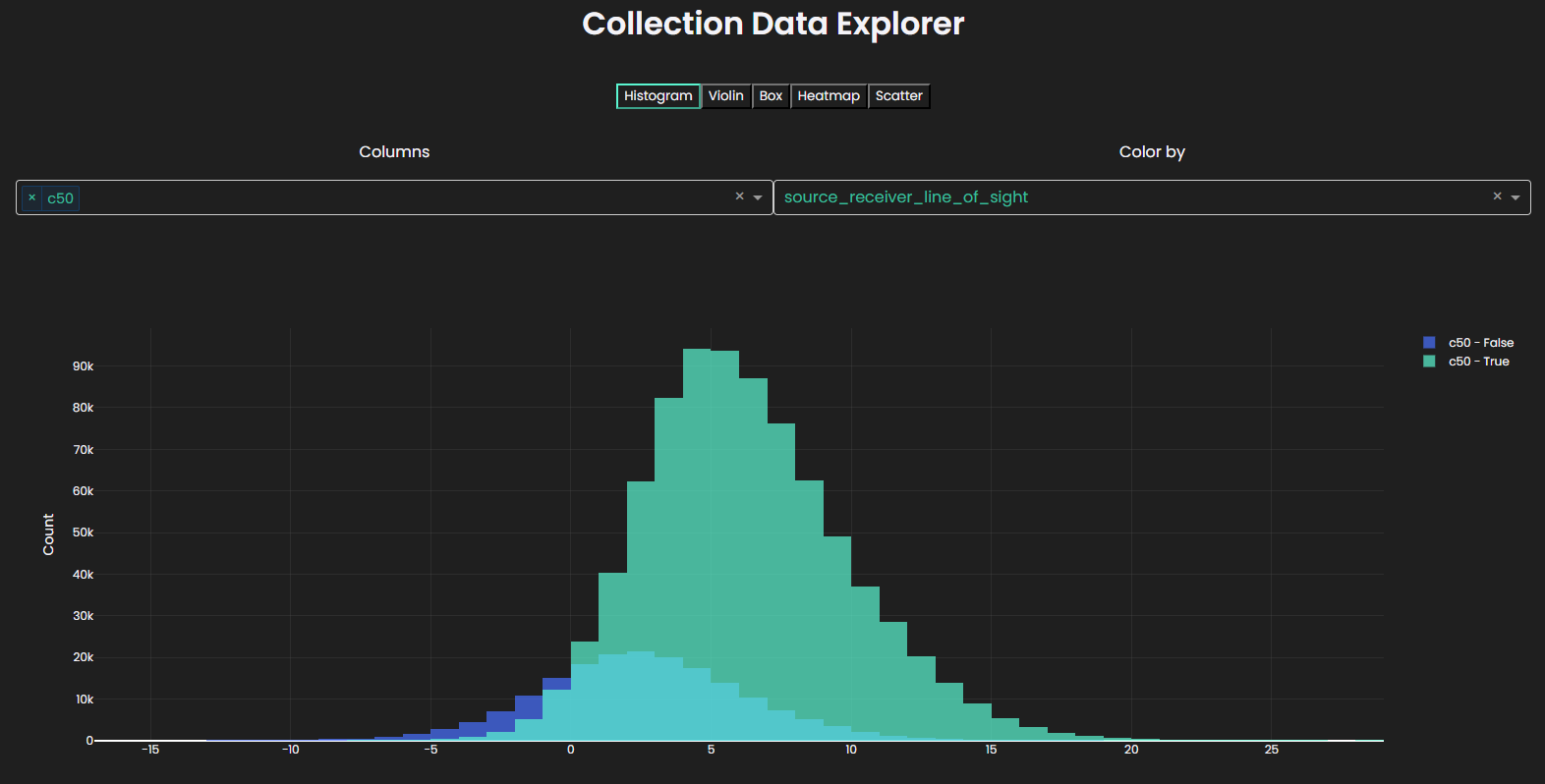
The widget supports multiple plot types:
- Histogram - Distribution of single or multiple columns
- Violin - Violin plot with box plot overlay
- Box - Box plot for distributions
- Heatmap - Density heatmap for two variables
- Scatter - Scatter plot for two variables
Features include color-by categorical columns and automatic column type detection.
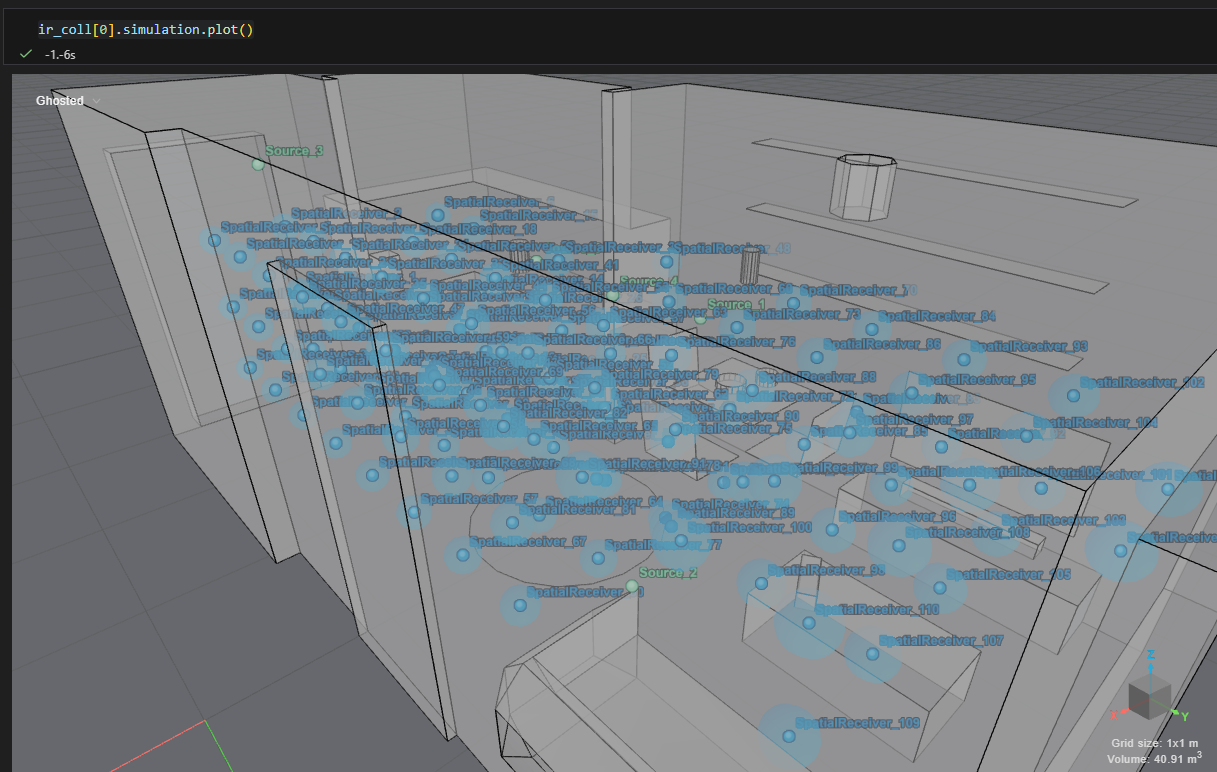
Visualize a Simulation
The underlying simulation can be visualized
collection[0].simulation.plot()
Advanced: Applying Transformations
You can use apply() to directly modify the underlying DataFrame. This allows you to combine multiple steps—like filtering, sorting, and creating new columns—into one transformation.
import polars as pl

# Apply multiple transformations at once
transformed = collection.apply(
    lambda df: (
        df.filter(pl.col("ir_length") > 0.5)  # Keep only rows with meaningful IR length (filter out very small values)
        .with_columns([
            # Convert distance from meters to centimeters
            (pl.col("source_receiver_distance") * 100).alias("distance_cm"),
        ])
        .sort("distance_cm", descending=True)  # Sort rows so largest distances come first
    )
)

# Add more interpretable derived columns
enriched = collection.apply(
    lambda df: df.with_columns([
        # Compute relative IR length compared to the dataset average
        # Values > 1.0 mean above average, < 1.0 mean below average
        (pl.col("ir_length") / pl.col("ir_length").mean()).alias("relative_ir_length"),

        # Group IR length into human-readable categories
        # This is called "binning" and helps simplify analysis
        pl.when(pl.col("ir_length") < 0.5)
          .then("short")
          .when(pl.col("ir_length") < 1.5)
          .then("medium")
          .otherwise("long")
          .alias("ir_length_category")
    ])
)
This is considered an advanced feature because it gives you direct access to the underlying DataFrame, allowing full flexibility—but also requiring a solid understanding of Polars DataFrame operations and their implications (e.g. performance, schema changes, and debugging).
Use this approach when built-in helpers are not sufficient and you need fine-grained control over how your data is transformed.
System columns (id, source_id, receiver_id, simulation_id, simulation_type) must be preserved otherwise a ValueError will be raised.
Loading IR Audio Data
The IRDataLoader
The IRDataLoader is the recommended way to load IR audio data. It handles:
- Downloading IRs from the server (when needed)
- Caching to disk for faster subsequent access
- Both lazy (on-demand) and eager (preload) loading modes
# Create a data loader with caching to a directory
dl = collection.get_data_loader(work_dir="./ir_cache")
Loading Modes
There are three loading modes:
| Mode | Description |
|---|---|
lazy (default) | Downloads IRs only when you request them, then caches them |
eager | Pre-downloads all IRs upfront |
lazy_no_cache | Downloads IRs on-demand without caching (not recommended) |
from treble_tsdk.results.ir_data_loader import IRDataLoaderBehaviour

# Eager loading - download everything at once
dl = collection.get_data_loader(
    work_dir="./ir_cache",
    behaviour=IRDataLoaderBehaviour.eager
)
Getting Mono IRs
# Lazy loading - download files only when needed
dl = collection.get_data_loader(
    work_dir="./ir_cache", behaviour=IRDataLoaderBehaviour.lazy
)

# Get a single IR info object
ir_info = collection.get_ir_info("bf16e6290e677cd0ee2573e1b57387ab")

# Load the mono audio data
mono_ir = ir_info.get_mono_ir(dl)

# Access the audio data as a numpy array
audio_data = mono_ir.data
sampling_rate = mono_ir.sampling_rate

print(f"Audio shape: {audio_data.shape}")
print(f"Sampling rate: {sampling_rate} Hz")
print(f"Duration: {len(audio_data) / sampling_rate:.2f} seconds")
If the IR has a processing recipe, get_mono_ir() returns the processed audio by default. Pass apply_filters=False for the original IR. See Remote IR Processing.
Getting Spatial IRs
# For spatial IRs (ambisonics format)
spatial_ir = ir_info.get_spatial_ir()

# Audio data is provided as a 2D NumPy array: (channels, samples)
audio_data = spatial_ir.data
print(f"Audio shape: {audio_data.shape}")  # e.g., (4, 48000) for first-order ambisonics
Getting Moving IRs
For moving source/receiver IRs:
# Get moving IR with explicit data loader
dl = collection.get_data_loader(work_dir="./cache")
moving_ir = ir_info.get_moving_ir(data_loader=dl)

# Get moving IR with default lazy loading
moving_ir = ir_info.get_moving_ir()

# Access moving IR properties
print(f"Number of time steps: {len(moving_ir)}")
print(f"Source trajectory: {moving_ir.source_trajectory}")
Remote IR Processing
The Treble SDK lets you assign processing recipes to individual IRs in a collection. A recipe can include:
- A filter chain: a sequence of SDK filter steps (e.g. Butterworth lowpass followed by gain)
- Device render parameters: a device and orientation for rendering spatial IRs into devices IRs
Recipes are applied remotely in the cloud. Once you start processing, each IR row gets a processed_id that links it to its processed audio in the cloud. You can fetch that audio through the standard collection API when you need it.
This is especially useful for large collections. Processing runs in parallel across all IRs you assign recipes to, so you are not limited by local CPU or one at a time workflows. You define the recipe and fetch only the processed result, there is no need to download full spatial IR waveforms to disk, apply filters locally, and upload again. For collections with thousands of ambisonic or higher order IRs, that saves time, bandwidth, and storage while keeping the entire workflow inside the SDK.
Processing Recipes and IR Identity
Each IR in a collection is identified by its ID. When you assign processing steps, the SDK constructs a new ID from the source ID, receiver ID, and processing parameters. Each IR ID must be unique and the SDK will refuse to create rows that would result in duplicate IDs.
Processing recipes modify the collection in place (including fanout operations that replace rows). Keep a copy of your original DataFrame or save an unprocessed parquet file if you may want to revert or try different recipes later.
Defining Filter Lists
Filter lists are lists of filter definitions applied sequentially to an IR. Common filter types include GainFilter, ButterworthFilter, OctaveBandFilter, FIRFilter, and IIRFilter. See Filtering IRs for details on individual filters.
# Example filter lists
filter_list_1 = [
    treble.ButterworthFilter(lp_frequency=300.0, lp_order=4),
    treble.GainFilter(5),
]
filter_list_2 = [
    treble.ButterworthFilter(lp_frequency=2000.0, hp_order=4),
    treble.GainFilter(10),
]
Assigning Filters with set_filters()
Use set_filters() to assign filter chains to IRs. The method accepts three forms:
1. Broadcast: same filter chain for a subset
Pass a single filter chain and an ir_subset to apply the same processing to multiple IRs:
ir_count = len(ir_coll)
ir_count_third = ir_count // 3

# Apply filter_list_1 to the first third of IRs
ir_coll.set_filters(filter_list_1, ir_subset=ir_coll.dataframe[0:ir_count_third])
2. Per-row mapping: different filter chains per IR
Pass a dictionary mapping each IR ID to its filter chain:
id_list = ir_coll.dataframe[2 * ir_count_third:]["id"].to_list()
mapping = {rid: filter_list_2 for rid in id_list}
ir_coll.set_filters(mapping)
3. Fan-out: one IR becomes multiple processed variants
Pass a list of filter chains to create multiple processed rows from a single IR. The original IR is consumed and replaced by one new row per filter chain:
# One IR becomes two rows: one with filter_list_1, one with filter_list_2
ir_coll.set_filters(
    [filter_list_1, filter_list_2],
    ir_subset=ir_coll.dataframe[ir_count_third:ir_count_third + 1],
)
You can also fan out per IR using a dictionary where each value is a list of filter chains:
id_list = ir_coll.dataframe[ir_count_third + 1:ir_count_third + 3]["id"].to_list()
mapping = {rid: [filter_list_1, filter_list_2] for rid in id_list}
ir_coll.set_filters(mapping)
IRs that are not assigned a filter chain remain unchanged (no processing applied).
Assigning Device Render Parameters with set_device_render_info()
Device IRs simulate how a real recording device (like a smartphone or microphone) would capture sound in a room. This is useful for:
- Training audio AI models on realistic device recordings
- Evaluating how different devices perform in various acoustic environments
Device rendering is configured with DeviceRenderParams, which pairs a device object with an orientation:
# Look up a device from your device library by name
device = tsdk.device_library.get_by_name("my_device")

# Single device render configuration
render_params = treble.DeviceRenderParams(device, treble.Rotation(azimuth=10, elevation=20, roll=0))
Like set_filters(), set_device_render_info() supports broadcast, per-row mapping, and fan-out:
Broadcast
ir_coll.set_device_render_info(
    treble.DeviceRenderParams(device, treble.Rotation(azimuth=10, elevation=20, roll=0)),
    ir_subset=ir_coll.dataframe[0:ir_count_third],
)
Per-row mapping
id_list = ir_coll.dataframe[2 * ir_count_third:]["id"].to_list()
mapping = {
    rid: treble.DeviceRenderParams(
        device, treble.Rotation(azimuth=-180 + i % 360, elevation=-90 + i % 180, roll=0)
    )
    for i, rid in enumerate(id_list)
}
ir_coll.set_device_render_info(mapping)
Fan-out
# One IR becomes two rows with different device orientations
ir_coll.set_device_render_info(
    [
        treble.DeviceRenderParams(device, treble.Rotation(azimuth=10, elevation=20, roll=0)),
        treble.DeviceRenderParams(device, treble.Rotation(azimuth=30, elevation=90, roll=0)),
    ],
    ir_subset=ir_coll.dataframe[ir_count_third + 10:ir_count_third + 12],
)

# Fan-out by ID with a list of render params per IR
id_list = ir_coll.dataframe[ir_count_third + 7:ir_count_third + 8]["id"].to_list()
mapping = {
    rid: [
        treble.DeviceRenderParams(device, treble.Rotation(azimuth=-180 + i % 360, elevation=-90 + i % 180, roll=0)),
        treble.DeviceRenderParams(device, treble.Rotation(azimuth=60, elevation=20, roll=0)),
    ]
    for i, rid in enumerate(id_list)
}
ir_coll.set_device_render_info(mapping)
An IR can have both a filter chain and device render parameters assigned. You can also assign only filters or only device rendering to specific IRs.
Estimating Processing Cost
Before starting remote processing, estimate the token cost:
ir_coll.print_remote_processing_token_cost()
If the collection has already been processed with the current recipes, the cost will be zero. If you change recipes for some IRs, you are only billed for the changed IRs.
Running Remote Processing
Start processing with:
ir_coll.start_remote_processing()
Monitor progress interactively (useful in notebooks):
ir_coll.as_remote_processing_live_progress()
Processing can be cancelled before tasks are shipped to the cloud:
# Cancels all processing tasks that have not yet been shipped
ir_coll.cancel_remote_processing()
Calling start_remote_processing() updates each IR row with a processed_id that points to its processed audio in the cloud.
ir_coll.write_parquet("processed_collection.parquet")

# Reload later and fetch processed audio on demand
ir_coll = tsdk.collections.ir_collection_from_file("processed_collection.parquet")
Accessing Processed vs. Unprocessed IRs
By default, IR accessor methods return processed audio (filters and device rendering applied according to the recipe). Pass apply_filters=False to retrieve the original, unprocessed IR:
ir_info = ir_coll[-1]

# Processed (default)
mono_ir = ir_info.get_mono_ir()
spatial_ir = ir_info.get_spatial_ir()
device_ir = ir_info.get_device_ir()

# Device metadata (when a device render recipe was assigned)
print(f"Device: {ir_info.device.name}")
print(f"Device orientation: {ir_info.device_orientation}")

# Unprocessed / clean
mono_ir_clean = ir_info.get_mono_ir(apply_filters=False)
spatial_ir_clean = ir_info.get_spatial_ir(apply_filters=False)
device_ir_clean = ir_info.get_device_ir(apply_filters=False)

# Compare processed vs. unprocessed
mono_ir.plot()
mono_ir_clean.plot()
This applies to mono, spatial, and device IRs alike.
Example: Processing a User-Created Collection
This example builds an IR collection from your own simulations, assigns mixed processing recipes, runs remote processing, and loads the results.
from pathlib import Path
from treble_tsdk import treble

work_dir = Path("./workdir")
work_dir.mkdir(parents=True, exist_ok=True)
tsdk = treble.TSDK()

# Look up a device from your device library
device = tsdk.device_library.get_by_name("my_device")

# Define filter lists
filter_list_1 = [
    treble.ButterworthFilter(lp_frequency=300.0, lp_order=4),
    treble.GainFilter(5),
]
filter_list_2 = [
    treble.ButterworthFilter(lp_frequency=2000.0, hp_order=4),
    treble.GainFilter(10),
]

# Create IR collection from completed simulations
p = tsdk.get_or_create_project("my-project")
sims = p.get_simulations(simulation_status=treble.SimulationStatus.completed)
sim_coll = tsdk.collections.simulation_collection(sims[0:30])
ir_coll = sim_coll.get_ir_collection()

ir_count = len(ir_coll)
ir_count_third = ir_count // 3
print(f"IR count: {ir_count}")

# --- Assign processing recipes ---

# Filters: first third gets filter_list_1, last third gets filter_list_2
ir_coll.set_filters(filter_list_1, ir_subset=ir_coll.dataframe[0:ir_count_third])
id_list = ir_coll.dataframe[2 * ir_count_third:]["id"].to_list()
ir_coll.set_filters({rid: filter_list_2 for rid in id_list})

# Device rendering: first third and last third get different orientations
ir_coll.set_device_render_info(
    treble.DeviceRenderParams(device, treble.Rotation(azimuth=10, elevation=20, roll=0)),
    ir_subset=ir_coll.dataframe[0:ir_count_third],
)
id_list = ir_coll.dataframe[2 * ir_count_third:]["id"].to_list()
ir_coll.set_device_render_info({
    rid: treble.DeviceRenderParams(
        device, treble.Rotation(azimuth=-180 + i % 360, elevation=-90 + i % 180, roll=0)
    )
    for i, rid in enumerate(id_list)
})

# --- Run remote processing ---

ir_coll.print_remote_processing_token_cost()
ir_coll.start_remote_processing()
ir_coll.write_parquet("my_processed_collection.parquet")

# Optionally monitor progress (processing continues in the cloud)
ir_coll.as_remote_processing_live_progress()

# Reload later
ir_coll = tsdk.collections.ir_collection_from_file("my_processed_collection.parquet")

# Load processed and clean IRs
ir_info = ir_coll[-1]
processed = ir_info.get_mono_ir()
clean = ir_info.get_mono_ir(apply_filters=False)
Example: Processing a Purchased Dataset
Purchased datasets (e.g. Treble10) work the same way, with one additional consideration: source/receiver ID mapping. When a dataset is purchased, source and receiver IDs are copied from the original simulation. The underlying H5 files are named after the original source ID, and each IR dataset within a file is named after the original receiver ID. The SDK handles this mapping transparently — you assign recipes using the collection's id column as shown above.
from pathlib import Path
from treble_tsdk import treble

work_dir = Path("./workdir")
work_dir.mkdir(parents=True, exist_ok=True)
tsdk = treble.TSDK()

device = tsdk.device_library.get_by_name("my_device")

filter_list_1 = [
    treble.ButterworthFilter(lp_frequency=300.0, lp_order=4),
    treble.GainFilter(5),
]
filter_list_2 = [
    treble.ButterworthFilter(lp_frequency=2000.0, hp_order=4),
    treble.GainFilter(10),
]

# Purchase dataset — this returns an IR collection
dataset = tsdk.datasets.purchase("Treble10")

ir_count = len(dataset)
ir_count_third = ir_count // 3
print(f"IR count: {ir_count}")

# Assign filter and device render recipes (same API as user collections)
dataset.set_filters(filter_list_1, ir_subset=dataset.dataframe[0:ir_count_third])
id_list = dataset.dataframe[2 * ir_count_third:]["id"].to_list()
dataset.set_filters({rid: filter_list_2 for rid in id_list})

dataset.set_device_render_info(
    treble.DeviceRenderParams(device, treble.Rotation(azimuth=10, elevation=20, roll=0)),
    ir_subset=dataset.dataframe[0:ir_count_third],
)
id_list = dataset.dataframe[2 * ir_count_third:]["id"].to_list()
dataset.set_device_render_info({
    rid: treble.DeviceRenderParams(
        device, treble.Rotation(azimuth=-180 + i % 360, elevation=-90 + i % 180, roll=0)
    )
    for i, rid in enumerate(id_list)
})

# Assign only device rendering to one IR, and only filters to another
render_only_index = ir_count_third + 2
filter_only_index = ir_count_third + 1
dataset.set_device_render_info(
    treble.DeviceRenderParams(device, treble.Rotation(azimuth=0, elevation=0, roll=0)),
    ir_subset=dataset.dataframe[render_only_index:render_only_index + 1],
)
dataset.set_filters(
    filter_list_1,
    ir_subset=dataset.dataframe[filter_only_index:filter_only_index + 1],
)

# Run processing
dataset.print_remote_processing_token_cost()
dataset.start_remote_processing()
dataset.write_parquet("treble10_processed.parquet")

# Optionally monitor progress (processing continues in the cloud)
dataset.as_remote_processing_live_progress()

# Reload later
dataset = tsdk.collections.ir_collection_from_file("treble10_processed.parquet")

ir_info = dataset[-2]
mono_processed = ir_info.get_mono_ir()
mono_clean = ir_info.get_mono_ir(apply_filters=False)
device_processed = ir_info.get_device_ir()
device_clean = ir_info.get_device_ir(apply_filters=False)
Using IRs for Downstream Tasks
Fetch each IR from the cloud and do something with it.
import os
os.makedirs("./device_ir_export", exist_ok=True)

# 1. Save collection metadata (includes processing recipes)
collection.write_parquet("processed_irs_metadata.parquet")

# 2. Later: reload and access IRs on-demand
collection = tsdk.collections.ir_collection_from_file(
    "processed_irs_metadata.parquet"
)
dl = collection.get_data_loader(work_dir="./ir_cache")

# Preload data to disk for fast iteration over IRs
dl.preload_data(collection)

for ir_info in collection:
    # Processed mono IR (filters applied when a recipe was assigned)
    mono_ir = ir_info.get_mono_ir(dl)

    # Unprocessed mono IR (original simulation audio, no filters applied)
    mono_ir_clean = ir_info.get_mono_ir(dl, apply_filters=False)

    # Device-rendered IR (when a device render recipe was assigned)
    device_ir = ir_info.get_device_ir(dl)

    # Do something with the audio data
    audio = mono_ir.data

    # Access paired metadata
    ir_info.source.location
    ir_info.simulation # Treble simulation object

    # Access data from DataFrame row
    ir_info.dataframe_row["source_receiver_dist"]
    ir_info.dataframe_row["ir_length"]
    ir_info.dataframe_row["receiver_tags"]
    ...
The H5 files produced by the SDK are internal and should not be accessed directly. Always use the collection API (get_mono_ir(), get_device_ir()) to access IR audio data. This ensures:
- Proper caching and versioning
- Consistent access patterns
- Future compatibility
The recommended workflow is to save the Polars DataFrame (metadata) to disk, then reload it to access simulations and IRs from the cloud on-demand. See the Quickstart for the recommended pattern.
Example: Train/Test Split from Simulation Collection
This example demonstrates how to create a simulation collection, add simulations and projects, attach metadata, and convert it into an IR collection.
Create or Load a Project and Fetch Simulations
p = tsdk.get_or_create_project(
    name="<Your project name>"
)  # reuse existing project or create new project

sims = p.get_simulations(simulation_status=treble.SimulationStatus.completed)

# Report numbers
print("Simulations:", len(sims))
ir_count = sum(len(sim.receivers) * len(sim.sources) for sim in sims)
print("IRs:", ir_count)
Create a Simulation Collection and Add Data
# Create a simulation collection
coll = tsdk.collections.simulation_collection()

# Add simulations
coll.add_simulations(sims)

# Optionally add entire projects
coll.add_projects([p2, p3, p4])  # or add more simulations with coll.add_simulations([...])
Add Train/Test Split as Metadata
Metadata can be added at the simulation level. Here are two approaches:
Option 1: Hash-based split
A deterministic split using a hash function:
import hashlib

def split_fn(row):
    # pick a stable identifier attribute from the object
    key = getattr(row, "id", None)

    h = int(hashlib.md5(str(key).encode("utf-8")).hexdigest(), 16)
    return "Train" if (h % 100) < 80 else "Test"

coll.add_column("split", split_fn)
Option 2: Shuffle-based split
A more intuitive approach that randomly shuffles rows and splits by index:
import numpy as np
import polars as pl

def create_split(df: pl.DataFrame, train_ratio: float = 0.8, seed: int = 42) -> pl.DataFrame:
    np.random.seed(seed)
    n_rows = len(df)

    # Shuffle all row indices randomly
    shuffled_indices = np.random.permutation(n_rows)

    # Split shuffled indices: first 80% for train, remaining 20% for test
    train_size = int(n_rows * train_ratio)
    train_indices = shuffled_indices[:train_size]

    # Assign labels based on index membership
    train_set = set(train_indices)
    return df.with_columns(
        pl.when(pl.int_range(n_rows).is_in(train_set))
          .then(pl.lit("Train"))
          .otherwise(pl.lit("Test"))
          .alias("split")
    )

coll = coll.apply(create_split)
Convert to an IR Collection
ir_coll = coll.get_ir_collection()

# Inspect the first few rows
ir_coll.head()
Inherit Metadata in the IR Collection
If you want metadata from the simulation collection to propagate:
ir_coll = coll.get_ir_collection(
    inherit_columns=[{"split": "split"}]
)
After creating the IR collection, you can assign processing recipes and run remote processing as described in Remote IR Processing.