Spatial conventions
The Treble SDK represents all geometric quantities and spatial transformations through a set of dedicated utility classes, available under treble_tsdk.utility_classes.
These classes enforce consistent semantics and unit conventions throughout the SDK.
All geometric operations in the SDK share the following conventions:
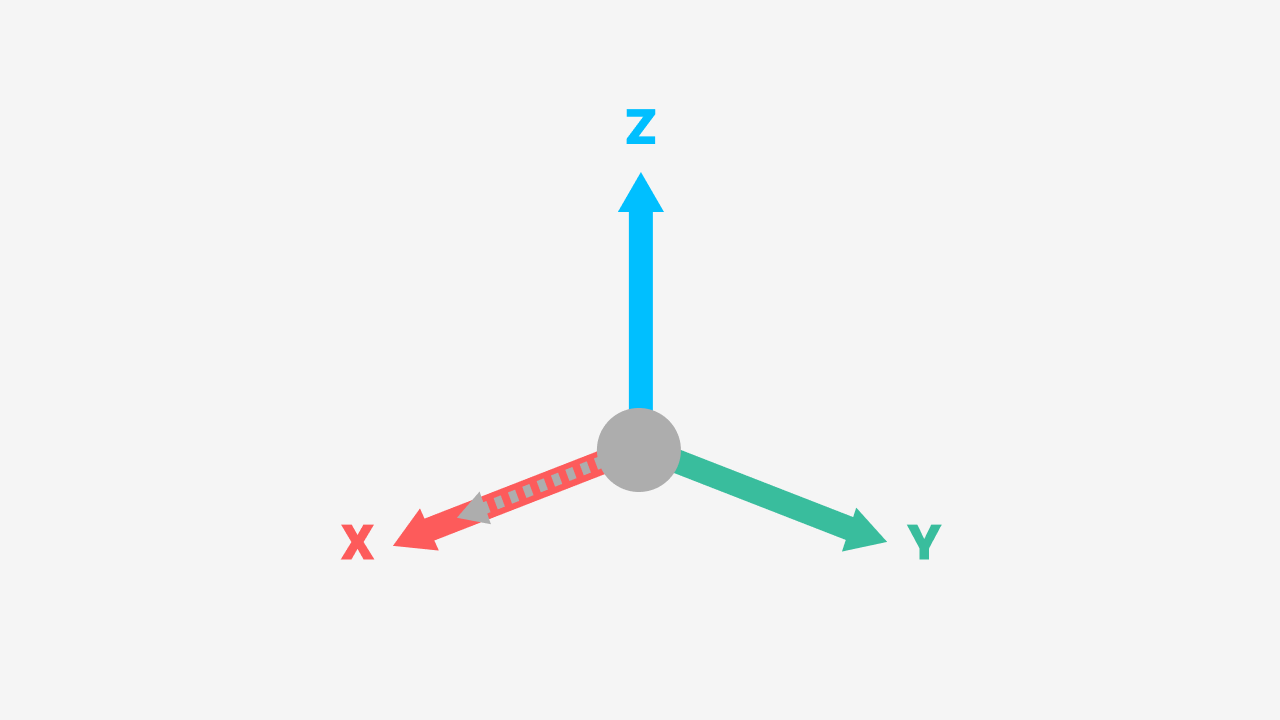
- Coordinate system: Right-handed, Z-up.
- Angles: All
Rotationarguments are in degrees. - Default device orientation: A device at zero rotation (
Rotation(0, 0, 0)) faces the positive X direction with its up axis aligned with positive Z.
Points and vectors
Point* classes (Point2d, Point3d) denote a fixed location in space, using (x, y, z) ordering.
# A point denotes a fixed location in space
origin = treble.Point3d(0, 0, 0)
corner = treble.Point3d(1.5, 2.0, 0.75)
All point and vector classes expose utility methods for serialization (.to_list(),
.to_dict(), .to_array()), floating-point-safe comparison (.almost_equal()), and
construction from standard Python types (.from_list(), .get_zero()).
Rotations
Rotation encodes an intrinsic Euler angle sequence in degrees, parameterized as
Rotation(azimuth, elevation, roll), applied in that order:
- Azimuth — rotation about the Z axis; range
[-360, 360]. Positive azimuth turns the device counter-clockwise when seen from above (from +X towards +Y). - Elevation — tilt about the body-fixed Y' axis; range
[-90, 90]. Positive elevation tilts the device upwards (towards +Z), negative elevation tilts it downwards. Note that "up = positive" is the opposite of the right-hand rule about +Y'; internally the SDK applies a rotation of-elevationabout +Y'. - Roll — rotation about the body-fixed X'' axis; range
[-360, 360].
Intrinsic means that the axes rotate together with the device: elevation is applied about the already-azimuth-rotated Y' axis, and roll about the resulting X'' (facing) axis.
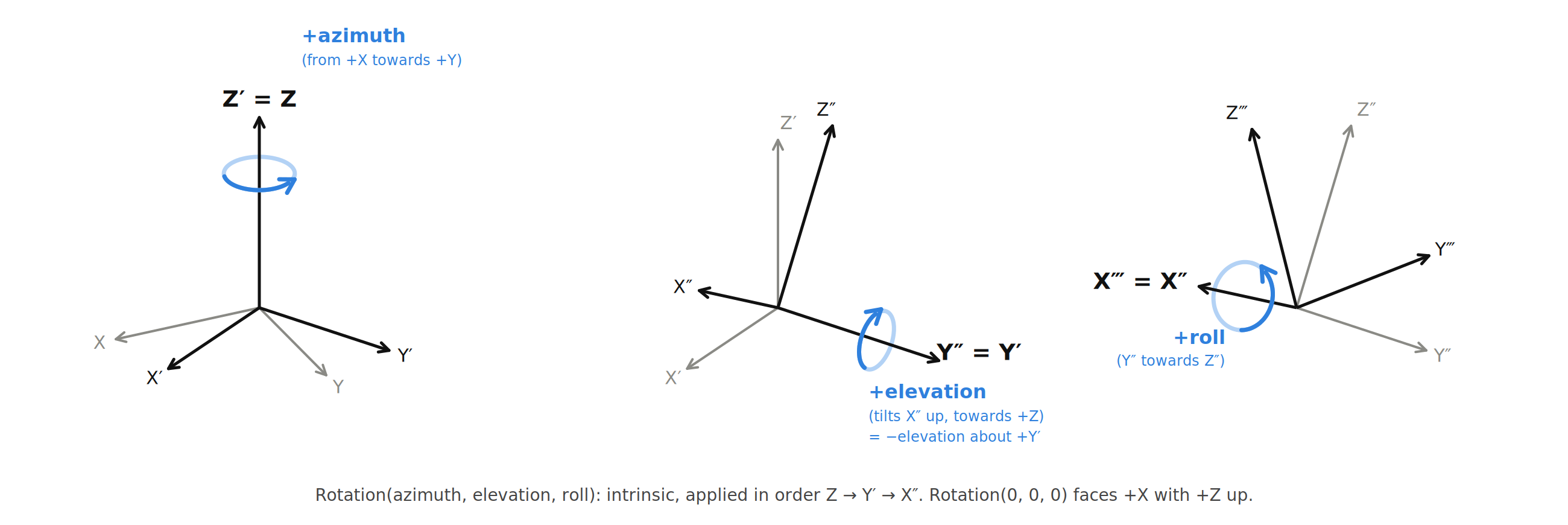
Recall that the default orientation (Rotation(0, 0, 0)) faces +X with +Z up.
Azimuth is therefore the most commonly adjusted parameter — it sweeps the device horizontally away from the +X default.
The same three angles are exposed as the azimuth, elevation and roll attributes, and Rotation.from_list([azimuth, elevation, roll]) / .to_list() use the same ordering.
# Zero rotation: device faces +X, up axis is +Z
default = treble.Rotation(0, 0, 0)

# Rotate 90° in azimuth: device now faces +Y
facing_y = treble.Rotation(90, 0, 0)

# Tilt 45° upward (elevation), no azimuth or roll change
tilted_up = treble.Rotation(0, 45, 0)

# Combined: face +Y and tilt 30° upward
combined = treble.Rotation(90, 30, 0)

# Keyword form, same result
combined = treble.Rotation(azimuth=90, elevation=30, roll=0)
Importing utility classes
Utility classes are accessible either through the convenience object or via explicit import from treble_tsdk.utility_classes:
from treble_tsdk import treble

# Instantiate via the namespace
vector    = treble.Vector3d(1, 0, 0)
rotation  = treble.Rotation(90, 0, 0)
transform = treble.Transform3d(vector, rotation)

# Alternatively, import classes explicitly
from treble_tsdk.utility_classes import Point3d, Vector3d, Rotation, Transform3d
Both import paths expose the same classes; the choice is a matter of namespace management preference.