IR collections
Use IR collections to organize impulse responses and their metadata in a compact and consistent format that facilitates efficient sharing, filtering, device rendering, and other downstream audio workflows. You can also assign processing recipes to the IRs in a collection and apply them on your machine or in the cloud; see Process IRs.
For the data model and caching behavior behind these examples, see the technical reference on IR collections. For a complete dataset workflow, see the IR collections tutorial.
For most workflows, use a metadata-first pattern:
- Create or load an IR collection from a dataset, completed simulations, or a metadata file.
- Save the collection metadata with
write_parquet(). - Reload the collection metadata with
ir_collection_from_file()when you start working on downstream tasks with your data. - Create a data loader and load IR audio only when you need audio arrays.
This keeps collection files small and lets the SDK fetch and cache IR audio on demand.
Run this setup before you work through the examples:
from pathlib import Path

from treble_tsdk import treble

# These examples require SDK credentials configured in the default location.
tsdk = treble.TSDK()
work_dir = Path("./ir_collection_cache")
work_dir.mkdir(parents=True, exist_ok=True)
Basic examples
Start by obtaining an IR collection. The common entry points are loading a collection from a dataset, reloading saved collection metadata, and deriving a collection from completed simulations.
Load a collection from a dataset
Load the free Treble10 dataset as an IR collection and display some basic information:
collection = tsdk.datasets.purchase("Treble10")  # Treble10 is a free dataset.
print(f"IR count: {len(collection)}")
print(collection.columns)
Save and reload collection metadata
Write the collection metadata to a local file:
collection.write_parquet(work_dir / "treble10.parquet")
Read the collection metadata from the local file:
collection = tsdk.collections.ir_collection_from_file(work_dir / "treble10.parquet")
The saved file contains only the collection metadata. Load audio data in a separate step.
Create an IR collection from completed simulations
Create an IR collection from a simulation collection when you already have completed simulations. get_ir_collection() expands simulations into one IR collection row per source-receiver pair in the simulation:
project = tsdk.get_or_create_project("<project_name>")
sims = project.get_simulations(simulation_status=treble.SimulationStatus.completed)

sim_collection = tsdk.collections.simulation_collection()
sim_collection.add_simulations(sims)

# Extract all source-receiver pairs from the completed simulations.
collection = sim_collection.get_ir_collection()
Inspect collection dataframes
Inspect the underlying Polars DataFrame when you need to check columns, types, or sample rows:
df = collection.dataframe

print(df.head())
print(df.schema)
print(collection.columns)
Visualize a collection
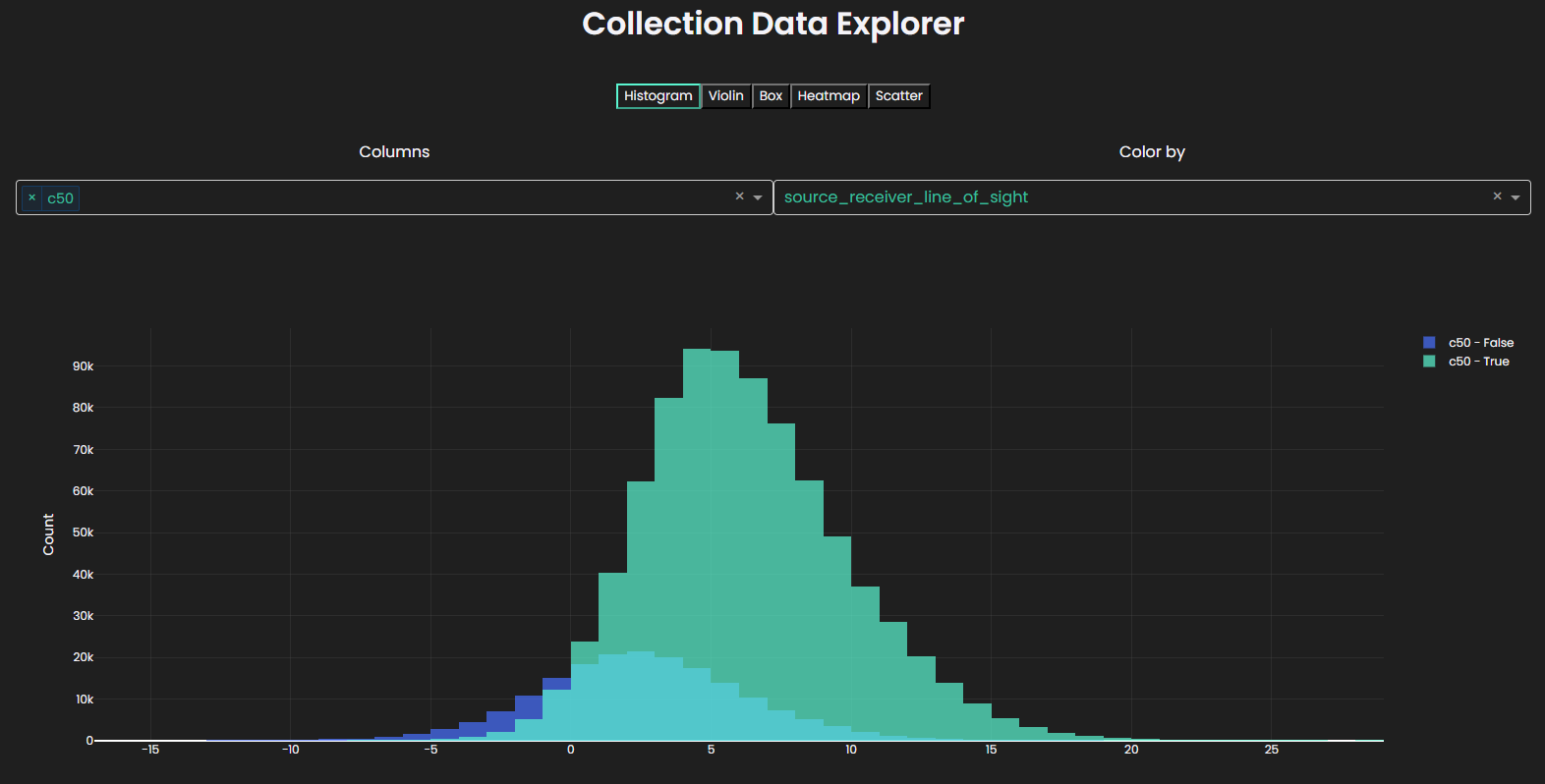
Explore and visualize the collection through an interactive widget with histograms, violin/box/scatter plots, and heatmaps:
collection.plot()
Filter a collection
Use Polars expressions with filter_collection() to create a collection subset. For example, create a subset that contains all IRs involving the first source, or a subset of hybrid simulations with an IR length greater than 1.5 s:
import polars as pl

first_source_id = collection[0].source.id
irs_with_first_source = collection.filter_collection(pl.col("source_id") == first_source_id)

long_hybrid_irs = collection.filter_collection(
    (pl.col("ir_length") > 1.5) & (pl.col("simulation_type") == "Hybrid")
)
Sort and select rows
Use collection helpers for common row operations:
sorted_collection = collection.sort("ir_length", descending=True)

mixed_sort = collection.sort(["simulation_type", "ir_length"], descending=[False, True])

first_10 = collection.head(10)
last_5 = collection.tail(5)
Transform the DataFrame
Use apply() when collection helper methods don't cover a DataFrame transformation.
For example, the code below transforms the collection into two new collections. The transformed collection includes all rows where the IR length is larger than 0.75 s while adding a new column containing the source-receiver distance in cm rather than m. The enriched collection categorizes each row of the original collection based on the IR length into short, medium, or long IRs:
import polars as pl

transformed = collection.apply(
    lambda df: (
        df.filter(pl.col("ir_length") > 0.75)
        .with_columns((pl.col("source_receiver_dist") * 100).alias("source_receiver_dist_cm"))
        .sort("source_receiver_dist_cm", descending=True)
    )
)

enriched = collection.apply(
    lambda df: df.with_columns(
        pl.when(pl.col("ir_length") < 0.7)
        .then(pl.lit("short"))
        .when((pl.col("ir_length") > 0.7) & (pl.col("ir_length") < 1.5))
        .then(pl.lit("medium"))
        .otherwise(pl.lit("long"))
        .alias("ir_length_category")
    )
)
Preserve the system columns id, source_id, receiver_id, simulation_id, and simulation_type when you transform the DataFrame. Removing one of these columns makes the collection invalid.
Access individual IR metadata
Use direct indexing or get_ir_info() when you want metadata for one specific IR:
# Get IR through row index.
first_ir = collection[0]
first_ir_id = first_ir.id

# Get IR through ID.
also_first_ir = collection.get_ir_info(first_ir_id)

# Access metadata.
print(f"Source: {first_ir.source.label}")
print(f"Source position: {first_ir.source.location}")
print(f"Receiver: {first_ir.receiver.label}")
print(f"Receiver position: {first_ir.receiver.location}")
print(f"Simulation type: {first_ir.simulation.type}")
print(f"IR type: {first_ir.ir_type}")
Load IR audio data
Create an IRDataLoader from the collection, then pass it to the IR access method:
data_loader = collection.get_data_loader(work_dir=work_dir)
ir_info = collection[0]

mono_ir = ir_info.get_mono_ir(data_loader=data_loader)
mono_ir_audio_data = mono_ir.unpadded_data()
sampling_rate = mono_ir.sampling_rate

print(f"Audio shape: {mono_ir_audio_data.shape}")
print(f"Sampling rate: {sampling_rate} Hz")
Load other IR types with the corresponding methods:
spatial_ir = ir_info.get_spatial_ir(data_loader=data_loader)
As outlined in Data loading and caching, different data loaders exist depending on the use case. For example, use an eager data loader when a workflow will read many IRs of the collection:
from treble_tsdk.results.ir_data_loader import IRDataLoaderBehaviour

eager_loader = collection.get_data_loader(
    work_dir=work_dir,
    behaviour=IRDataLoaderBehaviour.eager,
)
Advanced examples
Add computed metadata to collection
Add a custom column with add_column() when its value depends on other values from the row's IRInfo object:
import polars as pl

from treble_tsdk.collections.ir_info import IRInfo


def compute_doa(ir_info: IRInfo) -> list[float]:
    doa_vec = ir_info.source.location - ir_info.receiver.location
    doa_sph = treble.Rotation.cartesian_to_spherical(*doa_vec.to_list())
    return doa_sph.to_list()[:2]  # Return azimuth, elevation; discard radius.


collection.add_column("doa", compute_doa)
Filter by the new column to obtain all IRs where the source is in front of the receiver (+- 15 degree azimuth):
frontal_sources = collection.filter_collection(pl.col("doa").list[0].abs() < 15)
Establish a train/test split
Add split metadata to an IR collection:
import hashlib


def split_fn(simulation) -> str:
    key = simulation.id
    hashed_key = int(hashlib.md5(str(key).encode("utf-8")).hexdigest(), 16)
    return "train" if (hashed_key % 100) < 80 else "test"


collection.add_column("split", split_fn)
Enrich collection with acoustic parameters
Fetch precomputed acoustic parameters and append them as collection columns:
parameters = ["t30", "edt", "d50", "c50"]
collection.enrich_with_acoustic_parameters(
    acoustic_parameters=parameters,
    work_dir=work_dir / "acoustic_parameters",
)

print(
    collection.dataframe.select(
        pl.col(["simulation_name", "source_label", "receiver_label"] + parameters)
    )
)
Print supported acoustic parameter names before you request them:
print(treble.AcousticParameters.supported_parameters())
Sample rows with a target distribution
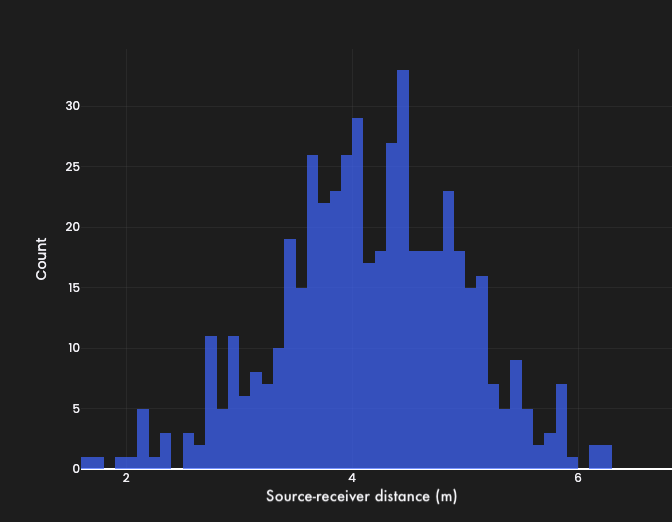
Sample rows with target distributions using importance weighting when a downstream dataset requires a specific distribution across a column. For example, the example below draws 500 samples from the collection, such that the subset's source-receiver distances follow a Gaussian distribution. Ensure reproducibility by using the seed argument:
gaussian_sample = collection.sample_with_gaussian_distribution(
    column="source_receiver_dist",
    n_samples=500,
    target_mean=5.0,
    target_std=1.0,
    seed=42,
)
gaussian_sample.plot()
Use the dedicated distribution objects (Uniform, LogNormal, Exponential, Bimodal) for more sampling flexibility:
from treble_tsdk.collections.distributions import Uniform

uniform_sample = collection.sample_with_distribution(
    column="t30",
    n_samples=500,
    distribution=Uniform(low=0.5, high=0.6),
)
uniform_sample.plot()
Render device IRs
Create a device render collection for rendering the collection's IRs through a device model:
devices = tsdk.device_library.get_devices()
device = devices[0]

orientations = [
    treble.Rotation(0, 0, 0),
    treble.Rotation(90, 0, 0),
]

device_collection = collection.create_device_render_collection(
    devices=[device],
    device_orientations=orientations,
)

cost = device_collection.estimate_device_render_cost(
    work_dir=work_dir / "device_renders",
)
print(f"Estimated cost: {cost} tokens")
Run the rendering job:
device_collection.perform_device_render_bulk(work_dir=work_dir / "device_renders")
Load a rendered device IR:
device_loader = device_collection.get_data_loader(
    work_dir=work_dir / "device_renders",
)
device_ir_info = device_collection[0]
device_ir = device_ir_info.get_device_ir(data_loader=device_loader)

print(f"Device: {device_ir_info.device.name}")
print(f"Device orientation: {device_ir_info.device_orientation}")
print(f"Device IR audio shape: {device_ir.data.shape}")
A device render collection is a separate collection that holds one row per device and orientation. To render devices as part of a processing recipe that updates the IRs of the current collection in place, see Assign device render parameters.
Work with collection subsets
Use the ir_subset argument with IRCollection methods to work on subsets rather than the entire collection. For example, the following code snippet creates a device render collection for a subset of the collection's IRs:
# Get a subset of IRs.
short_irs = collection.filter_collection(pl.col("ir_length") < 1.0)

# Create a device render collection only for the subset.
short_ir_device_collection = collection.create_device_render_collection(
    devices=[tsdk.device_library.get_devices()[0]],
    device_orientations=[treble.Rotation(0, 0, 0)],
    ir_subset=short_irs.dataframe,
)
Process IRs
Apply acoustic processing, such as filtering and device rendering, to the IRs in a collection through one of two execution paths:
- Local processing applies filter chains on your machine with
apply_filters()and writes the processed IRs to a local directory. It requires the IR audio on disk and is bounded by local compute, which makes it suitable for smaller collections and quick filter experiments. - Remote processing applies processing recipes — filter chains, device render parameters, or both — in the cloud with
start_remote_processing(). Processing runs in parallel across all IRs with assigned recipes, and you fetch only the processed audio instead of downloading full spatial IR waveforms, filtering locally, and uploading the results again. For collections with thousands of ambisonic or higher-order IRs, this saves time, bandwidth, and storage. Remote processing is billed in tokens.
Choose local processing when you're iterating on filter settings against a small collection you already have cached. Choose remote processing for large collections, for spatial and higher-order IRs, and for any recipe that includes device rendering.
Apply filters locally
Define an acoustic preprocessing filter chain with set_filters(), then apply it on your machine to generate processed IRs. Without the ir_subset argument, set_filters() assigns the chain to every IR in the collection:
filters = [
    treble.GainFilter(gain=2.0),
    treble.ButterworthFilter(lp_frequency=100.0, lp_order=4),
]

collection.set_filters(filters)

filtered_dir = work_dir / "filtered_irs"
filtered_dir.mkdir(parents=True, exist_ok=True)
collection.apply_filters(work_dir=filtered_dir)
Assign remote processing recipes
A processing recipe describes the processing the cloud applies to one IR. A recipe can include:
- A filter chain: a sequence of filter steps, for example a Butterworth lowpass followed by a gain.
- Device render parameters: a device and orientation used to render spatial IRs into device IRs.
Each IR in a collection is identified by its id. When you assign processing steps, the SDK constructs a new ID from the source ID, receiver ID, and processing parameters. Each IR ID must be unique, and the SDK refuses to create rows that would result in duplicate IDs.
Processing recipes modify the collection in place, including fan-out operations that replace rows. Keep a copy of your original DataFrame, or save an unprocessed parquet file, if you may want to revert or try different recipes later.
Define filter chains
A filter chain is a list of filter definitions that the SDK applies to an IR in sequence. Common filter types include GainFilter, ButterworthFilter, OctaveBandFilter, FIRFilter, and IIRFilter:
filter_chain_1 = [
    treble.ButterworthFilter(lp_frequency=300.0, lp_order=4),
    treble.GainFilter(gain=5.0),
]
filter_chain_2 = [
    treble.ButterworthFilter(lp_frequency=2000.0, lp_order=4),
    treble.GainFilter(gain=10.0),
]
Assign filter chains
set_filters() accepts three assignment forms: broadcast, per-row mapping, and fan-out. IRs without an assigned filter chain remain unchanged.
Broadcast one filter chain to a subset of IRs with the ir_subset argument:
ir_count = len(collection)
ir_count_third = ir_count // 3

collection.set_filters(filter_chain_1, ir_subset=collection.dataframe[0:ir_count_third])
Assign a different filter chain to each IR by passing a dictionary that maps IR IDs to chains:
id_list = collection.dataframe[2 * ir_count_third:]["id"].to_list()
collection.set_filters({ir_id: filter_chain_2 for ir_id in id_list})
Fan out one IR into multiple processed variants by passing a list of filter chains. The SDK creates one new row per chain and removes the original row:
collection.set_filters(
    [filter_chain_1, filter_chain_2],
    ir_subset=collection.dataframe[ir_count_third:ir_count_third + 1],
)
You can also fan out per IR by passing a dictionary whose values are lists of filter chains.
Assign device render parameters
Device rendering simulates how a real recording device, such as a smartphone or microphone, captures sound in a room. Configure it with DeviceRenderParams, which pairs a device with an orientation:
device = tsdk.device_library.get_devices()[0]

render_params = treble.DeviceRenderParams(
    device, treble.Rotation(azimuth=10, elevation=20, roll=0)
)
set_device_render_info() supports the same broadcast, per-row mapping, and fan-out forms as set_filters():
# Broadcast the same render parameters to a subset.
collection.set_device_render_info(
    render_params,
    ir_subset=collection.dataframe[0:ir_count_third],
)

# Assign different render parameters per IR.
id_list = collection.dataframe[2 * ir_count_third:]["id"].to_list()
collection.set_device_render_info({
    ir_id: treble.DeviceRenderParams(
        device, treble.Rotation(azimuth=-180 + i % 360, elevation=-90 + i % 180, roll=0)
    )
    for i, ir_id in enumerate(id_list)
})
An IR can carry both a filter chain and device render parameters. You can also assign only filters or only device rendering to specific IRs.
Estimate remote processing cost
Print the token cost of the assigned recipes before you start processing:
collection.print_remote_processing_token_cost()
The cost is zero if the collection has already been processed with the current recipes. If you change the recipes for some IRs, only the changed IRs are billed.
Run remote processing
Start processing in the cloud. The SDK updates each IR row with a processing_task_id that links the row to its processed audio:
collection.start_remote_processing()
Monitor progress interactively, which is useful in notebooks:
collection.as_remote_processing_live_progress()
Cancel tasks that haven't yet been submitted to the cloud:
collection.cancel_remote_processing()
Save the collection metadata, which includes the processing recipes, and reload it later to fetch processed audio on demand:
collection.write_parquet(work_dir / "processed_collection.parquet")
collection = tsdk.collections.ir_collection_from_file(
    work_dir / "processed_collection.parquet"
)
Access processed and unprocessed IRs
IR accessor methods return processed audio by default, with filters and device rendering applied according to the recipe. Pass apply_filters=False to retrieve the original, unprocessed IR:
data_loader = collection.get_data_loader(work_dir=work_dir)
ir_info = collection[-1]

# Processed (default).
mono_ir = ir_info.get_mono_ir(data_loader=data_loader)
spatial_ir = ir_info.get_spatial_ir(data_loader=data_loader)
device_ir = ir_info.get_device_ir(data_loader=data_loader)

# Device metadata (when a device render recipe was assigned).
print(f"Device: {ir_info.device.name}")
print(f"Device orientation: {ir_info.device_orientation}")

# Unprocessed / clean.
mono_ir_clean = ir_info.get_mono_ir(data_loader=data_loader, apply_filters=False)

# Compare processed vs. unprocessed.
mono_ir.plot()
mono_ir_clean.plot()
This applies to mono, spatial, and device IRs alike.