Generate valid positions
Use PointsGenerator to generate valid source or receiver positions in a room model. You can generate random positions that satisfy a PointRuleset, or generate positions on a uniform grid. Both approaches can enforce minimum distances from room model surfaces and from existing points such as source positions.
Use the following methods to generate positions:
generate_valid_points()returns random positions that satisfy aPointRuleset.generate_valid_grid()returns positions on a uniform grid that satisfy distance and coordinate constraints.
The examples below use a project named "Valid positions example", a polygonal room model, two source positions, and a PointsGenerator. Run the following setup before you generate positions:
from treble_tsdk import treble

# This example requires SDK credentials configured in the default location.
tsdk = treble.TSDK()
project = tsdk.get_or_create_project("Valid positions example")

# Create a polygonal room.
polygon_points = [
    [3.5, 0],
    [2.5, 0],
    [2.5, 2.5],
    [0, 2.5],
    [0, 3.5],
    [2.5, 3.5],
    [3, 6],
    [3.5, 3.5],
    [6, 3.5],
    [6, 2.5],
    [4.5, 1.5],
]
poly_room = treble.GeometryDefinitionGenerator.create_polygon_room(
    points_xy=polygon_points,
    height_z=2.2,
    join_wall_layers=False,
)

poly_model = project.add_model("Polygon room", poly_room)

# Define two source positions in the room.
source_height = 1.1
source_pos = [
    treble.Point3d(3, 3, source_height),
    treble.Point3d(3, 1, source_height),
]

pg = treble.PointsGenerator()
Generate random positions
Define point validation rules
Define a PointRuleset before you generate random positions. The following example defines rules for receiver positions:
- The generated points must be at least m from all room model surfaces.
- The generated points must be at least m from each other.
- The generated points must be at least m from existing sources.
- The generated points must be at least m from existing receivers.
receivers_ruleset = treble.PointRuleset(
    min_dist_from_surface=0.25,
    min_dist_from_other_points=0.5,
    min_dist_from_sources=0.5,
    min_dist_from_receivers=0.5,
)
Generate random valid receiver positions
Use generate_valid_points() to generate 15 random receiver positions in the room model. Pass existing_source_points=source_pos to keep each receiver at least m from the source positions. The z_range argument constrains the generated receivers to the same height as the sources:
# Generate 15 random valid points inside the room.
n_new_points = 15
receiver_pos = pg.generate_valid_points(
    poly_model,
    n_new_points,
    receivers_ruleset,
    existing_source_points=source_pos,
    z_range=(source_height, source_height),
)
generate_valid_points() aims to generate the requested number of points. If the specified rules are too strict, the function may return fewer points.
Use random positions in a simulation
Create Treble sources and receivers from the generated random positions:
# Create omni sources from source_pos.
sources = [treble.Source.make_omni(pos, label=f"Src{idx}") for idx, pos in enumerate(source_pos)]

# Create mono receivers from the generated positions.
receivers = [treble.Receiver.make_mono(pos, label=f"Rcv{idx}") for idx, pos in enumerate(receiver_pos)]
Add everything to a simulation definition and plot the setup:
sim = treble.SimulationDefinition(
    name="test_sim",
    simulation_type=treble.SimulationType.ga,
    model=poly_model,
    receiver_list=receivers,
    source_list=sources,
    material_assignment=[
        treble.MaterialAssignment(layer, tsdk.material_library.get_by_name("10% Absorption"))
        for layer in poly_model.layer_names
    ],
    ir_length=1,
)
sim.plot()
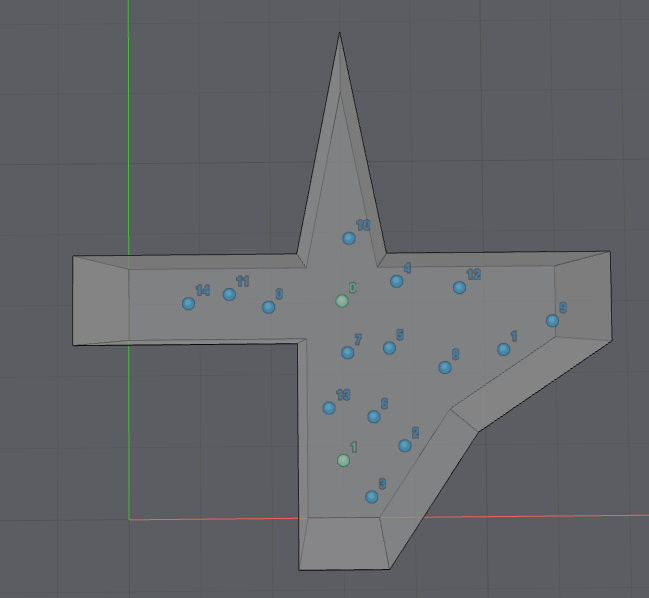
The image below shows the two sound sources in green and the generated receivers in blue.
Generate grids
Generate a valid receiver grid
Generate a receiver grid with the following constraints:
- The horizontal grid resolution is m.
- The vertical grid resolution is m.
- The grid fills the entire room model along the - and -axes.
- Each generated point is at least m from the room model surfaces.
- Each generated point is at least m from the source positions.
Call generate_valid_grid() on a PointsGenerator to generate the receiver positions. The x_res, y_res, and z_res arguments set the spacing between grid points, while existing_points, min_dist_surf, and min_dist_existing_points define the validity rules. The function returns Point3d objects that match the specified constraints:
# Generate a grid of valid receiver positions in the room.
grid_receiver_pos = pg.generate_valid_grid(
    model=poly_model,
    x_res=0.2,
    y_res=0.2,
    z_res=0.5,
    existing_points=source_pos,
    min_dist_surf=0.25,
    min_dist_existing_points=0.5,
)
Set grid density by point count
Use n_grid_points_x, n_grid_points_y, and n_grid_points_z instead of x_res, y_res, and z_res when you want to define the number of grid points along each axis. generate_valid_grid() splits each full axis into the requested number of points:
grid_receiver_pos_by_count = pg.generate_valid_grid(
    model=poly_model,
    n_grid_points_x=25,
    n_grid_points_y=25,
    n_grid_points_z=6,
    existing_points=source_pos,
    min_dist_surf=0.25,
    min_dist_existing_points=0.5,
)
The *_res and n_grid_points_* arguments are mutually exclusive. Define only one of them per axis.
Use grid positions in a simulation
Create Treble sources and receivers from the generated grid coordinates:
# Create omni sources from source_pos.
sources = [treble.Source.make_omni(pos, label=f"Src{idx}") for idx, pos in enumerate(source_pos)]

# Create mono receivers from the generated grid positions.
grid_receivers = [treble.Receiver.make_mono(pos, label=f"Rcv{idx}") for idx, pos in enumerate(grid_receiver_pos)]
Add everything to a SimulationDefinition and plot the setup:
grid_sim = treble.SimulationDefinition(
    name="valid_grid_preview",
    simulation_type=treble.SimulationType.ga,
    model=poly_model,
    receiver_list=grid_receivers,
    source_list=sources,
    material_assignment=[
        treble.MaterialAssignment(
            layer,
            tsdk.material_library.get_by_name("10% Absorption"),
        )
        for layer in poly_model.layer_names
    ],
    ir_length=1,
)
grid_sim.plot()
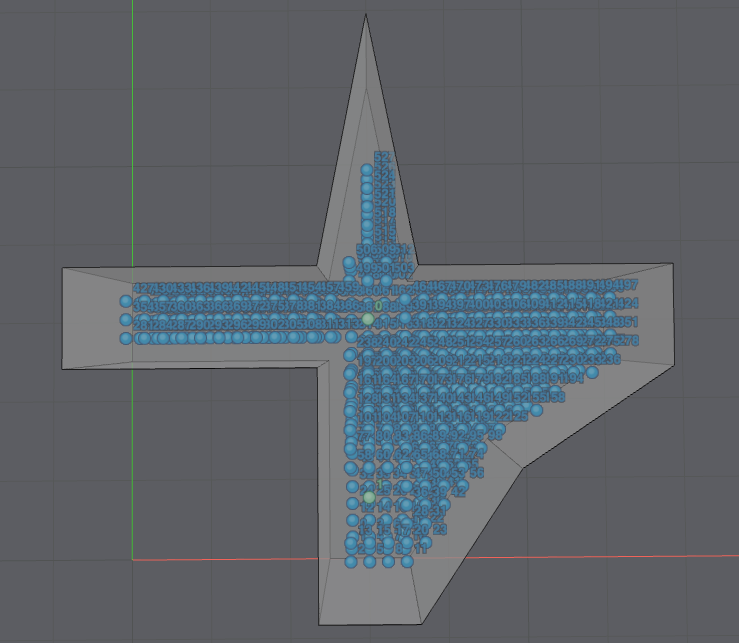
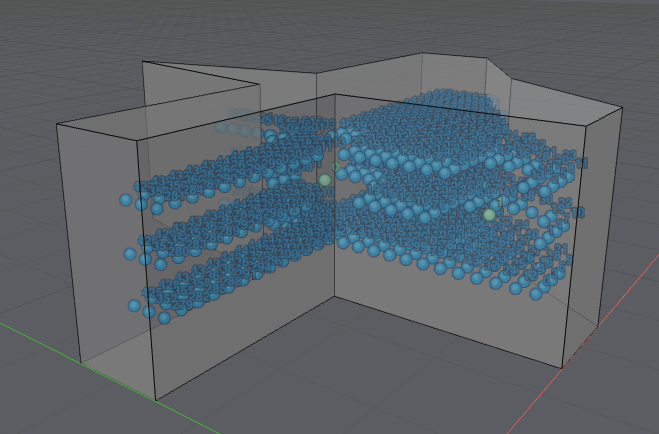
The images below show the two sound sources in green and the generated receivers in blue.
| Horizontal view | 3D view |
|---|---|
 |  |
Limit grid coordinates
Use x_range, y_range, or z_range to limit generated grid points to part of a room model. The following example keeps the same grid resolution and validity rules as the basic grid example, but limits the receiver grid to positions with -coordinates between m and m:
# Generate valid receiver positions within a limited height range.
grid_receiver_pos_limited = pg.generate_valid_grid(
    model=poly_model,
    x_res=0.2,
    y_res=0.2,
    z_res=0.5,
    z_range=(0.75, 1.75 + 1e-10),
    existing_points=source_pos,
    min_dist_surf=0.25,
    min_dist_existing_points=0.5,
)
The coordinate range arguments use half-open intervals:
x_range, y_range, and z_range include the lower limit and exclude the upper limit, like numpy.arange(). With z_range=(0.75, 1.75) and z_res=0.5, generate_valid_grid() returns positions at m and m, but not m. Add a small offset to the upper limit when you need to include the final grid plane.
Use this pattern to include the upper limit:
z_lower_limit = 0.75
z_upper_limit = 1.75
z_range = (z_lower_limit, z_upper_limit + 1e-10)