Materials
The Treble SDK comes with an extensive database of realistic materials, and it allows you to define custom materials shared within the organization. Treble materials contain three acoustical properties:
- scattering coefficients defined as either a single-number value or an array of values corresponding to the center bands of 63 Hz to 8000 Hz
- random-incidence absorption coefficients defined at the octave center bands of 63 Hz to 8000 Hz
- complex reflection coefficients defined at the associated one-third octave bands (50 Hz to 10000 Hz)
The geometrical acoustics (GA) solver uses all three properties to determine the attenuation, scattering, and phase of the simulation, while the wave acoustics (DG) solver uses only the reflection coefficients.
The SDK restricts all materials so that the random-incidence absorption coefficients fall between 0.0 and 0.95, ensuring compatibility with both GA- and DG-based simulations.
To run a simulation, you must create a list of material assignments where each layer in your geometrical model is matched to a material from the library.
Basic examples
Explore the library
You can print the available categories using the following code snippet:
material_library = tsdk.material_library.get_categories_with_count()
dd.as_table(material_library)
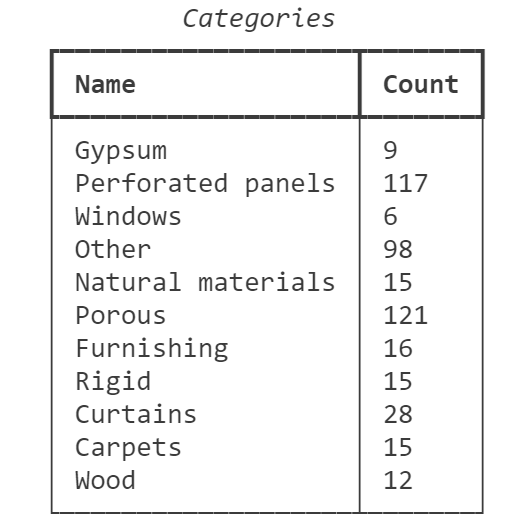
The count included in this table includes both the materials included by default with the SDK's installation, as well as any Imported Materials added to the library by members of your organization. To access the Material Library while excluding organization-generated materials, you may use the code in this example.
Search for a material by name
# Search for materials with 'Gypsum' in the name.
materials = tsdk.material_library.search(name='Gypsum')
assert materials
dd.as_table(materials)

# The search function does not care about upper- or lower-case letters.
materials2 = tsdk.material_library.search(name='GYPSUM')
assert len(materials) == len(materials2)

# You can also search for substrings.
materials = tsdk.material_library.search(name='ypsum')
assert len(materials) == len(materials2)
Fetch all materials, or all materials in a category
# get all available materials
all_materials = tsdk.material_library.get()
dd.as_table(all_materials)

# get all materials within a certain category using a MaterialCategory
gypsum = tsdk.material_library.get(category=treble.MaterialCategory.gypsum)

# get all materials within a certain category using a string
porous = tsdk.material_library.get(category= 'Porous')
Material assignment creation
We assume that you have a model containing three unique layers, called shoebox_walls, shoebox_floor, and shoebox_ceiling.
When creating a material assignment, you may specify which scattering coefficient will be used in the ga portion of the simulation, either using a single-number value (as in the example), or by defining a coefficient for each of the eight octave-band center frequencies.
# define a wood floor material, using get_by_id
wood_floor = tsdk.material_library.get_by_id('6981aefb-9d76-4498-8c9f-83aeb133d827')
# define a gypsum-board wall material, using get_by_name
walls = tsdk.material_library.get_by_name('Gypsum board nailed to studs')
# reuse the gypsum board walls for the ceiling
ceiling = tsdk.material_library.get_by_name('Plywood panelling, 1 cm thick')

# create a list of material assignments
# change the default scattering coefficient for the ceiling layer
material_assignment = [
    treble.MaterialAssignment(layer_name="shoebox_walls",material=walls),
    treble.MaterialAssignment(layer_name="shoebox_floor",material=wood_floor),
    treble.MaterialAssignment(layer_name="shoebox_ceiling",material=ceiling,scattering_coefficient=0.1)
]
dd.as_table(material_assignment)
Material plot
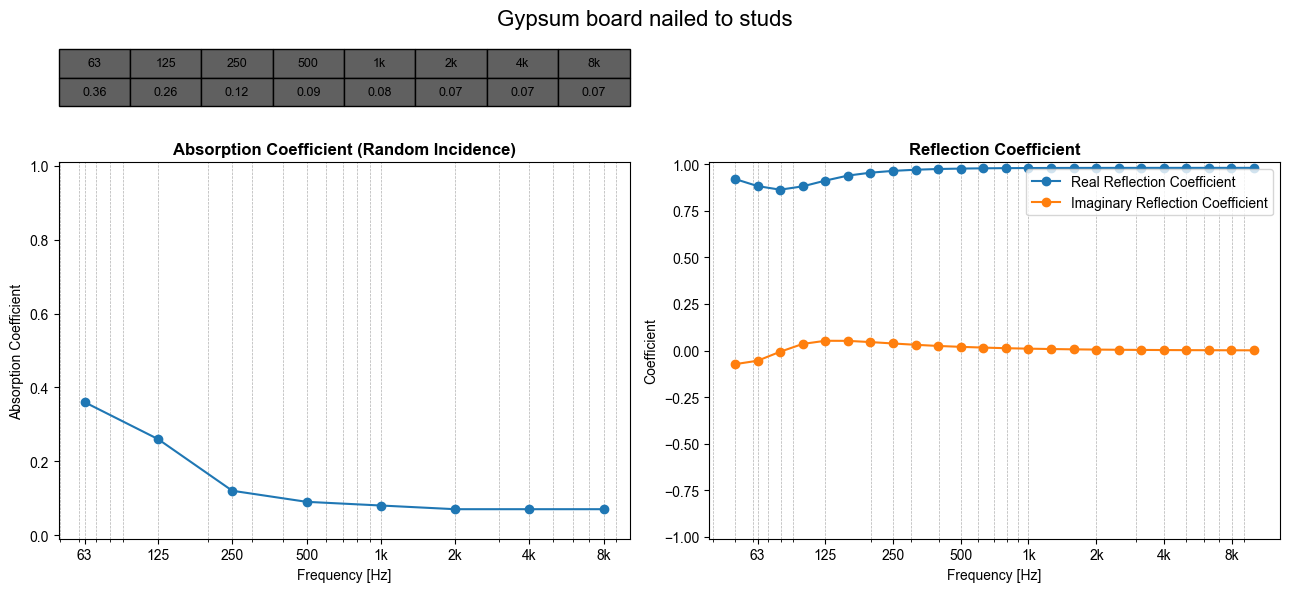
Calling .plot() on a material will return a table and graph of its random-incidence absorption coefficients (used in the geometrical acoustics solver) and a graph of its complex reflection coefficients (used in the wave-based solver).
# define a gypsum-board wall material, using get_by_name
walls = tsdk.material_library.get_by_name('Gypsum board nailed to studs')
# plot the material
walls.plot()
Material details
The dd.as_tree() function returns detailed information about a material included within the material library, including the material name and ID, description, category, default scattering coefficient, and random-incidence absorption coefficients of the material.
Unlike .plot(), dd.as_tree() can only be used to examine materials already within the the material library.
dd.as_tree(walls)

Advanced examples
Separation of default and created materials
The following code sorts the materials contained with the library into a list of default materials and a list of all materials created or imported by members of your organization.
If your organization has not created any materials, the created_materials list will be empty.
# Get all materials in the library
all_materials = tsdk.material_library.get()
# Prepare the lists
default_materials = []
created_materials = []

# Loop through all materials
for material in all_materials:
    # Check if the material has a creation timestamp
    # If it doesn't have a timestamp, it's a default material
    if material.created_at is None:
        default_materials.append(material)
    else:
        created_materials.append(material)
# Display the materials created by your organization
dd.as_table(created_materials)
Curated random material assignment list
The functions of the material library can be combined to create a material assignment list containing random selections from a list of prepopulated material options. The following example creates a random material assignment from lists of acceptable materials for any of the rooms contained in our database of meeting rooms.
import random

# Grab the meeting rooms dataset
meeting_rooms = tsdk.geometry_library.get_dataset(treble.GeometryLibraryDataset.meeting_room)
models = meeting_rooms
# choose a random meeting room
model = random.choice(models)

# Initialize an empty set to store unique layer names
unique_layer_names = set()

# Iterate over each model and add its layer names to the set
for model_tmp in models:
    unique_layer_names.update(model_tmp.layer_names)

# alphabetize
unique_layer_names = sorted(unique_layer_names)
print(unique_layer_names)

# pre-approved material lists
acoustic = tsdk.material_library.get(category='Perforated panels')
ceiling = tsdk.material_library.get(category='Gypsum')
acoustic_tiles = tsdk.material_library.search('ceiling')
ceiling = ceiling + acoustic_tiles # expand list of ceiling materials to include the acoustic_tiles list
chairs = tsdk.material_library.search('chair')
concrete_wall = tsdk.material_library.search('concrete')
floor = tsdk.material_library.search("floor")
floor = floor + concrete_wall
door = tsdk.material_library.search('door')
light_wall = tsdk.material_library.get(category='Gypsum')
monitor = tsdk.material_library.get(category='Windows')
table = tsdk.material_library.search('wooden flooring')
window = tsdk.material_library.get(category='Windows')

# create a dictionary to associate layer names with material lists
material_lookup = {
    "Acoustic": acoustic,
    "Ceiling": ceiling,
    "Chairs": chairs,
    "Concrete wall": concrete_wall,
    "Door": door,
    "Floor": floor,
    "Light wall": light_wall,
    "Monitor": monitor,
    "Table": table,
    "Window": window
}

# create a random material assignment from the approved lists, and assign a random scattering coefficient
material_assignment = [
    treble.MaterialAssignment(
        x,
        random.choice(material_lookup.get(x, light_wall)), random.uniform(0,1))  # Default to light_wall if no match is found

    for x in model.layer_names
]
Random material assignment dictionary with RT constraints
Building off the previous example, the following example uses the functions previously defined to create a list of possible material assignments that, when considered within the room model, should create a reverberation time between a minimum and maximum value when estimated via Sabine's formula. When combined with correct layer naming conventions in the previous example, this example allows you to create large dictionaries of valid material assignments for use in the Simulating many rooms tutorial.
min_rt = 0.5 # define range of acceptable RT values
max_rt = 1.0
desired_assignments = 20 # define the number of desired valid material assignments

# Grab the meeting rooms dataset
meeting_rooms = tsdk.geometry_library.get_dataset(treble.GeometryLibraryDataset.meeting_room)
models = meeting_rooms
# choose a random meeting room
model = random.choice(models)

# Initialize variables for Sabine estimates and material assignments
sabine_estimate = []
sabine_fband_estimate = []
sabine_estimates = []
valid_assignments = []

while len(valid_assignments) < desired_assignments:
    # Generate random material assignments for the layers of the model
    material_assignment = [
        treble.MaterialAssignment(
        x,
        random.choice(material_lookup.get(x, light_wall)), random.uniform(0,1))  # Default to light_wall if no match is found
        for x in model.layer_names
        ]

    # Recalculate Sabine estimates using the new material assignments
    sabine_fband_estimate = model.calculate_sabine_estimate(material_assignment)
    sabine_estimate = np.mean(sabine_fband_estimate[1:-1])  # Average from 125 Hz to 4 kHz

    #only store material assignments if they fall within the defined range
    if min_rt <= sabine_estimate <= max_rt:
        print(model.name, sabine_estimate)
        valid_assignments.append(material_assignment)
        sabine_estimates.append(sabine_estimate)
Modification of an existing material assignment list
For models with a large number of layers, it may be more efficient to modify an existing list of material assignments rather than create a new one. The following code creates a material assignment, and then modifies certain entries without regenerating the whole list.
# define a wood floor material, using get_by_id
wood_floor = tsdk.material_library.get_by_id('6981aefb-9d76-4498-8c9f-83aeb133d827')
# define a gypsum-board wall material, using get_by_name
walls = tsdk.material_library.get_by_name('Gypsum board nailed to studs')
# reuse the gypsum board walls for the ceiling
ceiling = tsdk.material_library.get_by_name('Gypsum board nailed to studs')

new_ceiling = tsdk.material_library.get_by_name('Plywood panelling, 1 cm thick')

# create a list of material assignments
# change the default_1 scattering coefficient for the ceiling layer
material_assignment = [
    treble.MaterialAssignment(layer_name="shoebox_walls",material=walls),
    treble.MaterialAssignment(layer_name="shoebox_floor",material=wood_floor),
    treble.MaterialAssignment(layer_name="shoebox_ceiling",material=ceiling,scattering_coefficient=0.1)
]
dd.as_table(material_assignment)

# designate your good material for replacements
goodmat = new_ceiling

# Create a list of the layer names which need to be re-assigned.
badlayer = ["shoebox_ceiling"]

# Iterate over the material_assignment
for material in material_assignment:
    layer_name = material['layerName']
    if layer_name in badlayer:
        print(f"Layer {layer_name} is a bad layer. Updating material: {material}")
        # Update the material to use the "good" material properties
        material['materialId'] = goodmat.id
        material['materialName'] = goodmat.name
dd.as_table(material_assignment)
Import a material
New materials can be imported in the Material Library using the Material Fitting Engine. Importing a new material into the Treble Material Library follows three steps:
- Define a
MaterialDefinitionobject perform_material_fitting()on theMaterialDefinitionand validate the fit- Add the fitted material to the library
Import from absorption coefficients
The following is a worked example of a material fitting using full octave-band absorption coefficients.
import numpy as np
import matplotlib.pyplot as plt
# full-octave band definitions
f_axis_oct = np.asarray([63, 125, 250, 500, 1000, 2000, 4000, 8000])

# Example input coefficients
absorption_coefficients = [0.2, 0.45, 0.3, 0.65, 0.8, 0.82, 0.84, 0.88]

# Create the material definition object
material_definition = treble.MaterialDefinition(
    name="Full octave absorption material",
    description="Imported material",
    category=treble.MaterialCategory.curtains,
    default_scattering=0.4,
    material_type=treble.MaterialRequestType.full_octave_absorption,
    coefficients=absorption_coefficients,
)

# Material fitting, nothing is saved in this step
fitted_material = tsdk.material_library.perform_material_fitting(material_definition)

# Retrieve the absorption coefficients from the fitted material
fitted_material_abs = fitted_material.absorption_coefficients

# Visualise the fitting results
plt.semilogx(f_axis_oct, absorption_coefficients,label='Original Coefficients')
plt.semilogx(f_axis_oct, fitted_material_abs, label='Fitted Coefficients')
plt.grid(which='both')
plt.xlim([50, 10000])
plt.ylim([0,1])
plt.xlabel('Frequency, Hz')
plt.ylabel('Absorption Coefficient')
plt.title('Input vs. Fitted Absorption Coefficients')
plt.legend()

# add the fitted material to the library
this_created_material = tsdk.material_library.create(fitted_material)
dd.as_tree(this_created_material)
Import from reflection coefficients
import json
import numpy as np
import matplotlib.pyplot as plt
# Frequency array for plotting
f_axis_thirdoct = np.asarray([63, 80,
                            100, 125, 160,
                            200, 250, 315,
                            400, 500, 630,
                            800, 1000, 1250,
                            1600, 2000, 2500,
                            3150, 4000, 5000,
                            6300, 8000, 10000,
                            12500])

# example input reflection coefficients
reflection_coefficients = [(0.9405-0.248j),(0.908-0.3j),
(0.858-0.367j),(0.7911-0.43j),(0.7012-0.48j),
(0.5747-0.53j),(0.4423-0.54j),(0.3062-0.51j),
(0.1797-0.45j),(0.0842-0.35j),(0.0412-0.23j),
(0.0509-0.13j),(0.1093-0.06j),(0.1701-0.07j),
(0.1864-0.12j),(0.1349-0.17j),(0.0429-0.16j),
(0.0422-0.07j),(0.0669-0.08j),(0.0497-0.083j),
(0.0339-0.073j),(0.0231-0.062j),(0.016-0.05j),
(0.0113-0.04j),
]

# Create the material definition object
material_definition = treble.MaterialDefinition(
    name="Material from reflection coefficient",
    description="Imported material",
    category=treble.MaterialCategory.curtains,
    default_scattering=0.4,
    material_type=treble.MaterialRequestType.reflection_coefficient,
    coefficients=reflection_coefficients
)

# Material fitting, nothing is saved in this step
fitted_material = tsdk.material_library.perform_material_fitting(material_definition)

# Retrieve the fitted reflection coefficients
fitted_material_refl_json = json.loads(fitted_material.material_metadata_json)
fitted_material_refl = np.asarray(fitted_material_refl_json['RealReflectionCoefficient']) + \
                        1j * np.asarray(fitted_material_refl_json['ImagReflectionCoefficient'])

# Visualise the fitting results
plt.semilogx(f_axis_thirdoct, np.real(reflection_coefficients),label='Original Coefficients, Real')
plt.semilogx(f_axis_thirdoct, np.imag(reflection_coefficients),label='Original Coefficients, Imaginary')
plt.semilogx(f_axis_thirdoct,np.real(fitted_material_refl), label='Fitted Coefficients, Real')
plt.semilogx(f_axis_thirdoct,np.imag(fitted_material_refl), label='Fitted Coefficients, Imaginary')
plt.grid(which='both')
plt.xlim([50, 16000])
plt.xlabel('Frequency, Hz')
plt.ylabel('Reflection Coefficient')
plt.title('Input vs. Fitted Reflection Coefficients')
plt.legend()