Moving sources and receivers (beta)
Moving sources and receivers are special instances of their respective Treble objects, sharing a number of properties in common. Both are defined using a Trajectory, which determines the spatial path the moving component takes through a room geometry. If the moving source is a directional source, the Trajectory's orientation must be set before running a simulation. If a moving receiver is a spatial receiver, its orientation can be set and reset as part of the device rendering workflow.
Trajectories
The TrajectoryGenerator class provides a set of predefined geometric shapes and utilities
for generating motion trajectories, allowing you to quickly create common movement patterns
such as linear paths, circular motions, and other parametric shapes.
For most trajectory generators, the direction of travel is implicitly defined by the input arguments. Generators with explicit start and end points (e.g., line, quadratic_bezier, L_shape, Z_shape, random) move from the start point toward the end point. For multi-point generators such as polyline, movement follows the order of the points in the input list. Concatenated trajectories preserve the order of their segments.
Some generators expose additional direction controls. For the semicircle, the direction parameter (1 or -1) sets the turning direction within the plane the normal vector defines: using the right-hand rule, 1 produces a counter-clockwise turn and -1 a clockwise turn when looking along the normal direction.
Predefined trajectory shapes
The following examples illustrate a few common trajectory configurations using the built-in
TrajectoryGenerator shapes:
from treble_tsdk import treble
from treble_tsdk.utility_classes import Point3d, Rotation
from treble_tsdk.trajectory import TrajectoryGenerator

# Polyline — movement follows the order of the points in the list,
# starting at the first point and ending at the last.
points = [
    Point3d(2, 6, 1.2),
    Point3d(-2.5, 5.96, 1.2),
    Point3d(-2.5, 3.8, 1.2),
    Point3d(2, 3.8, 1.2),
    Point3d(2, -3.4, 1.2),
    Point3d(-1, -3.4, 1.2),
]
polyline = TrajectoryGenerator.polyline(points=points, corner_radius=1)

# Semicircle
semicircle = TrajectoryGenerator.semicircle(
    start_point=Point3d(-1, -3.4, 1.2),
    radius=1.3,
    direction=1
)

# Circle
circle = TrajectoryGenerator.circle(
    center=Point3d(-0.56, 3.07, 1.7),
    radius=1.5
)

# Quadratic Bezier curve
bezier = TrajectoryGenerator.quadratic_bezier(
    start=Point3d(2, 3.8, 1.2),
    control=Point3d(0, 3.8, 1.2),
    end=Point3d(2, 1, 1.2)
)

# Spiral
spiral = TrajectoryGenerator.spiral(
    Point3d(-0.56, 3.07, 1.5),
    a=0.2,
    b=0.1,
    turns=2
)
Trajectory concatenation
You can combine trajectories into a longer path using .concat(). The following example
appends a semicircle to the end of a polyline:
points = [
    Point3d(2, 6, 1.2),
    Point3d(-2.5, 5.96, 1.2),
]
line = TrajectoryGenerator.line(
    start=treble.Point3d(2,6,1.2),
    end = treble.Point3d(-2.5, 5.96, 1.2)
)


semicircle = TrajectoryGenerator.semicircle(
    start_point=Point3d(-1, -3.4, 1.2),
    radius=1.3,
    direction=1
)

trajectory = polyline.concat([semicircle])
Trajectory orientation
When the moving source is directional, or the moving receiver is spatial and will be used
with device rendering, the trajectory also requires an orientation. Each of the following
methods returns a TrajectoryOrientation object, which is passed to the moving source
definition or the device rendering call:
# Constant orientation for the entire trajectory
orientation_fixed = trajectory.fixed_orientation(
    treble.Rotation(azimuth=45, elevation=0, roll=0)
)

# Aligns with the instantaneous direction of travel
orientation_lookahead = trajectory.look_ahead()

# Keyframe-based orientation at specified proportions along the trajectory
orientation_keyframes = treble.TrajectoryOrientation({
    0.0: treble.Rotation(azimuth=225, elevation=0, roll=0),
    0.5: treble.Rotation(azimuth=135, elevation=0, roll=0),
    0.75: treble.Rotation(azimuth=45, elevation=0, roll=0),
})

# Orients the source toward a fixed point in space
orientation_look_at = trajectory.look_at(treble.Point3d(1, 1, 1.5))
Trajectory visualisation
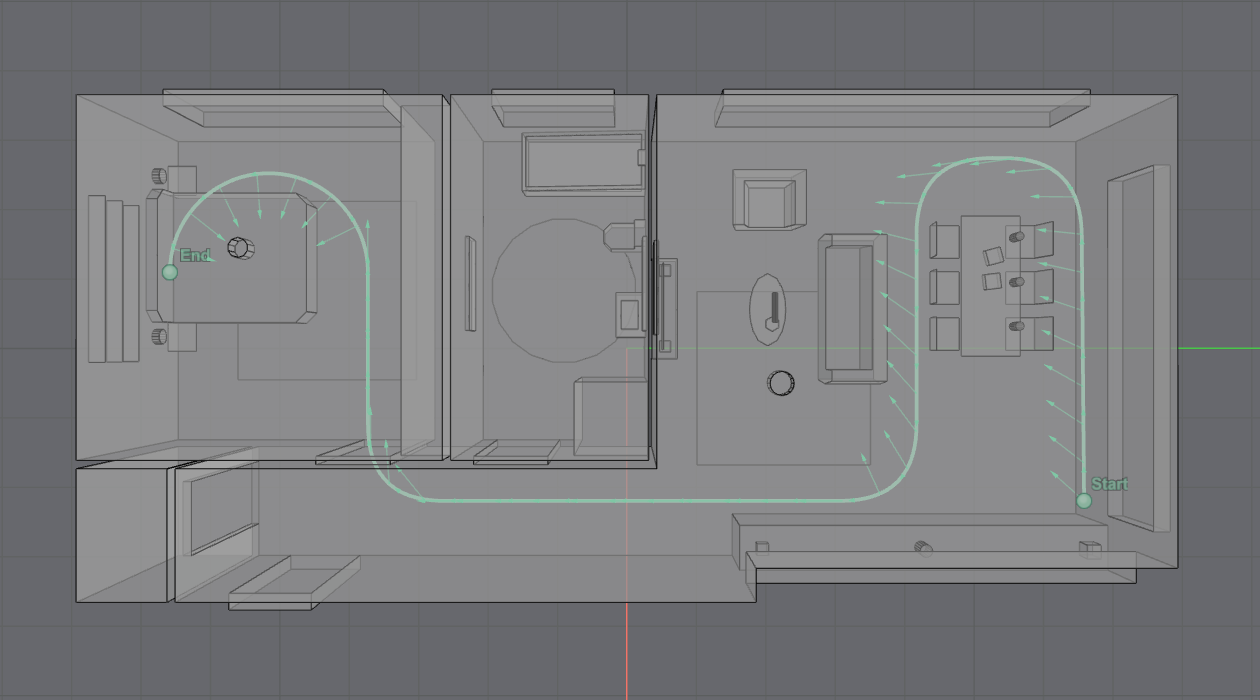
Use the following call to visualise the trajectory within your model. The orientation
argument is optional:
trajectory.plot(model=model, orientation=orientation_lookahead)
Moving sources
Moving omnidirectional source
The following example creates a moving omnidirectional source from a predefined trajectory:
moving_source = treble.Source.make_moving_omni(
    trajectory=trajectory,
    label='Moving_Omni'
)
Moving directional source
The following example creates a moving directional source using a speech directivity pattern and a predefined trajectory and orientation:
natural_directivities = tsdk.source_directivity_library.query(
    category=treble.SourceDirectivityCategory.natural,
    sub_category=treble.SourceDirectivityNatural.speech,
)
speech_directivity = natural_directivities[0]

moving_source = treble.Source.make_moving_directive(
    trajectory=trajectory,
    orientation=orientation_lookahead,
    label="Moving_Speech",
    source_directivity=speech_directivity
)
Moving receivers
Moving mono receiver
The following example creates a moving mono receiver from a predefined trajectory:
moving_receiver = treble.Receiver.make_moving_mono(
    trajectory=trajectory,
    label="Moving_Mono"
)
Moving spatial receiver
The following example creates a moving spatial receiver from a predefined trajectory:
moving_receiver = treble.Receiver.make_moving_spatial(
    trajectory=trajectory,
    label="Moving_Spatial",
    ambisonics_order=8,  # defaults to 2
)
Advanced examples
Custom trajectory from polyline concatenation
TrajectoryGenerator.polyline() is the most versatile option for custom paths, as it accepts
an arbitrary sequence of control points and supports corner rounding for smooth transitions
between segments. The following example constructs a complex path by concatenating a polyline
with a semicircle:
points = [
    Point3d(2, 6, 1.2),
    Point3d(-2.5, 5.96, 1.2),
    Point3d(-2.5, 3.8, 1.2),
    Point3d(2, 3.8, 1.2),
    Point3d(2, -3.4, 1.2),
    Point3d(-1, -3.4, 1.2),
]
polyline = TrajectoryGenerator.polyline(points=points, corner_radius=1)

semicircle = TrajectoryGenerator.semicircle(
    start_point=Point3d(-1, -3.4, 1.2),
    radius=1.3,
    direction=1
)

trajectory = polyline.concat([semicircle])
The resulting trajectory within an example model: