Audio scenes
An AudioScene combines audio tracks, a set of room impulse responses (IRs), and a listener configuration into a single serializable recipe.
It represents one capture scenario: audio sources placed at specific positions in a room, recorded at a single receiver using a defined device.
No audio is rendered until you call render(), so a scene can be built, inspected, and stored before any computation runs.
Once assembled, it can be rendered individually or added to a SceneCollection for batch processing.
The examples on this page show how to build a scene manually. For automated, large-scale scene generation, see the Scene collections how-to.
IR collection
IR collection loading and filtering
A scene is built around a single receiver position.
Start by loading an IRCollection, then filter it to the receiver you want, leaving one IR per source position in the room.
import polars as pl
from treble_tsdk import treble
import treble_tsdk.scene as sc

tsdk = treble.TSDK()
ir_collection = tsdk.datasets.purchase("Treble10")

# Select a single receiver.
# The resulting IR collection will contain IRs for just one receiver and one simulation.
rec = ir_collection[68].receiver
ir_collection = ir_collection.filter_collection(pl.col("receiver_id") == rec.id)

# Caches IR data to disk so re-running this script reads from disk instead of re-fetching
# from the network every time. Always attach one — see the note below.
data_loader = ir_collection.get_data_loader(work_dir="./cache")
Set a data_loader on every AudioScene you build. IR data can be large, and a data loader caches it to disk on first use.
Without one, AudioScene.render() still works, but it logs a warning and re-fetches the IR data remotely on every call — a real cost for anything beyond a single throwaway scene.
Custom metadata columns
Add metadata columns to the IR collection to simplify source selection. The example below flags elevated sources as noise candidates:
from treble_tsdk.collections.ir_info import IRInfo

# Sources above 1.9 m are treated as noise emitters.
def is_noise_source(ir_info: IRInfo):
    return ir_info.source.z > 1.9

# The new column is attached to the IR collection dataframe and can be in source_selection later.
ir_collection.add_column("IS_NOISE_SOURCE", is_noise_source)
add_column() on an IRCollection serves two purposes:
- Source and receiver selection — a column such as
IS_NOISE_SOURCEabove lets aSourceGrouprestrict which sources it draws from, or aListenerRules.receiver_selectionrestrict which receivers are eligible, whenSceneGeneratorbuilds scenes automatically. - ML metadata attachment — for tracks drawn from an IR, any column added here carries through to generated
AudioSceneandSceneCollectioninstances viaTrackMap.ir.dataframe_row, which copies the IR collection row verbatim at the time each scene is built.
Enrich the IR collection before generating or adding scenes, since a column added afterward won't retroactively appear. See Reading per-IR metadata across a generated collection for reading a value like this back once scenes exist.
Audio datasets
Dataset loading
Treble supports loading audio datasets from Hugging Face and from local directories of WAV files. See the Audio datasets how-to for the full set of built-in audio loaders and dataset-loading patterns.
The example below loads three datasets: a speech dataset for foreground tracks, a local music dataset, and a background noise dataset.
See the Logical columns expected by TrackGenerator, SceneGenerator, and AudioScene for what schema_mapping in the examples below is mapping to.
from pathlib import Path

# Pre-sliced LibriSpeech — see "Dataset from Hugging Face" in the Audio datasets how-to for why
# this repository is preferred over the raw corpus.
speech_dataset = sc.AudioDataset.from_huggingface(
    repo_id="treble-technologies/librispeech_asr_sliced",
    split="test",
    audio_loader_class=sc.LibriSpeechAudioLoader,
    schema_mapping={"transcript": "text"},
    drop_columns=["audio"],
)

# Change "my_music_wav_dir" below to the path where your local music WAV files are stored.
music_dataset = sc.AudioDataset.from_local_wav_directory(
    wav_dir=Path("my_music_wav_dir"),
    parquet_path=Path("my_music_wav_dir") / "music_dataset.parquet",
)

# AudioSet loaded from Hugging Face.
hvac_dataset = sc.AudioDataset.from_huggingface(
    repo_id="agkphysics/AudioSet",
    config="full",
    split="bal_train",
    audio_loader_class=sc.AudioSetAudioLoader,
    schema_mapping={"id": "video_id"},
    drop_columns=["audio"],
    max_parquet_files=1,
)
hvac_dataset = hvac_dataset.filter_collection(
    pl.col("human_labels").list.join(" ").str.to_lowercase().str.contains(r"air conditioning|air conditioner")
)

dog_bark_dataset = treble.scene.AudioDataset.from_huggingface(
    repo_id="437aewuh/dog-dataset",
    config="default",
    split="train",
    audio_loader_class=treble.scene.RowIndexAudioLoader,
)
Track generation
Generate the tracks that populate the scene with TrackGenerator.
The rules instance you pass to it determines the track type and how samples are placed on the timeline.
Choose the rules to match the nature of the audio content: turn-taking speech between multiple talkers, sparse transient events, continuous background noise, or synthetic noise with no recorded samples.
See Track generator for each rules type and when to use it.
For continuous background noise, you can also construct a single track manually instead of generating it — see Looped background track below.
For generating continuous noise tracks with NoiseSourceRules, see Source groups.
The example below produces two conversation tracks with ConversationRules and one transient dog-bark track with TransientNoiseRules, which Track-to-source assignment then places in the room:
duration_s = 20

# Two talkers taking turns, with occasional overlap.
conversation_generator = sc.TrackGenerator(
    audio_dataset=speech_dataset,
    rules=sc.ConversationRules(
        block_duration_range=(1.5, 5.0),
        overlap_range=(0.2, 0.5),
        overlap_probability=0.5,
        in_track_level_range_db_spl=(60, 65),
        max_simultaneous_blocks=2,
    ),
    talker_identifier="speaker_id",
)
tracks = conversation_generator.generate_tracks(n_tracks=2, duration_s=duration_s, seed=21)

# One dog-bark sample placed two to four times in the scene.
dog_bark_generator = sc.TrackGenerator(
    audio_dataset=dog_bark_dataset,
    rules=sc.TransientNoiseRules(
        free_field_level_db_spl=(60, 65),
        n_events_range=(2, 4),
        min_gap_s=1.0,
    ),
)
dog_bark_tracks = dog_bark_generator.generate_tracks(n_tracks=1, duration_s=duration_s, seed=7)
Track and source assignment
Track-to-source assignment
Each track is paired with an IR from the collection through a TrackMap, which binds the track to a spatial position in the room.
GroupTag categorizes tracks as TARGET, JAMMER, DISTRACTOR, NOISE, or BACKGROUND.
Use group_name to group related tracks in the visualization.
# Add two conversation (speech) tracks to the scene, each mapped to a different source position in the room.
track_maps = [
    sc.TrackMap(
        track=tracks[0],
        ir=ir_collection[0],
        group_name="conversation",
        tag=sc.GroupTag.TARGET,
    ),
    sc.TrackMap(
        track=tracks[1],
        ir=ir_collection[2],
        group_name="conversation",
        tag=sc.GroupTag.TARGET,
    ),
]

# Add a transient track to the scene.
track_maps.append(
    sc.TrackMap(
        track=dog_bark_tracks[0],
        ir=ir_collection[4],
        group_name="dog",
        tag=sc.GroupTag.BACKGROUND,
    )
)
Looped background track
Use RepeatedAudioTrack for sources that should play continuously throughout the scene.
The sample is looped to fill the required duration at the specified free-field level.
This is the manual way to build a looped background track — constructing it directly and pairing it with an IR by hand, as shown below.
For rule-driven generation of the same track type, use TrackGenerator with NoiseSourceRules instead — see Continuous background track generation, and Source groups for generation at scale.
track_maps.append(
    sc.TrackMap(
        track=sc.RepeatedAudioTrack(hvac_dataset[0], free_field_level_db_spl=55, start_time_s=2, duration_s=17),
        ir=ir_collection[3],
        group_name="hvac",
        tag=sc.GroupTag.BACKGROUND,
    )
)
Listener configuration
Scene listener configuration
SceneListener defines how the scene is captured at the receiver.
It combines a rendering device, a device orientation, optional per-channel noise floors, and optional output filters.
device = tsdk.device_library.get_device_by_name("KEMAR051123_1")

# One StaticNoiseTrack per device channel — models self-noise from each microphone element.
device_noise = [
    sc.StaticNoiseTrack(sc.StaticNoiseProfile.pink_noise(), level_db_spl=40),
    sc.StaticNoiseTrack(sc.StaticNoiseProfile.pink_noise(), level_db_spl=41),
]

listener = sc.SceneListener(
    receiver=rec,
    device=device,
    orientation=treble.Rotation(azimuth=180),  # rotate device 180° around the vertical axis
    noise_definitions=device_noise,
)
With no device set, the receiver renders as a single mono channel — noise_definitions and filter_definitions still apply to that one channel, so a plain mono scene can still carry microphone self-noise or a frequency-response filter without modeling a full device array.
Scene assembly
Scene assembly and inspection
An AudioScene brings together the track-to-source mappings and the listener definition.
Call plot() to display the track timeline and a 3D room view for quick inspection.
my_scene = sc.AudioScene(
    track_map=track_maps,
    scene_listener=listener,
    duration_s=duration_s,
    data_loader=data_loader,
)
my_scene.plot()
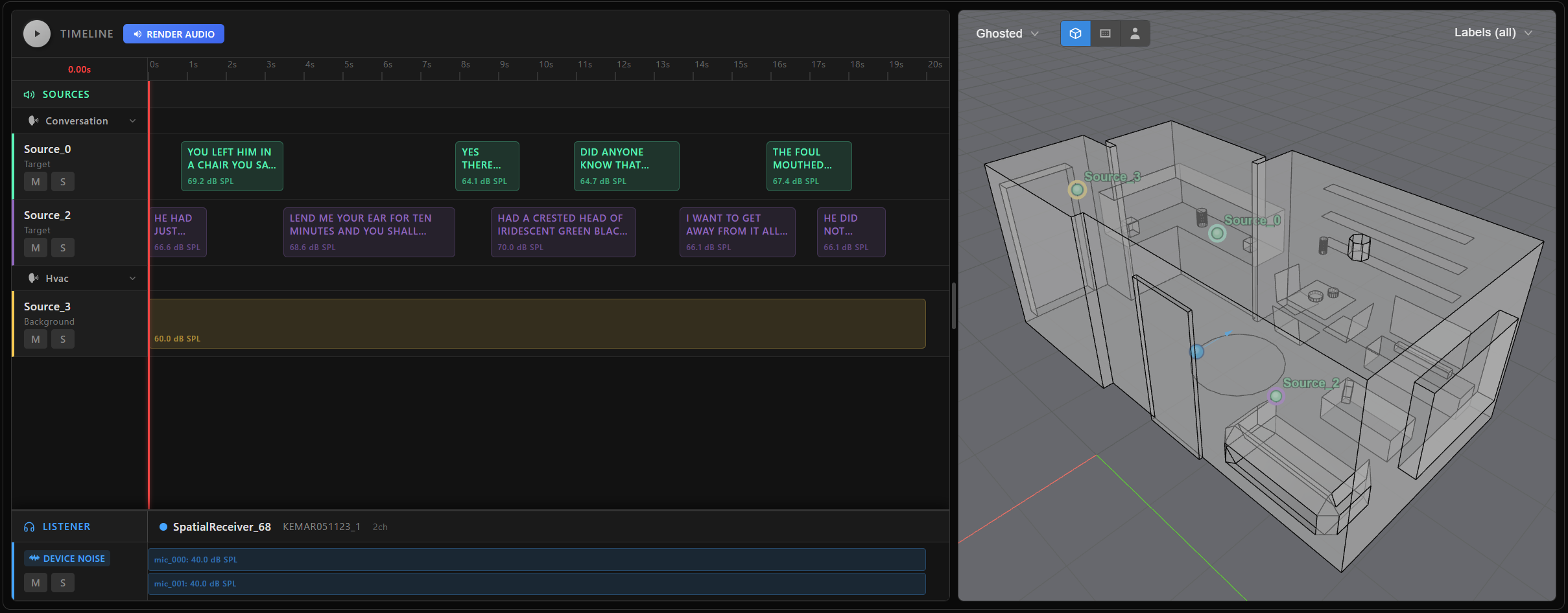
At this point my_scene is a serializable recipe — no audio waveforms have been computed yet.
Scene rendering
Single scene rendering
Call render() on an AudioScene to produce the mixed audio signal.
Set output_separated_tracks=True to also receive per-track rendered outputs.
mixed = my_scene.render(
    sampling_rate=32000,
    render_mode=sc.RenderMode.DEVICE,
)

mixed.plot()
mixed.playback()
Target signal extraction
Call render_target() to produce the clean target signal.
Pass a TargetSelection as target_selection to choose which tracks form the target.
When the selection resolves to several tracks, each track is rendered individually and the results are summed.
# Render every track tagged TARGET as the clean target signal.
target = my_scene.render_target(
    target_selection=sc.TargetSelection.tag(sc.GroupTag.TARGET),
    sampling_rate=32000,
    render_mode=sc.TargetRenderMode.WET_MONO,  # room-convolved, mono output
)
Target selection
TargetSelection identifies the track or tracks that act as the target.
Use one of the following constructors:
| Constructor | Selects |
|---|---|
TargetSelection.index(2) | The track at index 2 in track_map. |
TargetSelection.indices([0, 3]) | The tracks at indices 0 and 3 in track_map. |
TargetSelection.group("conversation") | Every track in the source group named "conversation". |
TargetSelection.tag(sc.GroupTag.TARGET) | Every track tagged TARGET. |
TargetSelection.group_position("conversation", 0) | The first track within the "conversation" group. |
TargetSelection.tag_position(sc.GroupTag.TARGET, [0, 1]) | The first two tracks within the tracks tagged TARGET. |
The group_position() and tag_position() constructors take positions relative to the group or tag, not indices in track_map.
Use them when scene generation places a different number of tracks in each scene and you want, for example, only the first talker of each scene.
Use get_track_indices_by_tag() or get_track_indices_by_group_name() to look up the track indices a tag or group name resolves to.
Metadata and transcripts
Export scene metadata — source positions, receiver properties, device info, track timing, and levels — as a JSON-serializable dictionary with to_struct():
scene_metadata = my_scene.to_struct()
To extract transcripts from speech tracks, use transcript().
Call it without arguments to retrieve the full scene transcript, or pass a TargetSelection as target_selection to restrict it:
full_transcript   = my_scene.transcript()
target_transcript = my_scene.transcript(target_selection=sc.TargetSelection.index(0))
Only ConversationRules-generated blocks contribute a transcript entry; RepeatedAudioTrack and StaticNoiseTrack tracks have none and are silently skipped, even if included in target_selection.
Each returned line has the form "{start_time_s}s: Track: {track.id}: {transcript}", sorted by start time across every included track.
Track and IR metadata for post-analysis
Every TrackMap in my_scene.track_map carries what was actually placed in the scene, so you can read positions, timings, and levels back directly instead of inferring them from the rendered audio.
track_map.ir (None for a dry track with no spatial position) exposes:
.source/.receiver— each with.label,.location(aPoint3d, or the bare.x/.y/.z), and.tags..simulation—.id,.name, and.get_model()for the room model..dataframe_row— the full IR collection row for this IR as it stood when the scene was built, including any custom columns added withadd_column().
track_map.track fields depend on the concrete type — check with isinstance, since the three types don't share the same attributes:
for tm in my_scene.track_map:
    if isinstance(tm.track, sc.AudioTrack):
        occurrences = [(b.start_time_s, b.end_time_s, b.free_field_level_db_spl) for b in tm.track.audio_blocks]
    elif isinstance(tm.track, sc.RepeatedAudioTrack):
        occurrences = [(tm.track.start_time_s, tm.track.start_time_s + tm.track.duration_s, tm.track.free_field_level_db_spl)]
    else:  # StaticNoiseTrack — exactly one of level_db_spl/mic_snr_db is set
        level = tm.track.level_db_spl if tm.track.level_db_spl is not None else tm.track.mic_snr_db
        occurrences = [(tm.track.start_time_s, tm.track.start_time_s + tm.track.duration_s, level)]
Use these methods to look up tracks by tag, group, or type instead of filtering track_map by hand:
my_scene.get_track_indices_by_tag(sc.GroupTag.BACKGROUND)     # -> list[int]
my_scene.get_track_indices_by_group_name("hvac")              # -> list[int]
my_scene.get_source_group_names()                             # -> list[str]
my_scene.track_info                                           # -> list[TrackSummary(index, tag, group_name, track_type)]