Scene collections
A SceneCollection is a container for AudioScene objects built for large-scale dataset generation. Rather than building and rendering scenes one at a time, it lets you generate hundreds or thousands of varied room-and-source combinations, inspect and filter the collection before rendering — for example by predicted SNR or reverberation time — and then render the scenes that meet your criteria in batch. The collection also supports Parquet serialization so you can persist and reload it across sessions.
There are two ways to create a SceneCollection: assembling it manually from individually built scenes, or generating it automatically from a set of rules using SceneGenerator.
For information on rendering the resulting collection, see Scene collection rendering. For calculating, targeting, and predicting the SNR of the scenes, see Scene SNR.
Basic examples
Manual assembly
Create an empty SceneCollection by passing a TSDK client and a data loader, then add scenes with add_scene() or add_scenes(). Prefer add_scenes() when appending many scenes at once. The data loader must be created from the same IRCollection the scenes use, and controls where IR data is cached on disk.
Set the data loader once, on the SceneCollection itself, rather than on each individual AudioScene you build for it: when a scene is added via add_scene()/add_scenes(), the collection's own data loader overwrites whatever data loader that scene already had — including none at all — so every scene in the collection ends up sharing it.
IRCollection.get_data_loader() derives its source and receiver id mappings from that specific collection's simulations. A data loader built from a different IRCollection won't resolve the IRs the scenes actually reference, so it must come from the same collection the scenes' IRs were drawn from.
add_scene() is functionally equivalent to calling add_scenes() with a single-item list — but add_scenes() batches the data-loader propagation and schema resolution instead of repeating it per call, so prefer it when adding many scenes at once.
from pathlib import Path

from treble_tsdk import treble
import treble_tsdk.scene as sc
from treble_tsdk.collections.scene_collection import SceneCollection

tsdk = treble.TSDK()

ir_collection = tsdk.datasets.purchase("Treble10")

# The data loader controls where IR files are cached on disk between sessions.
data_loader = ir_collection.get_data_loader(work_dir=Path("<work_dir>") / "cache")

scene_collection = SceneCollection(
    client=tsdk,
    data_loader=data_loader,
)

scene_collection.add_scene(scene_1)
scene_collection.add_scenes([scene_2, scene_3])
See Audio scene for how to build individual AudioScene objects to add to the collection.
Automated generation with SceneGenerator
SceneGenerator automates collection creation at scale by combining a set of rules with an IRCollection to produce a SceneCollection of randomized scenes. Depending on the set of rules, each scene could have randomly assigned sources and receiver, track content, and listener orientation drawn from the ranges you define. The examples below assume you already have an IRCollection, a data_loader created from it, and at least one AudioDataset — see Audio scene for how to prepare these.
Source groups
SceneRules is the top-level container for all generation rules. Add SourceGroup entries to it, each describing one category of sources in the scene. A SourceGroup declares:
- a
TrackGeneratorto produce audio tracks — see Track generator - a
source_selectionPolars expression to filter which IRs are eligible for that group - source count constraints via
n_sourcesandmin_n_sources - a semantic tag via
group_tag - an allocation priority via
priority_on_ir_collection - a
duration_soverride for this group alone, in place of the scene's own duration - a
start_time_soffset, in seconds, for when this group's sources start relative to the scene - whether the same IR can be selected for more than one source in this group, via
sample_ir_with_replacement
A device source is eligible for a SourceGroup like any other source. Select it with source_selection using source_type, ir_type, or another IRCollection column. By default, SceneGenerator assigns one track to the device source and combines its source layers into one IR. To give each layer its own track, see Split a device source into independent sources.
The following example defines a speech group and a noise group, using the speech_dataset and hvac_dataset loaded in Dataset loading:
import polars as pl
from treble_tsdk.collections.ir_info import IRInfo

# The new column is attached to the IR collection dataframe and can be in source_selection later.
def is_noise_source(ir_info: IRInfo):
    return ir_info.source.z > 1.9
ir_collection.add_column("IS_NOISE_SOURCE", is_noise_source)

scene_rules = sc.SceneRules(duration_s=20)

# Speech group — three foreground talkers drawn from non-elevated sources.
speech_tracks = sc.TrackGenerator(
    audio_dataset=speech_dataset,
    rules=sc.ConversationRules.from_preset(
        sc.ConversationRulesPresets.sequential_talkers_increased_overlap,
        in_track_level_range_db_spl=(69, 70),
    ),
    talker_identifier="speaker_id",
)

scene_rules.add_source_group(
    sc.SourceGroup(
        name="conversation",
        tracks=speech_tracks,
        source_selection=(~pl.col("IS_NOISE_SOURCE")),  # exclude elevated/ceiling sources
        n_sources=2,
        min_n_sources=2,   # skip the scene if fewer than 2 eligible IRs are available
        group_tag=sc.GroupTag.TARGET,
    )
)

# Noise group — elevated sources only.
noise_tracks = sc.TrackGenerator(
    audio_dataset=hvac_dataset,
    rules=sc.NoiseSourceRules(
        free_field_level_db_spl=(55, 56),
        reuse_single_sample=True,  # use the same clip for all sources (e.g. music to loudspeakers in a bar)
    ),
)

scene_rules.add_source_group(
    sc.SourceGroup(
        name="noise",
        tracks=noise_tracks,
        source_selection=pl.col("IS_NOISE_SOURCE"),
        min_n_sources=1,
        group_tag=sc.GroupTag.BACKGROUND,
    )
)
A SourceGroup with none of source_selection, priority_on_ir_collection, n_sources, or min_n_sources set is an "auto n_sources" group: it splits whatever IRs remain, after every other group has claimed its own, evenly across all such groups on that receiver.
Set priority_on_ir_collection (a GroupPriority: HIGH, MEDIUM, LOW, or NONE, default NONE) to control which group gets first pick of IRs when multiple groups compete for a limited or filtered pool. Groups are sorted by priority first, then by whether they set source_selection, then by whether they set an explicit n_sources, then by min_n_sources — each tier only breaking ties in the one before it. A group sorted earlier claims its IRs before groups sorted later, so give a group most likely to be starved (a narrow source_selection, or a high min_n_sources) a higher priority. The noise group defined above would claim its IRs before any lower-priority group with:
sc.SourceGroup(
    name="noise",
    tracks=noise_tracks,
    source_selection=pl.col("IS_NOISE_SOURCE"),  # a narrow, filtered pool of IRs
    min_n_sources=1,
    priority_on_ir_collection=sc.GroupPriority.HIGH,  # claim its IRs before lower-priority groups
    group_tag=sc.GroupTag.BACKGROUND,
)
For a group of sparse, discrete events (a door slam, a car horn) rather than continuous background, use TransientNoiseRules instead of NoiseSourceRules — see Transient (one-shot) track generation.
Listener rules
Use ListenerRules to configure the device and orientation used to capture generated scenes. Pass it to SceneRules.set_listener().
Set orientation to a fixed Rotation, as in Scene listener configuration, or to an OrientationRange for a different sampled rotation in each scene.
device = tsdk.device_library.get_device_by_name("KEMAR051123_1")

device_specs = sc.DeviceSpecs(
    noise_rules=sc.StaticNoiseRules.from_noise_type_and_level(
        noise_type=sc.StaticNoiseType.mems_noise_profile,  # generic spectral profile of MEMS mic
        level_db_spl=(20, 25),  # randomized per scene within this range
    ),
    filter_definitions=[treble.ButterworthFilter(hp_order=2, hp_frequency=80)]  # Emulate the microphone's frequency response
)

scene_rules.set_listener(
    sc.ListenerRules(
        device=device,
        orientation=sc.OrientationRange(  # Randomize orientation within a range
            azimuth_range=(-180, 180),
            elevation_range=(-10, 10),
            roll_range=(0, 0),
        ),
        device_specs=device_specs,
        receiver_selection=pl.col("receiver_label")=="SpatialReceiver_1",  # restrict which receivers are eligible
    )
)
Receiver selection
receiver_selection filters which receivers in the IR collection are eligible for generation (None, the default, makes every receiver eligible). When more than one receiver is eligible, a new scene draws one at random from that eligible set each time it's generated.
If receiver_selection allows both ordinary (mono or spatial) receivers and device receivers, scenes can use either type. With sc.RenderMode.AUTO, rendering follows the listener rules:
- With no
deviceinListenerRules, scenes at device receivers use their built-in device; scenes at ordinary receivers render in mono. - With a
deviceandorientationinListenerRules, scenes at device receivers still use their built-in device and orientation; scenes at spatial receivers use the device and orientation fromListenerRules.
A device receiver cannot be used as a position for another listener device. If you set ListenerRules.device, exclude mono receivers: they have no spatial IR to render through that device.
Use receiver_selection to narrow eligible receivers without changing the input IRCollection. To exclude receiver types from the input itself, filter the unprocessed collection before passing it to SceneGenerator. For example, retain only device receivers, or only spatial receivers when using a listener device:
device_receiver_irs = ir_collection.filter_collection(pl.col("receiver_type").eq("Device"))
spatial_receiver_irs = ir_collection.filter_collection(pl.col("receiver_type").eq("Spatial"))
Device noise and filters
Set device_specs in ListenerRules to add microphone noise or filters. It does not require device: without a listener device, an ordinary receiver renders in mono, and noise_rules/filter_definitions still apply to that one channel.
The flat DeviceSpecs.filter_definitions list in the listener example applies the same filter chain, in order, to every channel. See Postprocessing for filter pipelines.
StaticNoiseRules.from_noise_type_and_level() targets an absolute level_db_spl. For a microphone datasheet SNR, use from_noise_type_and_microphone_snr() instead: it scales the noise against a 94 dB SPL, 1 kHz reference tone after A-weighting. Use profile_band_jitter_db_range to vary the noise profile per generated track:
device_specs = sc.DeviceSpecs(
    noise_rules=sc.StaticNoiseRules.from_noise_type_and_microphone_snr(
        noise_type=sc.StaticNoiseType.mems_noise_profile,
        microphone_snr_db=(60, 65),            # from the microphone's datasheet
        profile_band_jitter_db_range=(-1, 1),  # per-band variation, sampled independently per track
    ),
)
Scene collection generation
Pass the IRCollection and SceneRules to SceneGenerator, then call generate_scenes(). The generator iterates over receiver positions in the collection, assigns sources to IRs respecting priority and filter constraints, and randomizes track content for each scene. Use max_n_scenes to cap the number of scenes produced.
Pass a data_loader to SceneGenerator itself, not just to the SceneCollection it produces — the two are separate objects, so setting one doesn't set the other. SceneGenerator propagates its data_loader to every AudioScene and to the SceneCollection it builds, which is what makes IR data get cached to disk from the very first generate_scenes() call, rather than only once you separately set one on the resulting collection.
SceneGenerator requires the IRCollection to be unprocessed — it rejects a collection that already has device-render columns or processing_filters applied.
scene_generator = sc.SceneGenerator(
    ir_collection=ir_collection,
    scene_rules=scene_rules,
    data_loader=data_loader,  # propagates to every generated AudioScene and to the SceneCollection
)

# Generate 100 scenes
scene_collection = scene_generator.generate_scenes(max_n_scenes=100)
Pass random_seed to make the batch reproducible — the same seed, with the same ir_collection, scene_rules, and datasets, regenerates the exact same scenes: the same configurations, IRs, audio samples, levels, and orientations, not just a similar distribution:
scene_collection = scene_generator.generate_scenes(max_n_scenes=100, random_seed=42)
This reproducibility guarantee depends on the other inputs staying fixed too. A different row order in the IRCollection or in an AudioDataset — for example a HuggingFace dataset shard set that changed upstream, or a differently filtered ir_collection — indexes into different choices even with an identical random_seed, because the seed reproduces the sampling process, not a snapshot of what was sampled from.
generate_scenes() first plans every valid (receiver, simulation, per-group IR selection) configuration once, then draws scenes from that pool. allow_config_reuse (default True) controls how: with reuse allowed, each scene draws a configuration at random from the full pool, so the same configuration — including the same receiver — can be reused across scenes, and max_n_scenes is always reached as long as max_attempts isn't exhausted first. Set it to False to consume planned configurations in order instead, without reuse:
# Cycle through each valid configuration once, instead of reusing them at random.
scene_collection = scene_generator.generate_scenes(max_n_scenes=100, allow_config_reuse=False)
With allow_config_reuse=False, generation stops once the planned configurations run out, even if max_n_scenes hasn't been reached yet — the resulting collection can have fewer scenes than requested. If max_n_scenes exceeds the number of feasible configurations, it's silently capped down to that number, with a warning logged through the plain Python logger.warning(...) rather than into the structured log described below.
Pass generate_logs=True to see how much of the full design space a batch actually covered. Feasibility planning — the first step generate_scenes() performs — enumerates every valid (receiver, simulation, per-group IR selection) configuration once; that total count isn't exposed anywhere else, so reading it back requires the log:
scene_collection, log = scene_generator.generate_scenes(
    max_n_scenes=200, random_seed=1, generate_logs=True,
)
planning_entry = next(e for e in log.entries if e.message == "Feasibility planning completed.")
n_feasible_configs = planning_entry.context["valid_candidates"]   # total distinct configs found
n_generated = len(scene_collection)                                 # how many were actually sampled
Report n_generated against n_feasible_configs alongside any other summary of a generated SceneCollection — it distinguishes "sampled 200 scenes broadly covering a 5,000-configuration space" from "sampled 200 out of only 210 configurations that exist," which changes how much diversity the collection actually has. This is especially relevant with allow_config_reuse=False, where hitting the ceiling silently shrinks the collection as described above.
log.warnings (entries with level == "warning") surfaces warnings raised while assembling individual scenes — for example a source group ending up with fewer tracks than its requested n_sources — each tagged with the simulation_id/receiver_id of the scene it happened in. log.print() gives a human-readable dump of every entry grouped by receiver and simulation.
generate_scenes() runs on one stateful, order-dependent sampling engine shared across the whole batch, so a single call can't be parallelized or split across processes without breaking both coverage and the random_seed guarantee above. To scale out generation across machines or processes, call generate_scenes(random_seed=seed_i) independently per batch with a different seed each time, then merge the resulting collections with add_scenes():
batches = [
    scene_generator.generate_scenes(max_n_scenes=100, random_seed=seed)
    for seed in (1, 2, 3)
]

merged = batches[0]
for batch in batches[1:]:
    merged.add_scenes(batch.scenes)
The resulting SceneCollection supports indexing, slicing, iteration, and dataframe access:
scene_collection[0].plot()
scene_collection.dataframe.head(5)
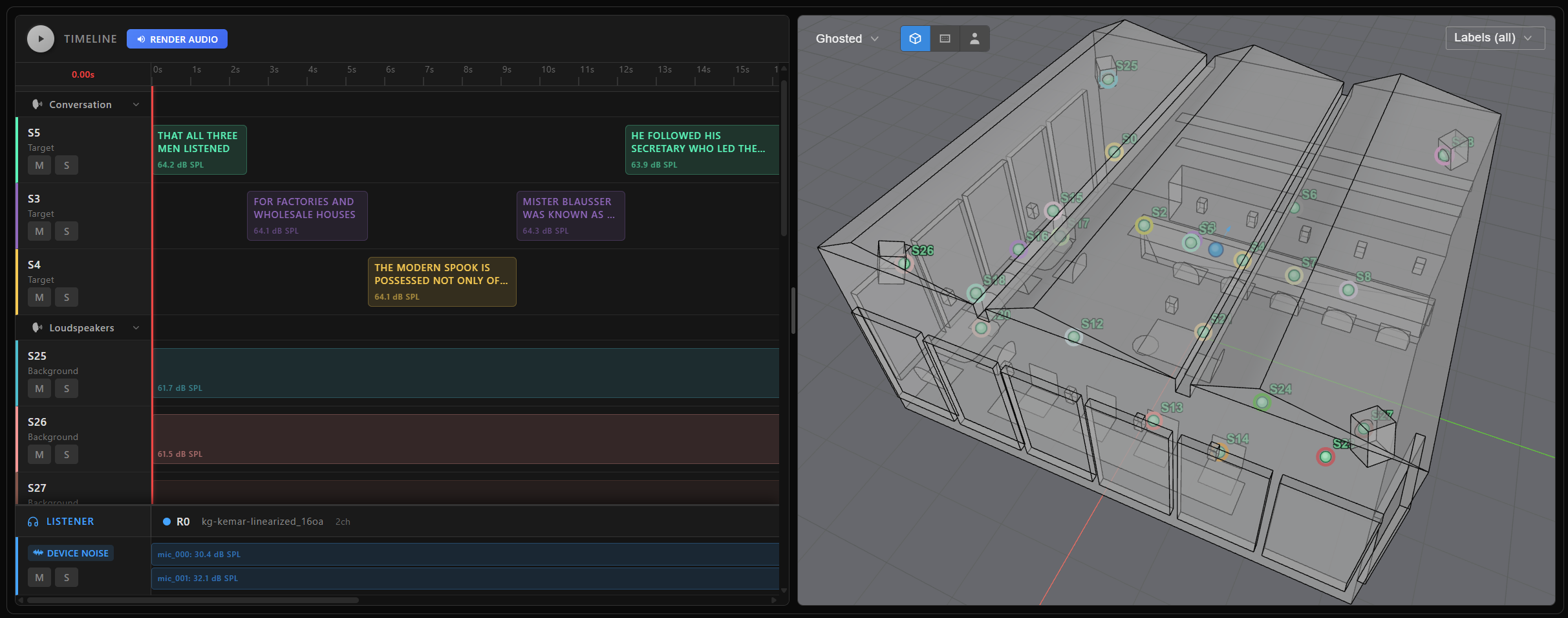
Use generate_scene(duration_s=None, random_seed=None, scene_listener=None) to produce a single AudioScene directly, without going through a SceneCollection. It's simpler than generate_scenes() but doesn't reuse a precomputed feasibility plan across calls:
scene = scene_generator.generate_scene(random_seed=1)
Advanced examples
Sampling ranges
Every range-shaped parameter across the rule classes above — SceneRules.duration_s, SourceGroup.duration_s, ConversationRules.in_track_level_range_db_spl, NoiseSourceRules.free_field_level_db_spl, OrientationRange's angle ranges, and more — accepts a plain tuple[float, float] (flat/uniform sampling) or a single number (a fixed constant). Pass a Uniform or ScaledBeta instance directly instead when you need a discrete step grid or a distribution shaped toward the center of the range:
ScaledBeta is a Beta distribution rescaled onto [low, high] instead of the Beta distribution's native [0, 1] range, so a/b control the same shape (both above 1 biases toward the center, both below 1 biases toward the edges) while low/high set the actual sampled range:
from treble_tsdk.collections.distributions import ScaledBeta

conversation_rules = sc.ConversationRules(
    # Biased toward the middle of the range (a=b=2.0 is the default), instead of flat sampling.
    in_track_level_range_db_spl=ScaledBeta(low=60, high=70),
    overlap_range=(0.2, 0.5),
)
Both Uniform and ScaledBeta accept an optional step argument to quantize sampled values onto a discrete grid — for example, step=1 for whole numbers.
Split a device source into independent sources
Set split_device_sources=True to let SceneGenerator split every device source in the IR collection into its source layers. Each layer then has its own IR and can receive a separate track. For a device source with more than one source layer, filter by parent_source_label, source_layer, or source_label to pick up the layers from the device as individual sources.
scene_rules = sc.SceneRules(duration_s=20, split_device_sources=True)
scene_rules.add_source_group(
    sc.SourceGroup(
        name="device_source_group",
        tracks=noise_tracks,
        source_selection=pl.col("parent_source_label").eq("<device_source_label>"),
        n_sources=2,
        min_n_sources=2,
    )
)
Swap the device in a generated collection
Use swap_device() to regenerate a SceneCollection with a different listener device. Start with a collection returned directly by SceneGenerator.generate_scenes(); manually assembled, filtered, copied, and reloaded collections don't retain the generation settings needed for this operation.
Use a collection generated with spatial receivers and a device from your device library. Replace the device name before running this example:
new_device = tsdk.device_library.get_by_name("<replacement_device_name>")
new_scene_collection = scene_collection.swap_device(
    device=new_device,
    orientation=sc.OrientationRange(azimuth_range=(0, 360), elevation_range=(-10, 10))
)
swap_device() returns a new collection and leaves scene_collection unchanged. It reuses the original generation rules and random seed, not the existing scenes: a replacement with a different number of microphones can change the sampled scene composition. The previous orientation and device_specs carry over unless you pass orientation or device_specs explicitly. Pass device=None to generate mono scenes at ordinary receivers. Rendered results, predictions, and custom collection columns don't carry over; compute them again on the new collection if needed.
This swaps the listener device at an ordinary receiver. A receiver built into a source-receiver device (SRD) uses that SRD's own device and orientation, regardless of the listener rules; swap_device() doesn't replace a device source or an SRD receiver's built-in device.
Reading per-IR metadata across a generated collection
A custom column added to the IRCollection with add_column() (see Custom metadata columns) carries through to every track drawn from that IR, once scenes have been generated or added. Read it back per scene the same way as any built-in column:
scene_collection[0].track_map[0].ir.dataframe_row["distance_to_nearest_wall"]
Or across the whole collection at once, from the IRs list-of-struct column on the collection's own dataframe — useful for building a training manifest directly from the dataframe instead of iterating scenes in Python:
scene_collection.dataframe.select(
    pl.col("IRs").list.eval(pl.element().struct.field("distance_to_nearest_wall"))
)
The IRs column's struct schema is fixed from the first batch of scenes added to the collection. Enrich the IR collection with every column you need before generating or adding scenes — a column added to the IR collection afterward doesn't retroactively appear.
Saving and reloading a collection
write_parquet() serializes the whole collection — the generation recipe (source groups, tracks, IR references, filters), plus rendered audio and metrics if render()/render_to_disk() have already run — to a single portable file:
scene_collection.write_parquet("scene_collection.parquet")
Reload it with tsdk.collections.scene_collection_from_file() (also accepts CSV, NDJSON, JSON, and IPC):
scene_collection = tsdk.collections.scene_collection_from_file("scene_collection.parquet")
This is what makes it practical to split scene generation and rendering across different machines or people, or to checkpoint a long-running batch. Whether remote optimization had already run before saving doesn't matter — that state round-trips through the parquet file too, and calling start_remote_optimization() again on a reloaded, already-optimized collection is a safe no-op rather than an error.
Analyzing generation coverage
Pass generate_logs=True to generate_scenes() to see how much of the possible design space a batch actually covers. Feasibility planning enumerates every valid (receiver, simulation, per-group IR selection) configuration once before sampling from it — that count is the denominator for "how broadly did this batch sample":
scene_collection, log = scene_generator.generate_scenes(
    max_n_scenes=200, random_seed=1, generate_logs=True,
)

planning_entry = next(e for e in log.entries if e.message == "Feasibility planning completed.")
n_feasible_configs = planning_entry.context["valid_candidates"]
n_generated = len(scene_collection)
Comparing n_generated to n_feasible_configs distinguishes "sampled 200 scenes broadly covering a 5,000-configuration space" from "sampled 200 out of only 210 configurations that exist" — the latter has far less diversity than the scene count alone suggests.
log.warnings surfaces everything that went wrong while assembling individual scenes, each tagged with the simulation_id/receiver_id it happened in — this is also where to look when n_generated comes back lower than max_n_scenes. Two distinct situations show up there:
- A group came up short but the scene still generated: a source group produced fewer tracks than its requested
n_sources, while still meetingmin_n_sources, so the scene renders with fewer sources in that group than asked for. - The scene itself was skipped and never made it into the collection — a group fell below its
min_n_sources, or no tracks ended up mapped to any IR at all. This is the reasonn_generatedcan fall short ofmax_n_sceneseven beforemax_attemptsruns out.
log.print() dumps every entry grouped by receiver and simulation.