Postprocessing
Building on the IR Containers guide, all IR types
(MonoIR, SpatialIR, DeviceIR, MovingIR) share common postprocessing
functionality including device/binaural rendering, filtering, audio
convolution, and summing.
All filters demonstrated in the Basic Examples section are
pre-built FilterDefinition subclasses that cover common audio DSP processing
blocks, including gain adjustment, FIR/IIR filtering, Butterworth and biquad
equalization, time shifting, and time windowing.
FilterDefinition objects are composable processing blocks that form
filter pipelines, enabling any type of impulse response processing—not just
classical signal processing filters. You can create custom filters, but note
that subclassing FilterDefinition isn't currently supported. Instead, define
plain Python classes that implement a filter method for local processing (see
Advanced Examples for details).
Basic examples
Gain adjustment
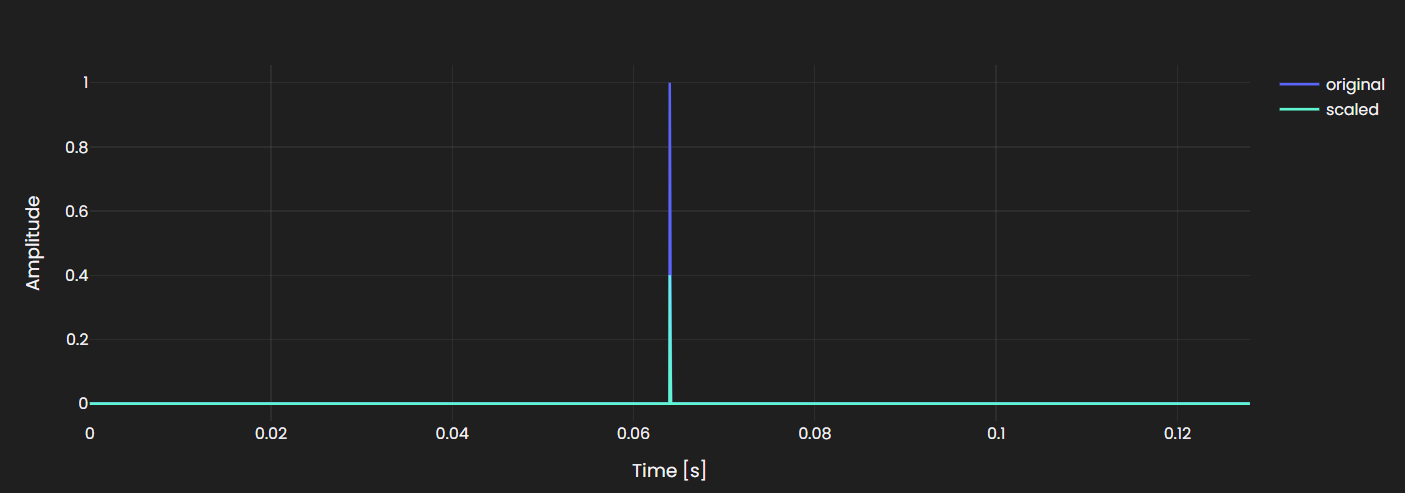
Applies a constant gain to scale the IR amplitude.
# Apply a constant gain to scale the IR amplitude.
scaled_ir = mono_ir.filter(treble.GainFilter(0.5))
Gain filters scale the entire impulse response by a fixed factor.
FIR filters
Finite Impulse Response (FIR) filters use a weighted sum of input samples, defined by coefficient arrays. The FIR must be a 1D array with the filter centered at the middle element and have an odd number of elements
# Create a simple 99-tap moving average FIR filter
fir_filter = treble.FIRFilter(
    np.ones(99) / 99,
    sampling_rate=32000,
)

# Apply to an IR
filtered_ir = mono_ir.filter(fir_filter)

# Create FIR filter from an existing MonoIR
fir_from_ir = treble.FIRFilter.from_mono_ir(mono_ir)
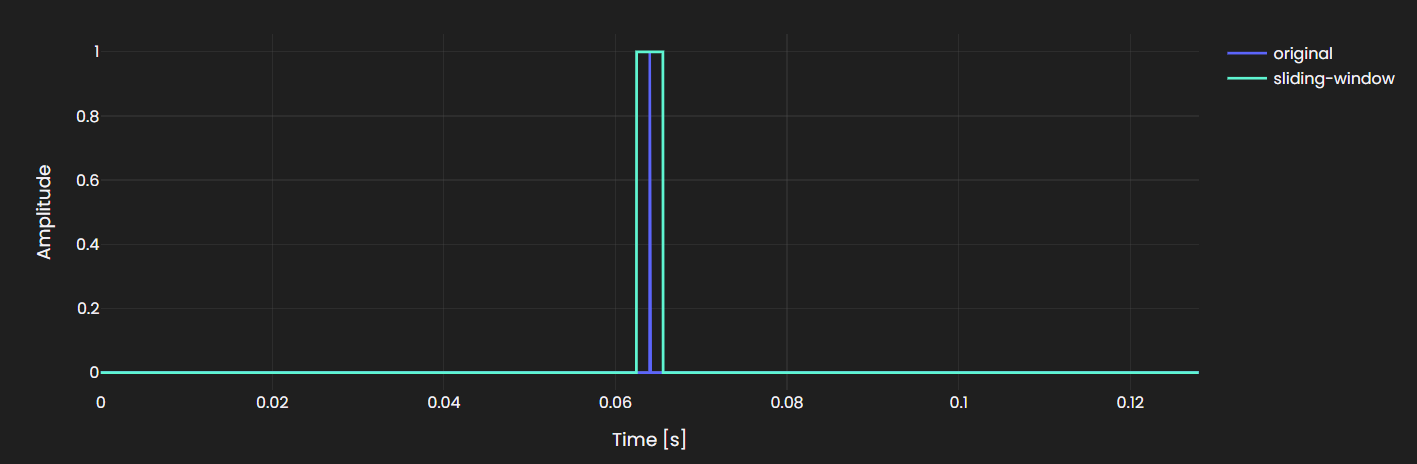
A FIR filter is mathematically equivalent to convolution with an impulse
response, so any MonoIR can be used directly as a FIR filter. This makes it
straightforward to serialize an impulse response to HDF5 and reload it as a
filter:
# Write IR to h5 file
mono_ir.write_to_file("fir_filter.h5")

# Load IR as a fir filter
fir_filter = treble.FIRFilter.from_mono_ir(
    treble.MonoIR.from_file("fir_filter.h5"),
)
FIRFilters to have an odd number of taps so their linear-phase delay is an
integer number of samples. This avoids half-sample delays, giving the impulse
response a single center sample and making audio alignment and latency
compensation simpler.
Butterworth filters
Butterworth filters provide flat passband response, available in high-pass, low-pass, and band-pass configurations:
# High-pass (remove content below cutoff)
hp_filter = treble.ButterworthFilter(hp_order=4, hp_frequency=100)
# Low-pass (remove content above cutoff)
lp_filter = treble.ButterworthFilter(lp_order=4, lp_frequency=4000)
# Band-pass (combine high and low pass)
bp_filter = treble.ButterworthFilter(
    hp_order=4, hp_frequency=100, lp_order=4, lp_frequency=4000
)

# Apply a high-pass Butterworth filter
filtered_ir = mono_ir.filter(hp_filter)
Configure order (steepness) and cutoff frequency to shape the IR's frequency content.
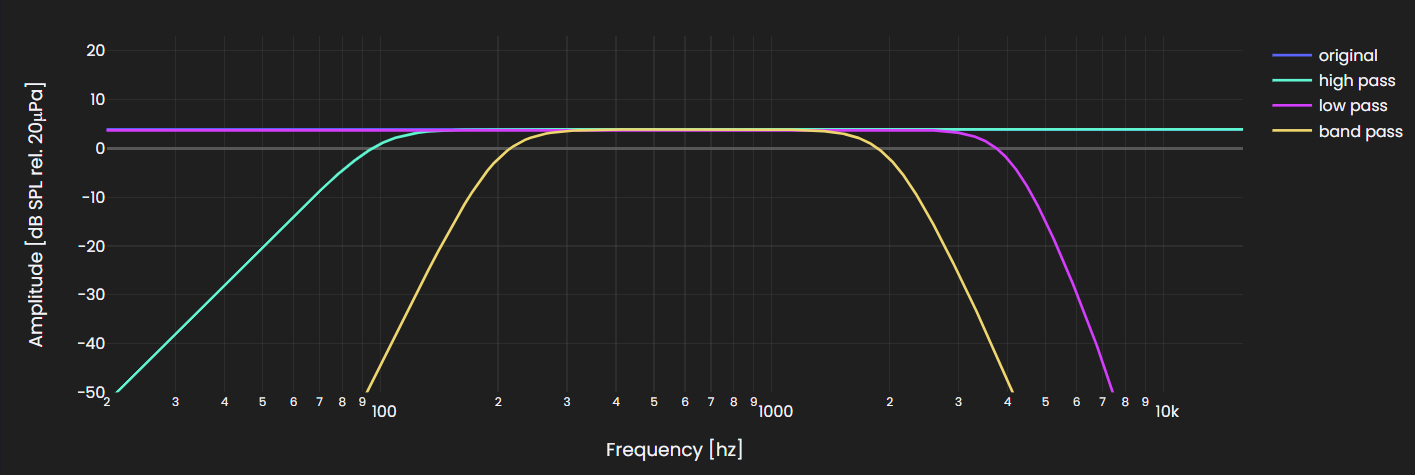
Butterworth filters are zero-phase by default. Zero-phase filtering introduces
no phase distortion, so the filtered output stays time-aligned with the
original — useful when comparing IRs or doing time-domain analysis. It works
by filtering forward and backward, which effectively doubles the filter order.
Pass forward_backward=False to disable this behavior.
IIR filters
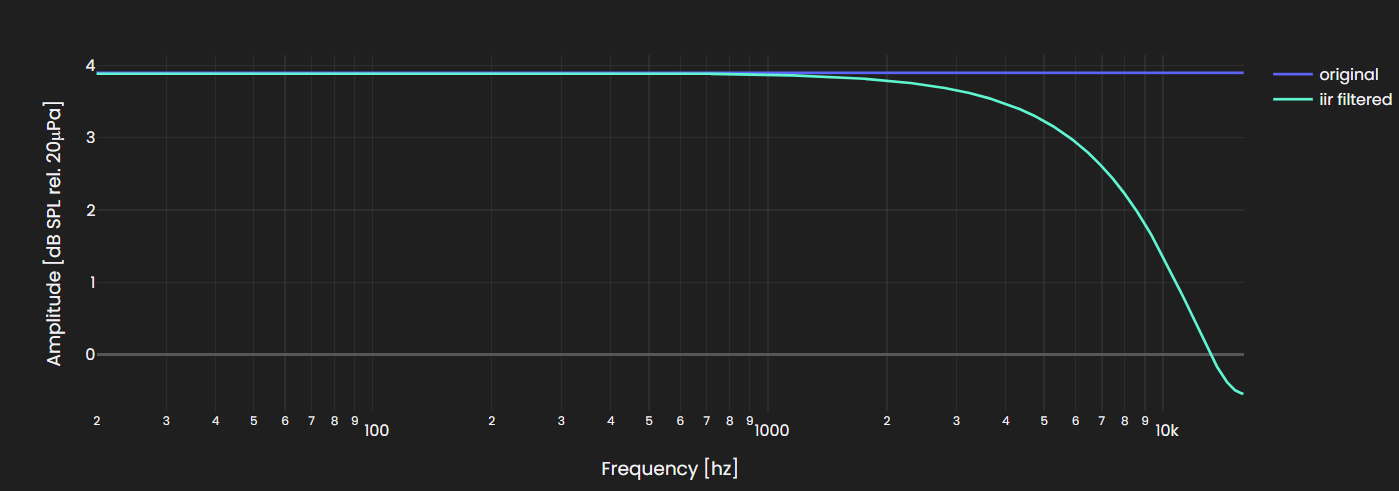
Infinite Impulse Response (IIR) filters use feedback to achieve a given frequency response with fewer coefficients than an equivalent FIR filter, at the cost of non-linear phase:
filtered_ir = mono_ir.filter(
    treble.IIRFilter(([0.2, 0.8], [1.0]), sampling_rate=32000),
)
Define IIR filters using numerator (b) and denominator (a) coefficient arrays following standard DSP conventions.
Biquad filters
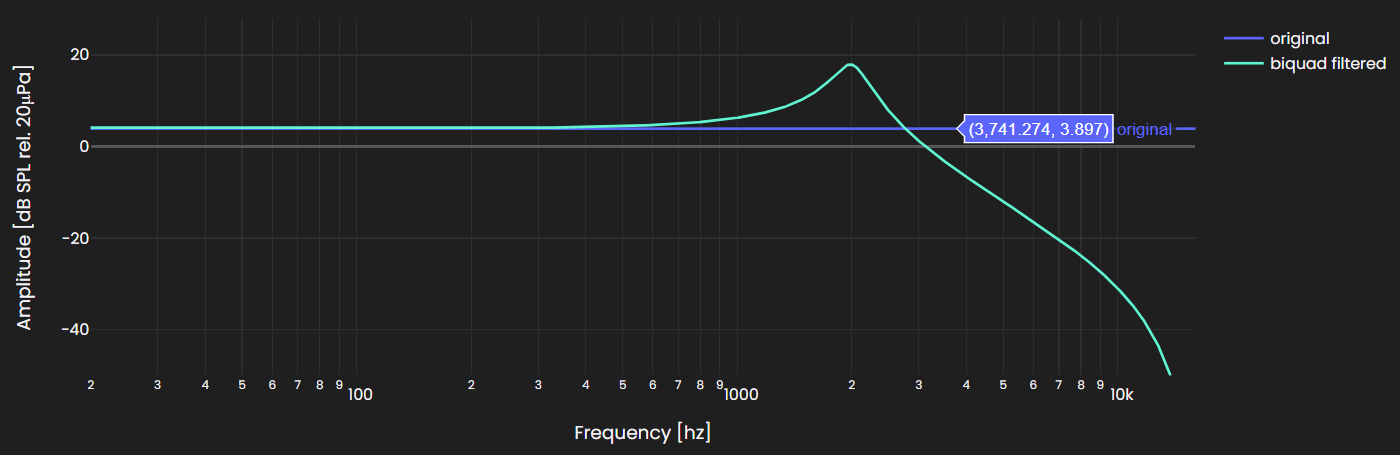
Biquad filters are second-order IIR filters, commonly used for parametric equalization:
filtered_ir = mono_ir.filter(
    treble.Biquad(
        fc=2000,
        Q=5,
        gain_db=0,
        biquad_type=treble.BiquadType.lowpass_2,
    )
)
Configure filter type, center frequency (fc), Q factor, and gain for parametric equalization.
Time shifting
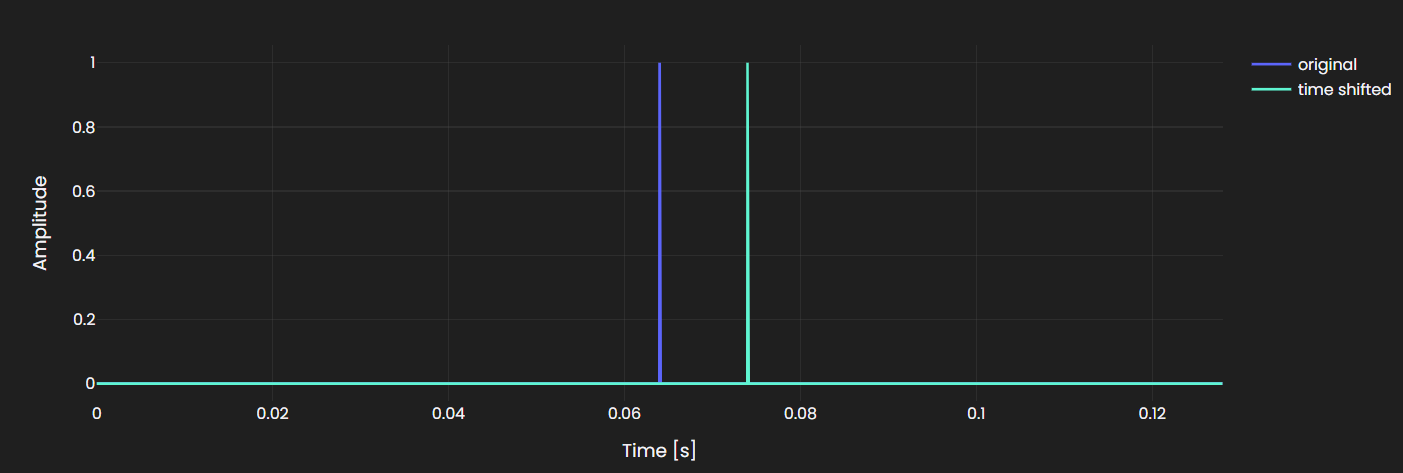
Shifts the impulse response in time by a specified number of seconds:
shifted_ir = mono_ir.filter(
    treble.TimeshiftFilter(0.01),
)
Positive shift values delay the IR, while negative values shift it earlier (truncating any content before time zero).
Time windowing
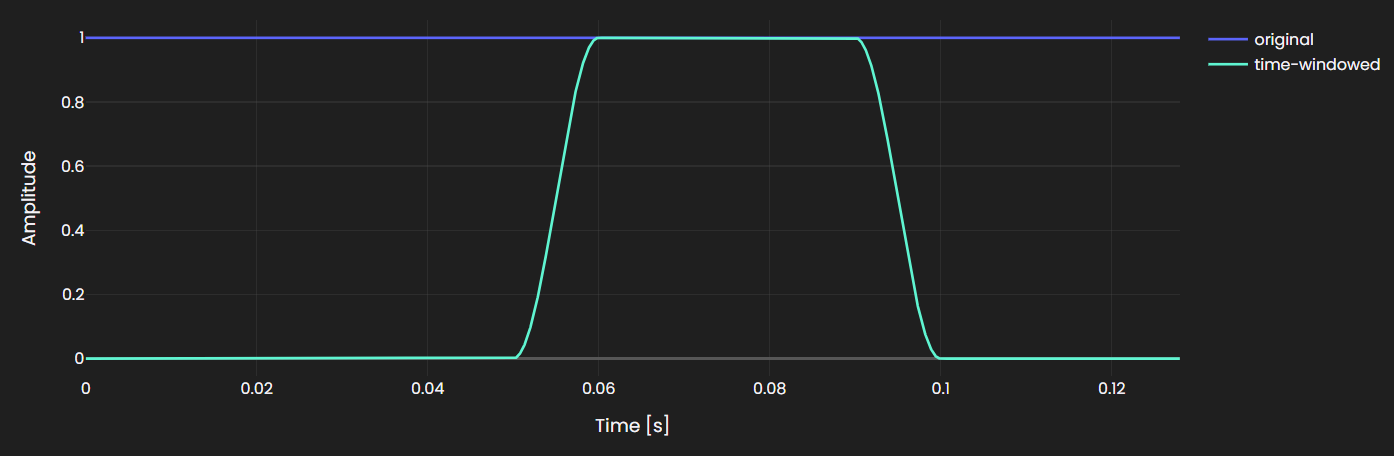
Isolates a specific time range of the impulse response using a time-domain window:
windowed_ir = mono_ir.filter(
    treble.TimeWindowFilter(
        start_time_s=0.05,
        end_time_s=0.1,
        fadein_length_s=0.01,
        fadeout_length_s=0.0,
    )
)
Configure start/end times and optional fade-in/fade-out lengths to avoid spectral artifacts from abrupt truncation.
IR resampling
Resamples an impulse response to match a target sample rate for compatibility with audio pipelines:
# Resample to a new sample rate
ir_48k = mono_ir.resample(48000)
Resampling preserves the IR's frequency content as much as possible while adjusting the sampling rate.
IR summing
Sums two impulse responses with automatic time alignment and zero-padding.
All the IR classes have the + operator overloaded so you can sum two impulse responses directly from the IR objects:
mono_ir = results.get_mono_ir(source="<source_id>", receiver="<receiver_id>")
mono_ir2 = results.get_mono_ir(source="<source_id_2>", receiver="<receiver_id>")

summed_ir = mono_ir + mono_ir2
This returns another MonoIR object and works with all IR classes.
Audio convolution
Convolve an IR with a dry audio signal to auralize the acoustic response.
from treble_tsdk.results.audio_signal import AudioSignal

# Load a dry audio signal
audio_signal = AudioSignal.from_file("<audio_file.wav>")

# Convolve with an impulse response
convolved_signal = mono_ir.convolve_with_audio_signal(audio_signal)
The result is a ConvolvedAudioSignal — a subclass of AudioSignal that
supports playback, plotting, cropping, trimming, and repeating.
AudioSignal manipulation
AudioSignal and ConvolvedAudioSignal share a common set of manipulation
methods. You can also construct an AudioSignal directly from a NumPy array:
import numpy as np

t = np.linspace(0, 1.0, 48_000, endpoint=False)
data = np.sin(2 * np.pi * 440 * t)  # 440 Hz sine wave

audio_signal = treble.AudioSignal(data=data, sampling_rate=48_000)
If you pass multichannel data to AudioSignal, it automatically selects the
first channel and logs a warning.
Use crop() to extract a specific time segment:
cropped_signal = audio_signal.crop(time_start=0.1, time_end=0.5)
Use trim_to_duration() to shorten the signal to a specified length:
trimmed_signal = audio_signal.trim_to_duration(duration_seconds=2.0)
Use repeat_to_duration() to extend the signal by repeating it:
repeated_signal = audio_signal.repeat_to_duration(duration_seconds=5.0)
Plot and play back the signal directly in a Jupyter notebook:
audio_signal.plot()
audio_signal.playback()
See the AudioSignal API reference for a full list of available methods.
Advanced examples
Processing pipelines
Multiple filters can be applied sequentially in a single call. When a list of filters is provided to the filter() method, they are applied in the order given.
# Apply sequential Butterworth filters (highpass + lowpass)
filtered_ir = mono_ir.filter(
    [
        treble.ButterworthFilter(hp_order=4, hp_frequency=200),
        treble.ButterworthFilter(lp_order=4, lp_frequency=4000),
        treble.GainFilter(0.5),
    ]
)
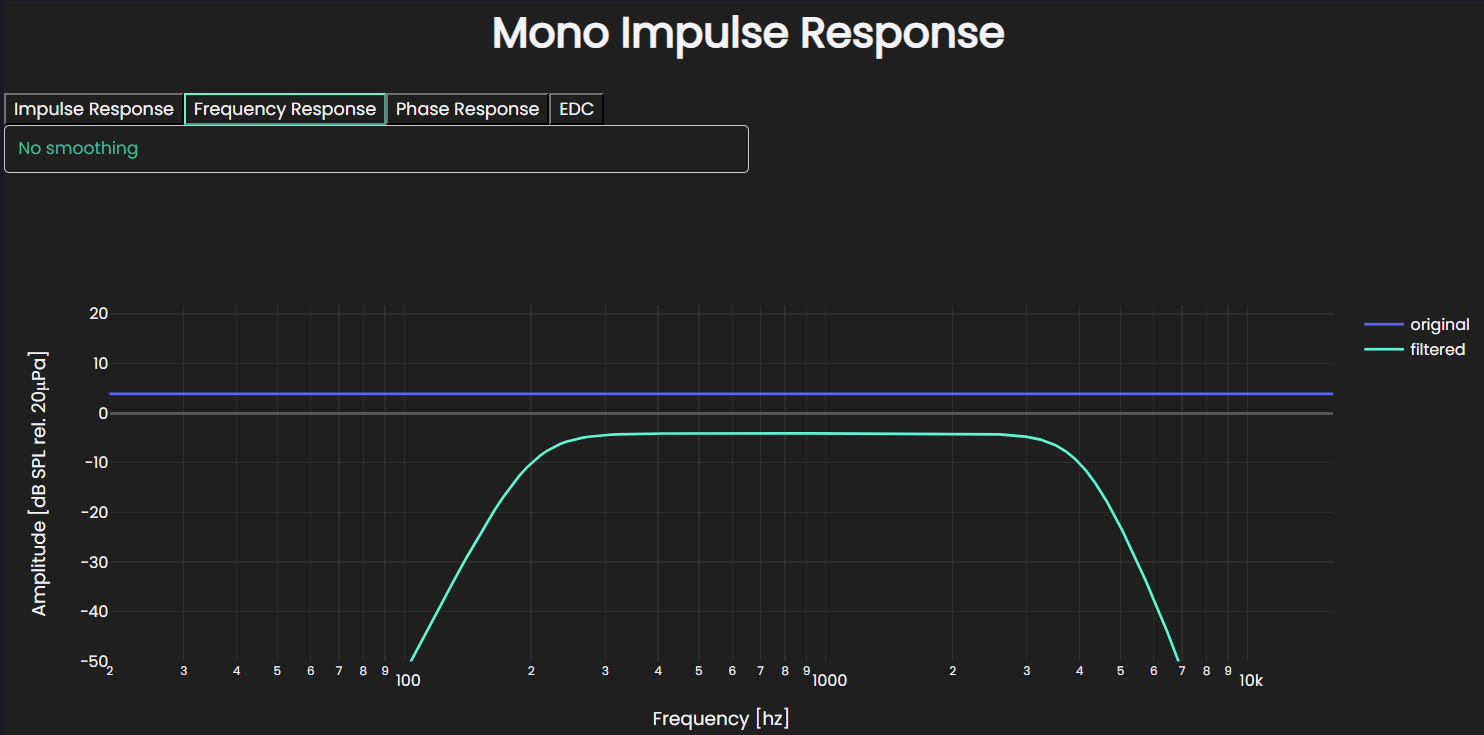
Visualize effects of a processing pipeline
A unit impulse (Dirac delta) is a useful test signal for inspecting what a
filter pipeline does: its frequency response is flat, so any deviation from
flat in the output directly reflects the combined effect of the filters.
Use plot() with the comparison argument to overlay the original and
processed IRs.
The impulse is zero-padded on both sides to avoid boundary artifacts due to
zero-phase filtering. The pre-padding gives the acausal part of the filter
response room to appear before the impulse, while the post-padding lets the
transient response decay after it. We pass zero_pad_samples=2048 to indicate
that the first 2048 samples correspond to negative time. This anchors the
impulse at t = 0, rather than at the beginning of the padded signal.
All IRs returned from Treble SDK simulations are already zero-padded in the same way — you don't need to add padding manually when working with simulation results.
import numpy as np

# Unit impulse with zero padding before and after the impulse.
mono_ir = treble.MonoIR(
    np.pad(np.array([1.0]), (2048, 2048)),
    sampling_rate=32000,
    zero_pad_samples=2048,  # Number of padded samples before the impulse
)

# Define a filter pipeline: band-pass + gain reduction
pipeline = [
    treble.ButterworthFilter(hp_order=4, hp_frequency=200),
    treble.ButterworthFilter(lp_order=4, lp_frequency=4000),
    treble.GainFilter(0.4),
]

filtered_ir = mono_ir.filter(pipeline)

mono_ir.plot(comparison={"filtered": filtered_ir}, label="original")
Device rendering
Render a SpatialIR for a specific device and orientation. For details on working with devices and the device library, see Devices.
spatial_ir = results.get_spatial_ir(
    source="<source_id>",
    receiver="<receiver_id>",
)

device = tsdk.device_library.get_by_name("<device_name>")

device_ir = spatial_ir.render_device_ir(
    device=device,
    orientation=treble.Rotation(
        azimuth=0.0,
        elevation=0.0,
        roll=0.0,
    ),
)
To render the same IR for another device or orientation, use change_device():
new_device = tsdk.device_library.get_by_name("<new_device_name>")

device_ir = device_ir.change_device(
    device=new_device,
    orientation=treble.Rotation(
        azimuth=45.0,
        elevation=0.0,
        roll=0.0,
    ),
)
Batch device rendering
Use treble.batch_render_device_ir() when rendering multiple SpatialIRs across multiple devices or orientations.
sim = proj.get_simulation("<simulation_id>")
results = sim.get_results_object()

spatial_irs = [
    results.get_spatial_ir(sim.sources[0], sim.receivers[0]),
    results.get_spatial_ir(sim.sources[0], sim.receivers[1]),
]

devices = [
    tsdk.device_library.get_device("<device1_id>"),
    tsdk.device_library.get_device("<device2_id>"),
]

orientations = [
    treble.Rotation(azimuth=0, elevation=0, roll=0),
    treble.Rotation(azimuth=45, elevation=0, roll=0),
]

batch_results = treble.batch_render_device_ir(
    devices=devices,
    spatial_irs=spatial_irs,
    orientations=orientations,
)
By default, every device is rendered with every SpatialIR and every orientation.
The result is organized as:
batch_results[device_name][spatial_ir_index][orientation_index]
For example, to plot a specific render:
batch_results["<device1_name>"][1][1].plot()
This plots:
device:      <device1_name>
SpatialIR:   second input IR
orientation: second input orientation
Multi-source auralization
Use a DeviceIR to render a spatial impulse response for a playback device,
then convolve it with a dry audio signal.
# Get a built-in earbuds device
device = tsdk.device_library.get_by_name("Earbuds_in_KEMAR")

# Get the simulated sound paths for two sources
spatial_ir_1 = results.get_spatial_ir(source="<source_id>", receiver="<receiver_id>")
spatial_ir_2 = results.get_spatial_ir(source="<source_id_2>", receiver="<receiver_id>")

# Load the audio file you want to play in the simulation
loaded_audio = AudioSignal.from_file("<audio_file.wav>")

# Apply the earbuds device to each simulated sound path
binaural_ir_1 = spatial_ir_1.render_device_ir(device)
binaural_ir_2 = spatial_ir_2.render_device_ir(device)

# Combine each simulated sound path with the audio file
audio_1 = binaural_ir_1.convolve_with_audio_signal(loaded_audio)
audio_2 = binaural_ir_2.convolve_with_audio_signal(loaded_audio)

# Add the two sources together and play the result
(audio_1 + audio_2).playback()
Or, just listen to a single source:
audio_1.playback()
Per octave band processing
Decompose an impulse response into octave bands by creating an octave-band filter bank and applying each filter to the impulse response. The resulting list contains one filtered impulse response per frequency band, which can then be used for band-wise analysis or metric computation.
full_octave_frequencies = (63, 125, 250, 500, 1000, 2000, 4000, 8000)

# Create a 1/1-octave-band filter bank
filter_bank = [
    treble.OctaveBandFilter(
        center_frequency=center_frequency,
        octave_fraction=1,
    )
    for center_frequency in full_octave_frequencies
]

full_octave_filtered_irs = [ir.filter(ob_filter) for ob_filter in filter_bank]
Or for one-third octave bands:
one_third_octave_frequencies = (
    50, 63, 80, 100, 125, 160, 200, 250, 315, 400, 500, 630, 800,
    1e3, 1.25e3, 1.6e3, 2e3, 2.5e3, 3.150e3, 4e3, 5e3, 6.3e3, 8e3,
)

# Create a 1/3-octave-band filter bank
filter_bank = [
    treble.OctaveBandFilter(
        center_frequency=center_frequency,
        octave_fraction=3,
    )
    for center_frequency in one_third_octave_frequencies
]

one_third_filtered_irs = [ir.filter(ob_filter) for ob_filter in filter_bank]
Once the impulse responses have been filtered, optionally compute aggregated metrics for each band. For example, the following helper function computes the total energy level of each filtered impulse response in decibels.
import numpy as np

def compute_energy(ir: treble.MonoIR) -> float:
    """Compute total energy level in dB."""
    energy = np.sum(ir.data**2)
    return 10 * np.log10(energy)


# Compute energy per full octave band
energy_per_full_octave_band = [compute_energy(ir) for ir in full_octave_filtered_irs]

# Compute energy per one-third octave band
energy_per_one_third_octave_band = [compute_energy(ir) for ir in one_third_filtered_irs]
Time alignment
This function aligns an impulse response to a reference impulse response by shifting its peak to match the peak time of the reference.
def peak_align(ir: treble.MonoIR, reference_ir: treble.MonoIR) -> treble.MonoIR:

    # Find peak times
    ir_peak_time = ir.time[ir.data.argmax()]
    reference_peak_time = reference_ir.time[reference_ir.data.argmax()]

    return ir.filter(
        treble.TimeshiftFilter(reference_peak_time - ir_peak_time)
    )
Generic IR transformations
Because all IR classes inherit from BaseIR, you can write reusable functions
that operate on any IR container type. This is useful when you want to build a
postprocessing pipeline that accepts a MonoIR, SpatialIR, DeviceIR, or
MovingIR without depending on the concrete IR class.
The following example defines a typed transformation that takes a BaseIR as
input and returns a BaseIR as output:
from treble_tsdk.results.base_ir import BaseIR

def prepare_ir_for_export(ir: BaseIR) -> BaseIR:
    """Apply a reusable postprocessing chain to any IR container."""
    processed_ir = ir.resample(48000).filter(
        treble.ButterworthFilter(hp_frequency=80, hp_order=4)
    )

    return processed_ir

# Make example IR containers
mono_ir = treble.MonoIR(np.random.randn(32000), sampling_rate=32000)
spatial_ir = treble.SpatialIR(np.random.randn(4, 32000), sampling_rate=32000)

# Apply the same typed transformation to different IR types
processed_mono_ir = prepare_ir_for_export(mono_ir)
processed_spatial_ir = prepare_ir_for_export(spatial_ir)

# Inspect the processed IRs
processed_mono_ir.plot()
processed_spatial_ir.plot(channel_range=(0, 3))