Track generator
TrackGenerator produces audio tracks from an AudioDataset according to a set of rules.
A rules instance determines both the resulting track type and how samples are placed on the timeline.
Choosing the right rules class means matching it to the nature of the audio content — turn-taking, continuous, transient, or synthetic — not to the application the tracks are ultimately used for.
| Rules class | Produces | Placement behavior | Use for |
|---|---|---|---|
ConversationRules | list[AudioTrack] | Turn-taking among multiple identities, with configurable overlap and per-block level variation | Multiple talkers, or other identities such as sound classes, each with several short candidate samples |
NoiseSourceRules | list[RepeatedAudioTrack] | Loops a single sample continuously to fill the requested duration | Continuous background content with no discrete events, such as HVAC hum or a music bed |
TransientNoiseRules | list[AudioTrack] | Scatters one sample at one or more non-overlapping onset times | Sparse, discrete one-shot events, such as a door slam or a car horn |
StaticNoiseRules | list[StaticNoiseTrack] | Synthesizes frequency-shaped noise; no audio file involved | A noise floor with no recorded samples, such as microphone self-noise |
TrackGenerator requires an audio_dataset for every rules type except StaticNoiseRules, which needs none.
talker_identifier is only used by ConversationRules — it names the column in audio_dataset that groups rows into talkers or identities; the other three rules types ignore it.
The examples on this page build tracks directly with TrackGenerator.generate_tracks(), the manual workflow used when assembling an individual AudioScene — see Audio scenes.
For automated, rule-driven generation across a SceneCollection at scale, wrap the same TrackGenerator in a SourceGroup instead — see Source groups.
The examples below use the speech_dataset, hvac_dataset, and dog_bark_dataset audio datasets loaded in Dataset loading.
See Audio datasets for other loading options.
Every example shares the following import and track duration:
import treble_tsdk.scene as sc

duration_s = 20
Basic examples
Conversation track generation with explicit rules
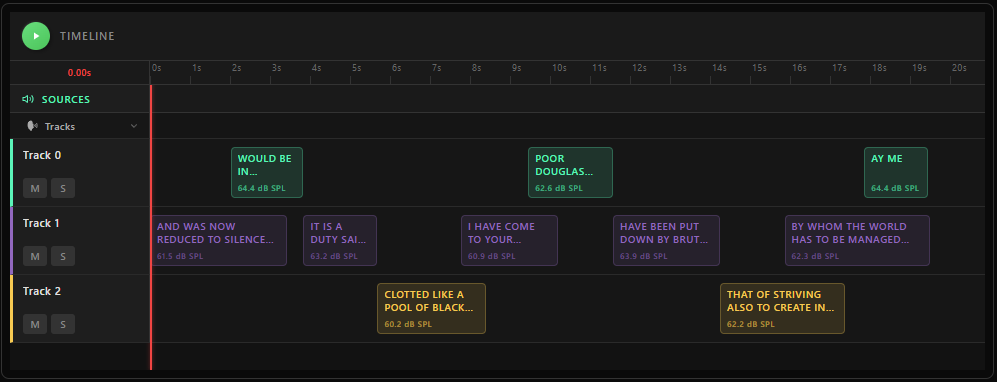
ConversationRules controls conversational timing — turn-taking, overlap, and per-block levels.
The result is a set of AudioTrack objects, each containing timed AudioBlock references.
Pass a seed for reproducible output.
conversation_rules = sc.ConversationRules(
    block_duration_range=(1.5, 5.0),      # duration range for candidate audio blocks, in seconds
    overlap_range=(0.2, 0.5),             # fractional overlap between consecutive blocks, in [0, 1]
    overlap_probability=0.5,              # probability that consecutive blocks overlap at all
    in_track_level_range_db_spl=(60, 65), # free-field level range for blocks from the same talker, in dB SPL
    max_simultaneous_blocks=2,            # polyphony cap across all talkers; defaults to n_tracks if omitted
    samples_per_talker=sc.SamplesPerTalker.reshuffle,  # behavior once a talker's samples run out
)

track_generator = sc.TrackGenerator(
    audio_dataset=speech_dataset,
    rules=conversation_rules,
    talker_identifier="speaker_id",
)

tracks = track_generator.generate_tracks(n_tracks=3, duration_s=duration_s, seed=21)
samples_per_talker (a SamplesPerTalker) controls what happens once a talker's own candidate samples are exhausted mid-generation: force_unique uses each sample at most once and raises when they run out, reshuffle (the default) re-shuffles and continues, recycle reuses the same initial shuffled order, and random samples uniformly with replacement for every block.
talker_identifier names the column in audio_dataset that holds each sample's talker identity, such as speaker_id for LibriSpeech. It's required for ConversationRules and ignored by the other rules types.
ConversationRules works best when each talker's clips are short — seconds, not multi-minute recordings.
If the dataset in hand is long-form, slice it into utterance-length clips before loading rather than wiring long clips directly into ConversationRules — see Speech dataset from a WAV directory.
Call plot_audio_tracks() to inspect the generated timelines before assembling the scene:
sc.plot_audio_tracks(tracks, duration_s)
Conversation tracks with a preset
For common conversation patterns, use a predefined preset via ConversationRules.from_preset() rather than specifying all parameters manually:
conversation_rules = sc.ConversationRules.from_preset(
    sc.ConversationRulesPresets.sequential_talkers_no_overlap
)
Continuous background track generation
Use NoiseSourceRules for sources that should play continuously for the full requested duration, with no discrete occurrences — background noise, HVAC hum, traffic drone, or a music bed.
Each generated track loops or cross-fades a single sample to fill the duration:
hvac_rules = sc.NoiseSourceRules(
    free_field_level_db_spl=(55, 56),
    reuse_single_sample=True,  # use the same clip for every track (e.g. music to loudspeakers in a bar)
)

track_generator = sc.TrackGenerator(
    audio_dataset=hvac_dataset,
    rules=hvac_rules,
)

tracks = track_generator.generate_tracks(n_tracks=3, duration_s=duration_s, seed=21)

sc.plot_audio_tracks(tracks, duration_s)
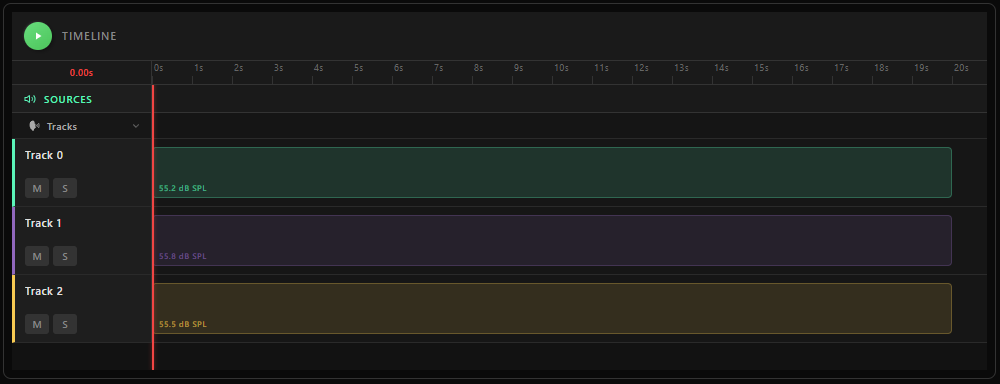
reuse_single_sample=True picks one sample and reuses it across every generated track instead of drawing a separate sample per track.
Set overlap_s to cross-fade successive repeats of the sample by that many seconds; the default 0 loops the sample back-to-back without a cross-fade.
To categorize the resulting tracks as background sources, tag their TrackMap with sc.GroupTag.BACKGROUND — see Track-to-source assignment.
Transient (one-shot) track generation
Use TransientNoiseRules for sparse, discrete sound events — a dog bark, a door slam, a car horn — rather than a continuous background.
Each generated track gets one sample, placed at one or more randomly chosen onset times at least min_gap_s apart:
dog_bark_rules = sc.TransientNoiseRules(
    free_field_level_db_spl=(60, 65),
    n_events_range=(2, 4),  # how many times the sample occurs in the scene
    min_gap_s=1.0,          # minimum silence enforced between placements
)

dog_bark_generator = sc.TrackGenerator(
    audio_dataset=dog_bark_dataset,
    rules=dog_bark_rules,
)

tracks = dog_bark_generator.generate_tracks(n_tracks=3, duration_s=duration_s, seed=31)

sc.plot_audio_tracks(tracks, duration_s)
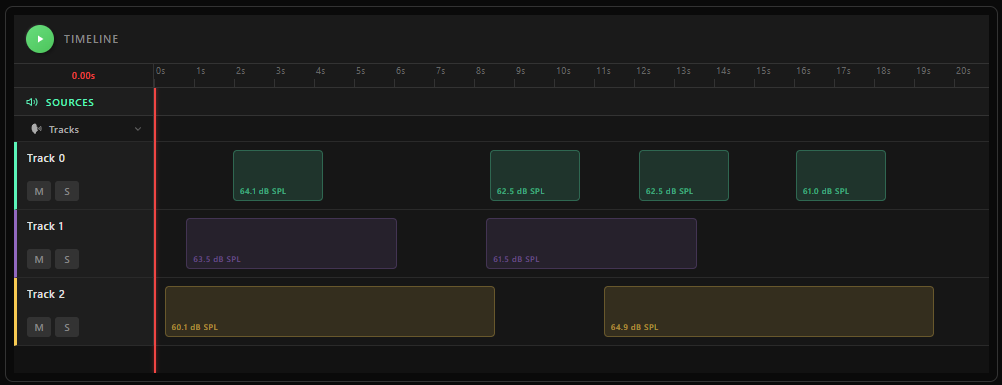
Each resulting track is an AudioTrack whose audio_blocks give the exact start_time_s/end_time_s of every placed occurrence — see Track and IR metadata for post-analysis for reading these back.
Advanced examples
Filtering a track's source content
Pass filter_definitions to TrackGenerator to shape the generator's dry audio before it reaches the room IR — for example, band-limiting a noise source to the range a real emitter would produce.
This applies to that TrackGenerator's own tracks only, before any convolution.
See Postprocessing for the full set of available FilterDefinition subclasses.
from treble_tsdk import treble

hvac_generator = sc.TrackGenerator(
    audio_dataset=hvac_dataset,
    rules=sc.NoiseSourceRules(free_field_level_db_spl=(55, 56)),
    filter_definitions=[treble.ButterworthFilter(lp_order=2, lp_frequency=2000)],
)
This is a source-side filter, scoped to one generator's tracks.
A receiver-side filter that shapes what every microphone hears, regardless of source, is set separately via DeviceSpecs.filter_definitions — see Listener rules.
Synthetic noise track generation
StaticNoiseRules synthesizes frequency-shaped noise from a noise profile, scaled to either an absolute level or a target microphone SNR, so the TrackGenerator needs no audio_dataset.
The example below generates two microphone self-noise tracks with a MEMS noise profile, each at a level drawn from 20 dB SPL to 25 dB SPL:
device_noise_generator = sc.TrackGenerator(
    rules=sc.StaticNoiseRules.from_noise_type_and_level(
        noise_type=sc.StaticNoiseType.mems_noise_profile,
        level_db_spl=(20, 25),  # sampled independently for each track
    ),
)

noise_tracks = device_noise_generator.generate_tracks(n_tracks=2, duration_s=duration_s, seed=5)
Use StaticNoiseRules.from_noise_type_and_microphone_snr() instead when you have a datasheet SNR rather than an acoustic level.
The same rules and track type model per-channel device self-noise in SceneListener.noise_definitions and DeviceSpecs.noise_rules — see Scene listener configuration and Listener rules for both usages.