Scene SNR
The signal-to-noise ratio (SNR) of an audio scene is the level of its target tracks relative to its noise. The tracks selected by target_selection are the target, and all non-target tracks plus any device self-noise are the noise — see Target selection for all selection options.
The SDK works with three distinct SNR quantities on a SceneCollection:
| Quantity | Set or computed by | Meaning |
|---|---|---|
| Calculated SNR | calculate_snr=True on render_to_disk() or render() | The SNR measured on the rendered audio |
| Target SNR | SceneRules.target_snr, sampled once per scene at generation | The SNR each scene is gain-adjusted to at render time |
| Predicted SNR | enrich_with_predicted_snr(), before rendering | An estimate, made before rendering, of the SNR that results from the source levels and IRs |
Without a target SNR, the SNR of a scene follows from its composition: the source levels defined in the rules and the IRs the sources are rendered through. That's the scene's natural SNR. Each quantity serves a different purpose:
- Calculated SNR gives the ground-truth SNR of each scene, measured on the audio once the collection is rendered — see SNR calculation.
- Target SNR overrides the natural SNR: at render time, the target and noise tracks are gain-adjusted until the scene measures at the target, so the rendered source levels differ from the levels defined in the rules. Since
target_snris sampled once per scene, from a distribution if you pass one, it also sets the SNR distribution of the collection as a whole — see Target SNR. - Predicted SNR estimates the natural SNR before rendering, so you can steer the collection toward a desired SNR range while keeping the source levels faithful to the rules — see Predicted scene SNR and Filter by predicted SNR.
To reach a desired SNR range without overriding the natural SNR, combine the predicted and calculated SNR:
- Generate the collection and predict its SNR with
enrich_with_predicted_snr(). - Adjust the source levels in the rules and regenerate the collection until the predicted SNR falls within the desired range. Alternatively, keep only the matching scenes with
filter_by_predicted_snr(). - Render the collection with
calculate_snr=Trueto measure the true SNR of each scene, since the predicted SNR is an estimate.
The examples on this page assume the ir_collection, data_loader, speech_dataset, hvac_dataset, IS_NOISE_SOURCE column, and generated scene_collection from Scene collections, along with the following imports:
from pathlib import Path

import polars as pl

from treble_tsdk import treble
import treble_tsdk.scene as sc
Basic examples
SNR calculation
Pass calculate_snr=True to render_to_disk() or render() to measure the SNR of each rendered scene and store it alongside the audio results. target_selection is required when using this option. Retrieve the SNR under the "snr" key — from get_renders_from_disk() after a disk render, or from get_render() after an in-memory render:
output_path = Path("<output_path>")

scene_collection.render_to_disk(
    output_path=output_path,
    sampling_rate=32000,
    target_selection=sc.TargetSelection.group("conversation"),
    target_render_mode=sc.TargetRenderMode.WET_MONO,
    calculate_snr=True,
)

result = scene_collection.get_renders_from_disk(scene_collection[0].id, output_path=output_path)
snr = result["snr"]   # one value per output channel, in dB
The SNR is measured using the ITU-T P.56 active-speech level method. An activity mask is derived from the rendered target signal and applied to both the target and the combined noise before computing the ratio, so only intervals where the target is active contribute to the result.
When a scene has a target SNR, the calculated SNR is measured after the target and noise tracks have been gain-adjusted to reach it. See Rendering a scene collection for the other render options.
Target SNR
Set target_snr on SceneRules to render each scene at a specified SNR, instead of its natural SNR. Like the other range-shaped parameters, it takes a fixed value, a tuple[float, float], or a distribution — see Sampling ranges. It's sampled once per scene, so passing a range or a distribution is what sets the SNR distribution across the collection.
A target SNR overrides the natural SNR of the scene. For each scene, render() and render_to_disk() apply it as follows:
- The SDK measures the scene's SNR with the same method as SNR calculation.
- The SDK computes the difference between the target SNR and the measured SNR.
- The SDK splits the difference into two equal halves and applies one half as a gain to the target tracks and the other as an opposite gain to the noise tracks.
As a result, the rendered levels of the target and noise sources differ from the levels defined in the rules, such as in_track_level_range_db_spl or free_field_level_db_spl. The relative levels between the noise tracks stay the same, as do the relative levels between the target tracks. For example, a scene with a measured SNR of 20 dB and a target SNR of 5 dB has its target tracks attenuated by 7.5 dB and its noise tracks amplified by 7.5 dB. Device self-noise counts as a noise track and is rescaled with the others.
For multichannel output, such as a device render, the target SNR is the mean SNR across all channels. The SDK measures the SNR per channel, computes the gain from the mean of those values, and applies the same gain to every channel. Individual channels can therefore end up above or below the target SNR, while their mean matches it.
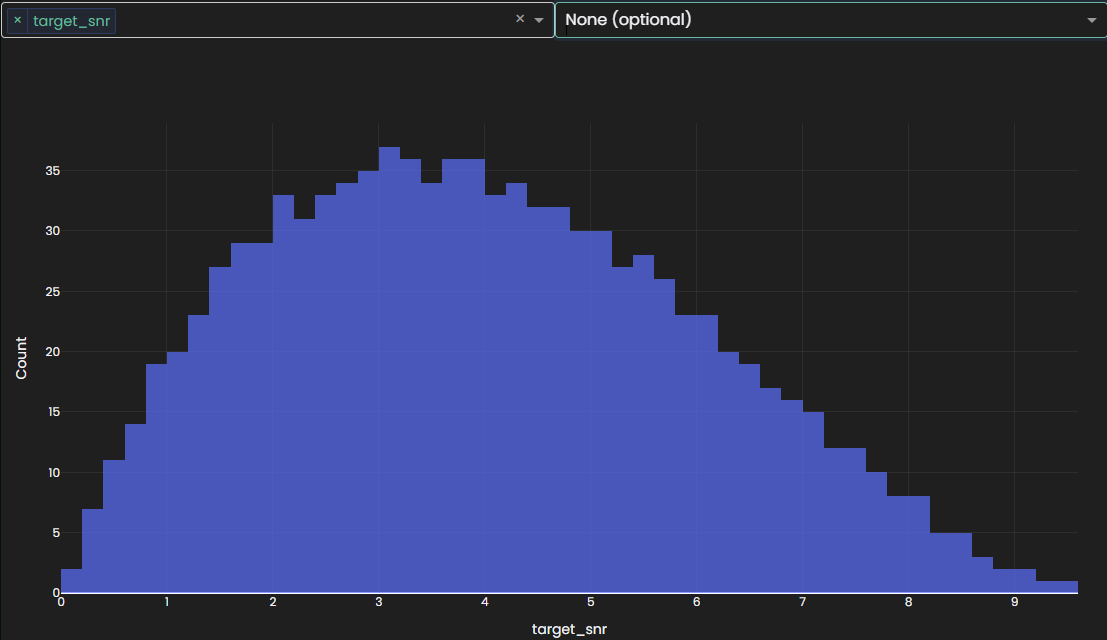
The following example samples a target SNR between 0 dB and 10 dB for each scene:
scene_rules = sc.SceneRules(
    duration_s=treble.distributions.ScaledBeta(low=10, high=15, a=3, b=2),
    # Sampled once per scene and stored in the scene metadata as "target_snr".
    target_snr=treble.distributions.ScaledBeta(low=0, high=10, a=2, b=3),
)

# Speech group: the target of the SNR.
conversation = sc.TrackGenerator(
    audio_dataset=speech_dataset,
    rules=sc.ConversationRules.from_preset(sc.ConversationRulesPresets.sequential_talkers_increased_overlap),
    talker_identifier="speaker_id",
)
scene_rules.add_source_group(
    sc.SourceGroup(
        name="conversation",
        tracks=conversation,
        source_selection=(~pl.col("IS_NOISE_SOURCE")),
        n_sources=1,
        min_n_sources=1,
        group_tag=sc.GroupTag.TARGET,
    )
)

# Noise group: every non-target track counts as noise.
hvac = sc.TrackGenerator(
    audio_dataset=hvac_dataset,
    rules=sc.NoiseSourceRules(free_field_level_db_spl=(55, 56)),
)
scene_rules.add_source_group(
    sc.SourceGroup(
        name="noise",
        tracks=hvac,
        source_selection=pl.col("IS_NOISE_SOURCE"),
        n_sources=1,
        min_n_sources=1,
        group_tag=sc.GroupTag.BACKGROUND,
    )
)

scene_generator = sc.SceneGenerator(
    ir_collection=ir_collection,
    scene_rules=scene_rules,
    data_loader=data_loader,
)
scene_collection = scene_generator.generate_scenes(max_n_scenes=1000, random_seed=1)
The sampled value is available on each scene as AudioScene.target_snr and as the target_snr column of the collection dataframe. Call plot() on the SceneCollection and select the target_snr column to display its distribution across all scenes:
scene_collection.plot()
Render the collection with a target_selection to apply the target SNR. The SNR is measured between the target rendered with target_render_mode and the noise, so the same target SNR produces a different mix for a WET_MONO target than for a DRY_MONO target:
scene_collection.render_to_disk(
    output_path=Path("<output_path>"),
    sampling_rate=32000,
    target_selection=sc.TargetSelection.group("conversation"),  # required to apply the target SNR
    target_render_mode=sc.TargetRenderMode.WET_MONO,            # the target signal the SNR is measured against
    calculate_snr=True,
)

# The calculated SNR matches the sampled target SNR (its mean across channels, for multichannel output).
scene = scene_collection[0]
result = scene_collection.get_renders_from_disk(scene.id, output_path=Path("<output_path>"))
print(scene.target_snr, result["snr"])
Only SceneCollection.render_to_disk() and render() apply the target SNR. Rendering a scene individually with AudioScene.render() ignores it and logs a warning.
enrich_with_predicted_snr() and filter_by_predicted_snr() don't account for the target SNR. On a collection with a target SNR, the predicted SNR still describes each scene's natural SNR.
Predicted scene SNR
enrich_with_predicted_snr() estimates the broadband SNR for each scene without rendering. It operates on per-band octave SPL values already attached to the source samples and IRs, so it runs fast and avoids the full convolution step. Use it to sanity-check your scene configuration, filter out degenerate setups, or select source–IR combinations likely to fall within a desired SNR range. The prediction reflects the scene's natural SNR, and doesn't account for a target SNR.
The prediction requires SPL values on both the IR collection and every audio dataset feeding a track:
enrich_with_acoustic_parameters()fetches precomputed acoustic parameters and appends them as columns on the IR collection — see Enrich collection with acoustic parameters.enrich_with_spl()analyzes every audio file in a dataset and appends its SPL as columns on the dataset.
Each scene stores the SPL values of its IRs and audio samples at generation, so run both enrichments after loading and filtering the IR collection and datasets, and before you generate the scenes:
# Run after loading and filtering, and before generate_scenes().
ir_collection.enrich_with_acoustic_parameters(acoustic_parameters=["spl"])

# Processes every audio file, so it's slow for large datasets.
speech_dataset.enrich_with_spl()
hvac_dataset.enrich_with_spl()
Then pass a TargetSelection as target_selection:
# Add a predicted SNR column to the collection dataframe.
scene_collection.enrich_with_predicted_snr(target_selection=sc.TargetSelection.group("conversation"))

# Retrieve the predicted SNR for a specific scene index.
scene_collection.get_predicted_snr(scene_id=scene_collection[0].id, target_selection=sc.TargetSelection.group("conversation"))
The prediction is estimated for a single channel represented by the Mono IR, not for the device's captured signal, so it doesn't account for the device IR. Device noise is accounted for, but averaged over all device microphones into that single channel.
Call plot() on the SceneCollection and select the predicted SNR column to display its distribution across all scenes:
scene_collection.plot()
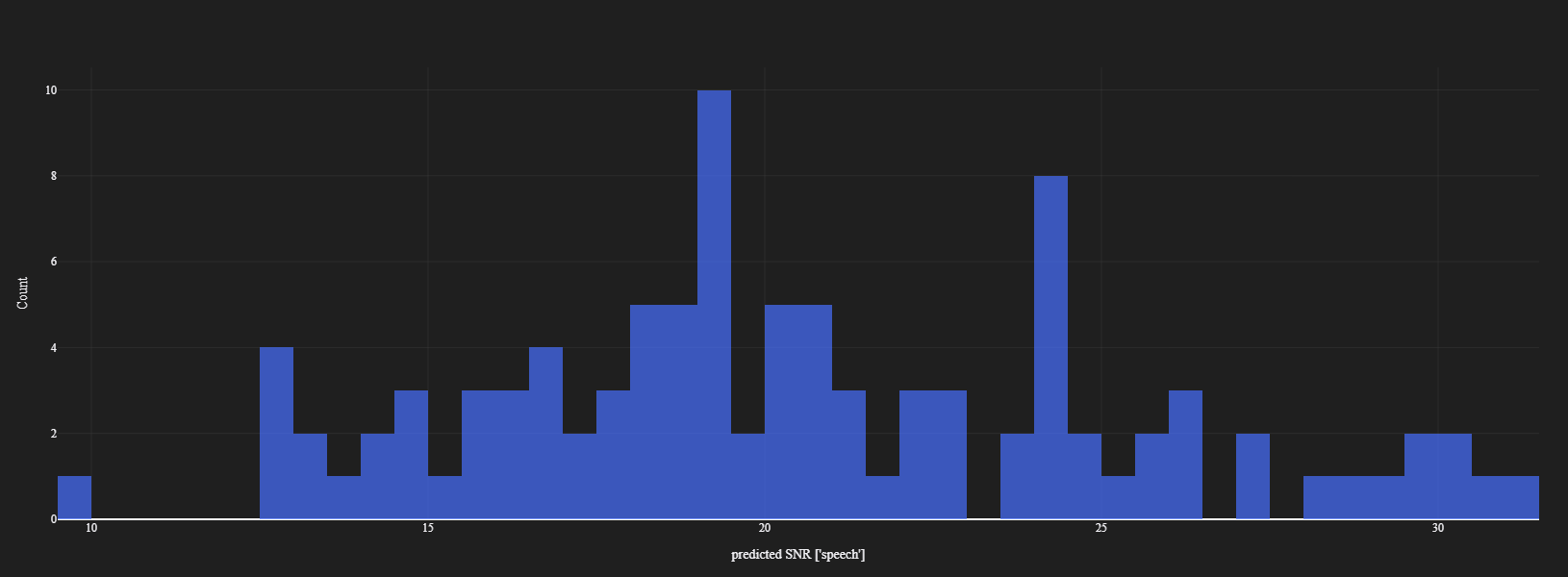
The predicted SNR has an expected error of −0.2 dB mean and 1.5 dB standard deviation relative to the SNR measured from rendered audio.
The main sources of deviation are:
- Mono-channel, no device transfer function/HRTF. The prediction is computed for a single (mono) channel only, never the true multi-channel signal an actual device would capture. It does not model the device's own transfer function/HRTF at all — it does fold in
SceneListener.filter_definitions, but only as one uniform per-band gain applied equally to every track, not a real per-channel response. When the listener has more than one device microphone, each microphone's noise profile/level is averaged into a single channel before being added as noise power. Bias direction: either direction. - Speech RMS over full sample duration. If speech samples contain leading, trailing, or inter-sentence silence, the prediction underestimates speech level and produces a lower SNR than the rendered value. Bias direction: prediction underestimates SNR. Trimming leading and trailing silence reduces this error but does not eliminate it entirely.
- Non-stationary noise. The prediction uses the long-term average SPL of each noise source. If the noise level during speech-active periods differs from that average (e.g., music with loud and quiet passages), the estimate will be off. Bias direction: either direction.
- Partial temporal overlap. When a noise source is active for only part of the scene, its contribution to noise RMS is reduced in proportion to its overlap with the speech-active window. This compounds the stationarity issue described above and partial overlap might amplify the stationarity error. Bias direction: either direction.
- Reverberant tails. The rendered signal includes IR decay after a source stops; the prediction treats source activity as ending at block boundaries. This affects both the noise contribution and the P.56 speech-activity mask, which can extend into the reverberant tail. Bias direction: either direction.
- Octave-band spectral approximation. Source and IR spectra are represented as piecewise-constant over octave bands. Within-band variation (e.g., low-frequency room modes, spectrally shaped noise) introduces error. Bias direction: either direction.
- Multiple speech-type noise sources. When speech is used as noise (e.g., babble or a competing talker), all of the above effects compound. Bias direction: prediction is highly likely to underestimate SNR.
- Incoherent power summation. The prediction accumulates noise power additively, assuming all sources are uncorrelated. When sources are positioned close together, their IRs may be spatially correlated, or the room may add correlation through shared early reflections or room modes, increasing the actual noise level above the prediction. Bias direction: either direction.
- Band-count mismatch (GA-only IRs). For IRs produced by a GA-only simulation, the 63 Hz octave band is skipped in the SPL calculations, resulting in one fewer band than in hybrid simulations. The missing band affects both the noise and target level estimates. Bias direction: either direction.
enrich_with_spl() processes every audio file in the dataset and can be slow for large datasets. If you reuse the same dataset across multiple sessions, save the enriched dataset to Parquet after the first run and load it from there on subsequent runs:
# First run: load, enrich and save.
noise_dataset = sc.AudioDataset.from_huggingface(
    repo_id="agkphysics/AudioSet",
    config="full",
    split="bal_train",
    audio_loader_class=sc.AudioSetAudioLoader,
    schema_mapping={"id": "video_id"},
    max_parquet_files=1,
)

noise_dataset.enrich_with_spl()

parquet_path = "./noise_dataset.parquet"
noise_dataset.dataframe.write_parquet(parquet_path)

# Subsequent runs: load directly.
noise_dataset = sc.AudioDataset(
    parquet_url=parquet_path,
    audio_loader=sc.AudioSetAudioLoader(parquet_url=parquet_path, id_column="id"),
)
Filter by predicted SNR
Once the collection is enriched with predicted SNR, call filter_by_predicted_snr() to keep only the scenes that fall within a desired SNR range for a given source group. Pass the same target_selection used during enrichment:
scene_collection = scene_collection.filter_by_predicted_snr(
    min_db=15,
    max_db=25,
    target_selection=sc.TargetSelection.group("conversation"),
)