Boundary velocity layer sources
A boundary velocity layer source drives a named geometry layer with a prescribed normal velocity, making that surface radiate sound directly into the model.
Boundary layer sources can only be used in the wave-based (DG) solver. Use this source type when a surface in your room model should radiate sound directly.
Each source radiates with a flat 1 m/s normal velocity across all frequencies. If you need a flat pressure response at a reference distance, use a boundary velocity submodel instead.
Basic examples
Create a boundary velocity layer source
Specify the display label with label and the geometry layer to drive with boundary_velocity_layer. Pass the layer name as a string:
layer_source = treble.Source.make_boundary_velocity_layer(
    label="<label>",
    boundary_velocity_layer="<layer_name>",  # must match the layer name in your model geometry
)
You can also pass a BoundaryVelocityLayer object directly if you need more control over the layer definition:
bv_layer = treble.BoundaryVelocityLayer(boundary_layer_name="<layer_name>")

layer_source = treble.Source.make_boundary_velocity_layer(
    label="<label>",
    boundary_velocity_layer=bv_layer,
)
The layer can be non-planar or non-connected, but this makes results harder to interpret. The DG solver applies the velocity to the local normal direction of each mesh element, so a non-planar or multi-part surface will radiate in diverging directions.
Use a boundary velocity layer source in a simulation
Pass the source into a SimulationDefinition. Set simulation_type to wave_based — boundary velocity layer sources require the DG solver. See Receivers and Advanced simulation settings for details on the remaining fields:
layer_source = treble.Source.make_boundary_velocity_layer(
    label="<label>",
    boundary_velocity_layer="<layer_name>",
)

simulation_definition = treble.SimulationDefinition(
    name="<simulation_name>",
    simulation_type=treble.SimulationType.wave_based,
    model=model,
    source_list=[layer_source],
    receiver_list=[...],
    ir_length=0.1,
)
Inspect source placement before submitting:
simulation_definition.plot()
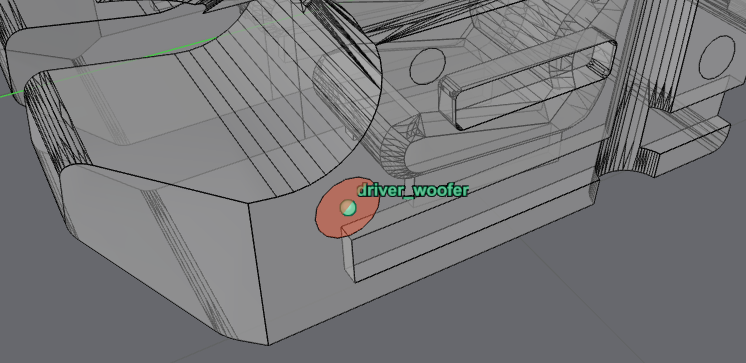
When the setup looks correct, add the simulation to your project and start it:
simulation = project.add_simulation(simulation_definition)
simulation.start()
See Starting simulations for cost estimates and Fetching results for result retrieval.
Advanced examples
Create multiple sources from model layer names
When your model contains several loudspeaker membranes, build the source list from model.layer_names instead of specifying each driver manually:
def is_membrane(layer_name: str) -> bool:
    return "membrane" in layer_name


source_list = [
    treble.Source.make_boundary_velocity_layer(
        label=layer_name.replace("membrane_", ""),
        boundary_velocity_layer=layer_name,
    )
    for layer_name in filter(is_membrane, model.layer_names)
]
label sets the display name used in results and plots. boundary_velocity_layer identifies the geometry layer to drive.
Assign "Fully reflective surface" to all membrane layers in your material map. The boundary velocity condition controls radiation; without a fully reflective material the surface will also absorb energy, which distorts the output level.
Customize mesh sizing on a boundary velocity layer source
Control mesh density on the source layer independently of the rest of the model by passing a BoundaryVelocityLayer object:
bv_layer = treble.BoundaryVelocityLayer(
    boundary_layer_name="<layer_name>",
    mesh_keep_exterior_edges=True,  # preserves the perimeter of the source layer in the mesh
    mesh_local_sizing=0.005,  # target element edge length in meters on this layer
)

source = treble.Source.make_boundary_velocity_layer(
    label="<label>",
    boundary_velocity_layer=bv_layer,
)
mesh_local_sizing overrides the global mesh density on the source layer. mesh_keep_exterior_edges=True locks the boundary edges of the layer into the mesh, preventing the mesher from smoothing away the perimeter of the radiating surface.
Halving mesh_local_sizing on a surface roughly quadruples the element count on that surface. On a large radiating panel this can dominate the total mesh size. The default sizing is derived from the simulation frequency — only override it when the default doesn't resolve the surface geometry adequately, for example when the layer has fine geometric detail that the global mesh would smooth away.
Set a source position
The source position is used for visualization only and is not used during simulation. By default, the position is calculated automatically from the center of the boundary layer (calculate_source_position=True). You can override this by passing a source_position:
layer_source = treble.Source.make_boundary_velocity_layer(
    label="<label>",
    boundary_velocity_layer="<layer_name>",
    source_position=treble.Point3d(x=1.0, y=2.0, z=0.5),
)
To disable automatic position calculation without setting a position manually, set calculate_source_position=False.