Populating rooms with objects
A powerful feature of the Treble SDK is its ability to generate and inject geometries into programmatically generated rooms. This can be useful for parametric studies of geometrical features, programmatic furnishing of rooms, or to simply enable a modular workflow, where single components can be easily reused and adapted for different projects. For a quick start guide, see tutorial Generating a furnished room.
The classes that allow to parametrize the creation and injection of geometries into a room belong to the following four categories:
-
GeometryComponentis a "small" component (such as chairs, desks, etc.) that can be added to aGeometryDefinition(e.g. a room) to create a more detailed model. -
GeometryDefinitionis a mutable definition of a geometry object, consisting of a base room geometry, either uploaded or generated (see Room creation). It can host a collection ofGeometryComponentobjects. -
GeometryComponentLibrary- A library of geometry components provided by the SDK. -
GeometryComponentGenerator- Can be used to create simple geometry components such as boxes, planes, triangles and loudspeakers.
In summary, geometry components can be injected into GeometryDefinition objects to form furnished room models.
Basic examples
Explore the component library
The Treble SDK provides a library of geometry components that can be easily retrieved and visualized. This section demonstrates how to access and display these components. Retrieve a table geometry component from the library and visualize it:
dd.display(tsdk.geometry_component_library.get_groups_with_count())
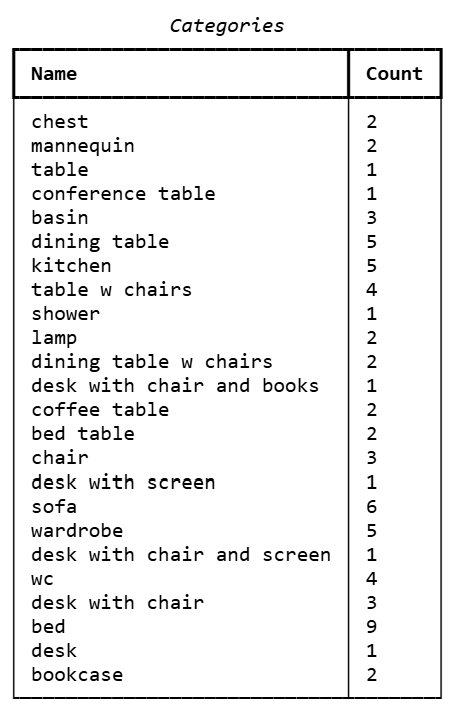
Query the library by group:
table_gc_list = tsdk.geometry_component_library.query(group='table')
table_gc_list[0] # GeometryComponent instance
This returns a GeometryComponent object that you can inject into a
GeometryDefinition — see Use geometry components.
Use geometry components
Components rely heavily on various treble_tsdk.utility_classes for representing geometric quantities and transformations, which are available through either the treble_namespace or by explicitly importing from utility_classes. See Spatial Conventions.
Components need to be placed within an existing geometry definition. See Room creation to know more on how to create or import rooms, or refer to the tutorial Generating a furnished room.
The following example creates the simplest GeometryDefinition — a shoebox room — named geo_def, with a primitive box component:
geo_def = treble.GeometryDefinitionGenerator.create_shoebox_room(3, 3, 3)

box = treble.GeometryComponentGenerator.create_box(
    bounding_box= treble.BoundingBox.from_points(0, 0.9, 0, 0.1, 0, 0.1),
    layer_name = "box"
)
You can manage components within a GeometryDefinition through several methods, listed in the following sections.
Add component
add_geometry_component
Adds a geometry component to the geo_def model with a specified transformation.
geo_def.add_geometry_component(
    name="name",
    geometry_component=box,
    transform=Transform3d(Vector3d(1, 1, 0.5), Rotation(45, 0, 0)),
)
Move component
move_geometry_component
Moves a component by a given vector without redefining its transformation.
geo_def.move_geometry_component("name", Vector3d(1, 1, 0))
Remove component
remove_geometry_component
Removes a specified component from the model, keeping the scene clean and adaptable.
geo_def.remove_geometry_component("name")
Clear components
clear_geometry_components
Removes all components from the model, to start from scratch.
geo_def.clear_geometry_components()
Component transformations
Components can be manipulated through transforms such as translations and rotations through the methods listed below.
Get component transform
get_geometry_component_transform
Retrieves a component’s position and rotation for analysis or modification.
geo_def.get_geometry_component_transform("name") # Transform3d class instance
Set component transform
set_geometry_component_transform
Updates a component’s position and rotation to refine spatial placement.
geo_def.set_geometry_component_transform(
    name="name",
    transform=Transform3d(
        Vector3d(2, 2, 0),
        Rotation(90, 0, 0),
    ),
)
Set component rotation
set_geometry_component_rotation
Adjusts the rotation of a component without changing its position.
geo_def.set_geometry_component_rotation("name", Rotation(135, 0, 0))
Component generators
The GeometryComponentGenerator class provides several methods to generate
geometry components directly in the Treble SDK. These can simply be
accessed either via the TSDK namespace, or an explicit import:
# Access via SDK namespace
from treble_tsdk import tsdk_namespace as treble
treble.GeometryComponentGenerator

# Explicit import
from treble_tsdk.geometry.generator import GeometryComponentGenerator
From database model
create_component_from_model
In the Treble SDK you can create a GeometryComponent by extracting it from a furnished room, for example.
The following example extracts an arm chair from an apartment included in the Room database:
# load and visualize an apartment from the room database
apartments = tsdk.geometry_library.get_dataset('Apartments')
apartment = apartments[70]
apartment.plot()
print(apartment.layer_names) # display the layer names within the model

# Extract an arm chair and plot it
gc = treble.GeometryComponentGenerator.create_component_from_model(
    model=apartment,
    component_name="My_Arm_Chair",
    layer_names=['Furniture/Arm chair']
)
gc.plot()
From local model files
You can also load custom geometry components using local files with create_component_from_model.
The resulting GeometryComponent object retains the original
translation and rotation, which will be used as the object’s origin
within the scene.
speaker = project.add_model(
   model_name="my_custom_object",
   model_file_path="path/to/my/3dm/object.3dm"
)

gc = GeometryComponentGenerator.create_component_from_model(speaker,component_name="my injected geometry")
Components from primitives
Triangle
create_triangle
Triangles can be defined via three Point3d objects, each representing
a unique vertex. Here point0 acts as the reference point for
translations, and rotations.
triangle = GeometryComponentGenerator.create_triangle(
    point0=Point3d(0, 0, 0),
    point1=Point3d(1, 0, 0),
    point2=Point3d(0, 1, 0),
    layer_name="my_triangle",
)
Plane
create_plane
Creates a 2D rectangle centered in the -plane via length and
width.
plane = GeometryComponentGenerator.create_plane(
    length=2,
    width=1,
    layer_name="my_plane",
)
Box
create_box
Define boxes using treble.GeometryComponentGenerator.create_box(), which takes six coordinates — x_min, x_max, y_min, y_max, z_min, z_max — to define the limits of the box.
box = treble.GeometryComponentGenerator.create_box(
    bounding_box= treble.BoundingBox.from_points(0, 0.9, 0, 0.1, 0, 0.1),
    layer_name = "box"
)
Loudspeaker component
create_loudspeaker
Loudspeakers can be defined via their width, height and depth to
control the shape of the box enclosure. To place the membrane the
parameters membrane_diameter and membrane_center_height are used.
The center of the membrane is placed at the origin.
speaker = GeometryComponentGenerator.create_loudspeaker(
    width=0.2,
    height=0.4,
    depth=0.3,
    membrane_diameter=0.1,
    membrane_center_height=0.1,
    membrane_layer_name="my_membrane",
    enclosure_layer_name="my_enclosure"
)
Advanced examples
Automatic placement of components
The GeometryComponentPlacement class defines how a set of geometry
components should be placed in a GeometryDefinition. It takes a list
of GeometryComponent objects, from which the placement algorithm will
randomly select one each time it attempts a placement. This allows for
variation while maintaining control over the types of components used.
You can specify a preferred_count, which indicates how many instances
you’d like to place. Note that this number is a guideline, and actual
placement may vary depending on spatial constraints.
To control placement behavior, you can also define minimum distance thresholds:
placements = treble.GeometryComponentPlacement(
    components=tsdk.geometry_component_library.query(group="table"),
    preferred_count=3,
    rotation_settings=treble.ComponentAnglePool([0, 90, 180, 270]), #controls the rotation behavior during placement (optional).
    min_dist_from_walls=0.1, #sets the minimum allowed distance from any wall (meters).
    min_dist_from_objects=0.1, # ensures spacing from other placed objects (meters).
)
Different selection algorithms are available to control how components are placed:
random: Randomly selects components for placement.ordered_single: Places one instance of each component sequentially.ordered_all: Places all instances of a component before moving to the next.
Populate the model
Once the placements are defined, the model can be populated and visualized. Rerunning this will generate different layouts.
# Clear existing components
geo_def.clear_geometry_components()

# Populate the room
geo_def.populate_with_geometry_components(
    components=[placements],
    selection_algorithm=treble.ComponentSelectionAlgorithm.random,
)
Snap a component to a layer
The SDK can snap a component to a layer by translating it along that layer until it sits flush on the surface. This works for horizontal layers (floors, tables, ceilings) as well as vertical walls and other orientations.
gd = treble.GeometryDefinitionGenerator.create_shoebox_room(3, 3, 2)
box = treble.GeometryComponentGenerator.create_box(treble.BoundingBox.from_points(-0.5, 0.5, -0.5, 0.5, -0.5, 0.5))
gd.add_geometry_component(
    name='box',
    geometry_component=box,
    transform=treble.Transform3d(translation=treble.Vector3d(1, 1, 0), rotation=treble.Rotation.get_zero()),
    snap_layer_name='shoebox_floor'
)

gd.plot()